
Plugin directory / Terminal / dsh-plugin-terminal
dsh-plugin-terminal
Unverified mervyn-teo
What it does
DeepSeek Harness Web plugin: a real PTY terminal in a VS Code-style collapsible footer panel
Unverified — not yet verified
DeepSeek Harness Web plugin: a real PTY terminal in a VS Code-style collapsible footer panel Not yet verified — install and test it yourself.
“Unverified” means our automated CI has not yet installed this plugin. Feature descriptions and version compatibility are the author’s claims. This is not a security audit and not an endorsement of third-party code.
README
dsh-plugin-terminal
English | 中文
A DeepSeek Harness (DSH) Web
plugin that adds a real interactive terminal — a VS Code-style collapsible
panel docked to the footer. This plugin runs an actual shell in a PTY
and streams the raw terminal bytes to the browser. It is a persistent bundle
plugin (a host half plus a browser half) that loads on every boot.
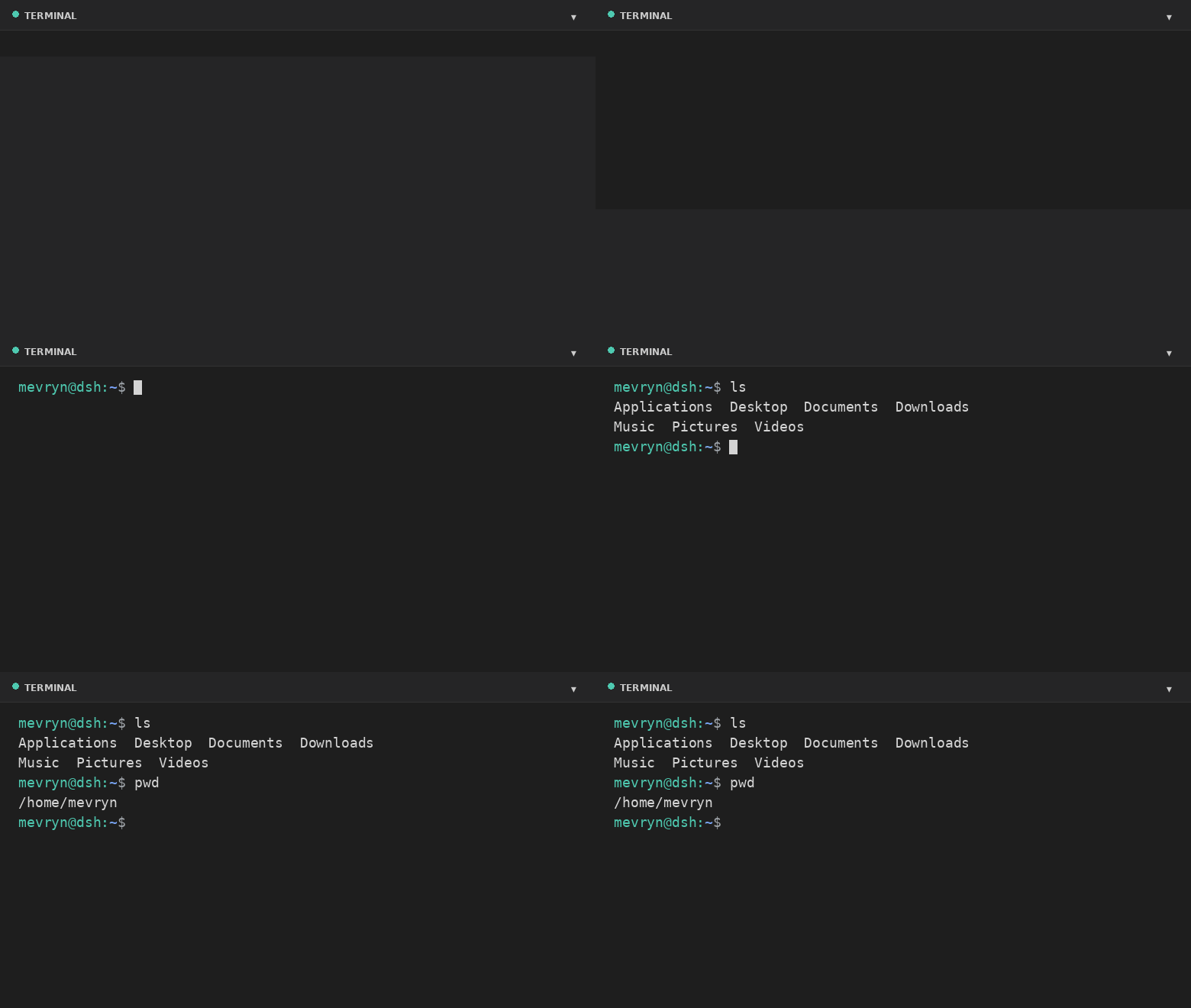
Demo
What it does
- Actual terminal — a real interactive shell (PowerShell on Windows,
$SHELL//bin/bashelsewhere, by default) running in a PTY via the harness'ssubprocess.spawnTerminalprimitive (node-pty). - Full terminal rendering — xterm.js renders ANSI colors, cursor movement,
full-screen apps (vim,htop,top, …), and 256-color output. - VS Code-style footer panel — a collapsible bottom panel with a header,
drag-to-resize top edge, restart button, and collapse toggle. - Keyboard shortcut — `Ctrl+
- Live resize — the PTY reflows when you resize the panel.
- A Terminal settings card under Settings → Plugins configures theme, font
size, panel height, opacity, start-collapsed, shell, and working directory at
runtime. - Graceful fallback — if xterm.js cannot load (offline), a plain streaming
view still exposes the real shell.
Files
| File | Purpose |
|---|---|
lib/index.js |
Host half — spawns the PTY and bridges it over the /api/terminal WebSocket. |
lib/client.js |
Browser half — the footer panel and the settings card. |
cordis.patch.yml |
Composition patch that inserts the plugin row. |
package.json |
Package metadata (dsh.bundle + dsh.client manifest). |
Install
dsh plugin --profile web add github:mervyn-teo/dsh-plugin-terminal
Then restart dsh web — host bundles load at boot.
Defaults live in cordis.patch.yml. Change them there (or in the profile's owncordis.patch.yml) and restart, or adjust them at runtime from the settings
card. The host half serves two same-origin routes the browser half uses:GET|POST /api/terminal/config and the /api/terminal WebSocket upgrade.
Requirements
- DSH with the
subprocessandwebServerservices mounted. - Network access to jsDelivr the first time the terminal renders xterm.js
(the plain fallback works without it).
Settings
Settings → Plugins → Terminal exposes:
| Setting | Description |
|---|---|
| Theme | dark or light terminal theme (applied live). |
| Font size | Terminal font size in pixels (applied live). |
| Max height | Maximum panel height in pixels. |
| Opacity | Terminal background opacity 0–100% (100 = fully opaque). |
| Start collapsed | Whether the panel starts collapsed. |
| Shell | Shell executable for new sessions. |
| Working directory | Default directory for new sessions (empty = home directory). |
Shell and working directory apply the next time you open the terminal; theme,
opacity, font size, and max height apply immediately.
Notes and limitations
- The terminal renders xterm.js from the jsDelivr CDN; the first expansion
requires network access. The plain fallback still works offline. - A session is process-local and does not survive a harness restart.
- The WebSocket route is loopback-bound like the rest of the Web GUI.
- Windows — on Windows the default shell is
powershell.exe(setshelltocmd.exefor Command Prompt, withshellArgs: []). It needs a Windows-builtnode-pty(conpty/winpty) from the DSH host.
License
Install
Install the catalog once, then DeepSeek Harness can find and install any plugin from this site automatically:
dsh plugin add dshbase-catalogThen say "install dsh-plugin-terminal for me" — your agent finds it in the directory and installs it. Docs: dshbase-catalog · verified packs.
This plugin is GitHub source (not published to npm) — install it straight from the repo:
Web profile:
dsh plugin --profile web add github:mervyn-teo/dsh-plugin-terminalHeadless (CLI) profile:
dsh plugin --profile headless add github:mervyn-teo/dsh-plugin-terminalTest report
Not yet L3-verified — see failure note below if we already ran it.
Note: 验证: runtime-fail (0.1.0-rc.6) Browse all pending failures →
When to use it
Improve the terminal experience — a TUI, command palette, or shell integration — so dsh feels native in a terminal.
Who it's for
Terminal-first developers who drive dsh from the command line and want it to behave like the CLI agents they know.
For developers — extending it
The TUI layout and shell integration are the seams — add panels, keybindings, or new shell hooks.
Share this badge
Drop this badge into your README — it links back here and updates automatically when our test status changes:

[](https://dshbase.com/plugins/dsh-plugin-terminal/)<a href="https://dshbase.com/plugins/dsh-plugin-terminal/"><img src="https://dshbase.com/badges/dsh-plugin-terminal.svg" alt="dshbase listed"></a>