
Plugin directory / Terminal / dsh-tui
dsh-tui
Verified · install-tested on dsh openguardrails
What it does
Claude Code-style terminal UI for DeepSeek Harness agents, as an out-of-tree dsh plugin bundle
Works — verified, early-stage project
Claude Code-style terminal UI for DeepSeek Harness agents, as an out-of-tree dsh plugin bundle It installs cleanly and boots without issues in our testing. It's early-stage but functional.
“Verified” means our automated CI actually ran dsh plugin add in a clean profile and it booted — nothing more. Feature descriptions and version compatibility are the author’s claims. This is not a security audit and not an endorsement of third-party code.
README
@dsh-tui/dsh-tui
English | 中文
An interactive terminal (TUI) front door for DeepSeek Harness agents — a Claude Code / Codex-style chat interface in your terminal, installed as an out-of-tree dsh plugin bundle. Built on @earendil-works/pi-tui.
It composes over the official @deepseek-ai/dsh-base bundle, so the whole plugin ecosystem — shell and filesystem tools, skills, subagents, workflows, sandbox approvals — is the same one the official web surface uses. Nothing is forked.
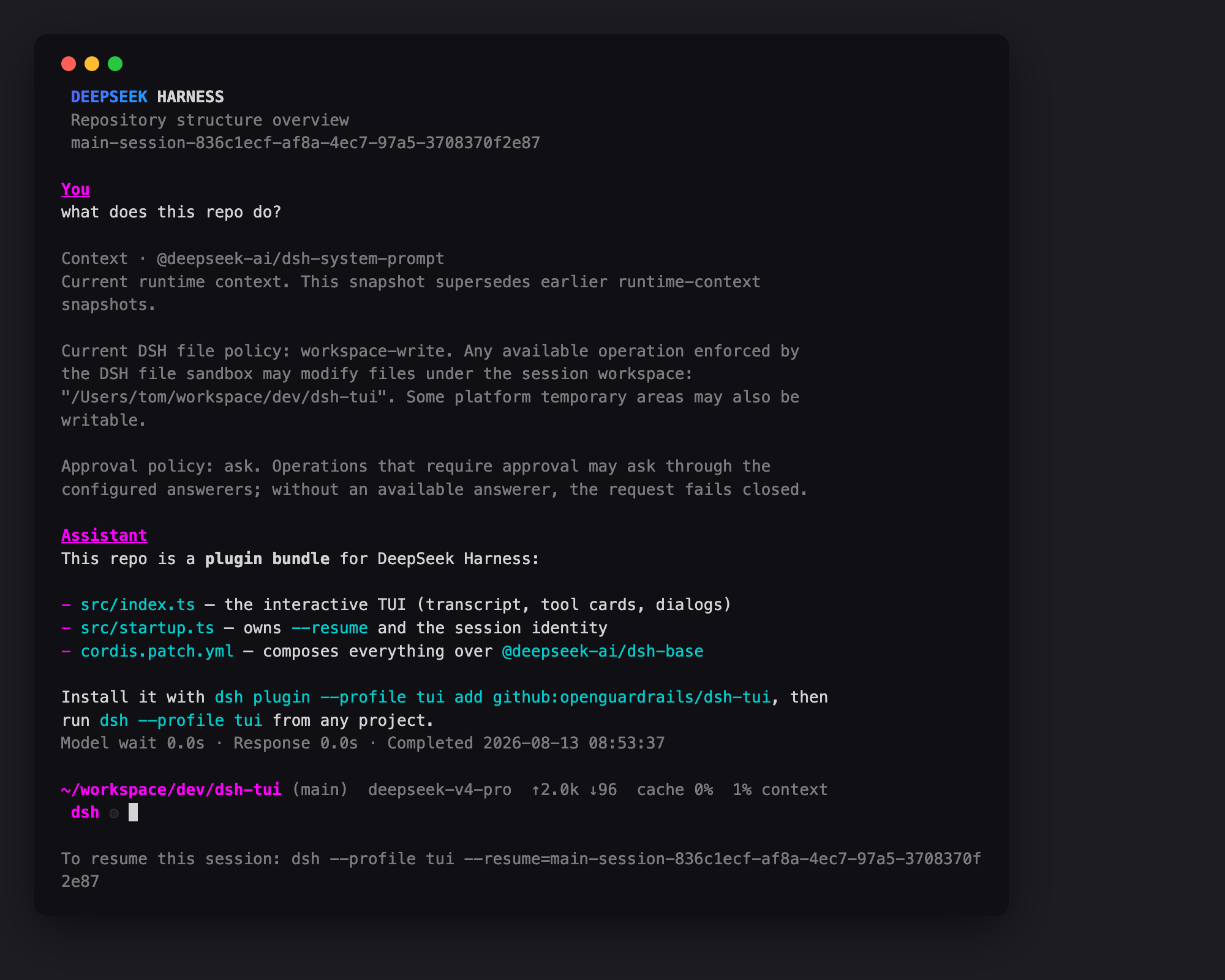
Features
- Streaming model output and reasoning, rendered as Markdown
- Tool-call cards with terminal / diff / generic render intents; Ctrl+O cycles collapsed → expanded → hidden
- Approval and
ask_user_questiondialogs, plan-mode review included @filepath autocomplete and@sessionreference cards- Slash commands:
/model(with reasoning-effort selection),/resume,/compact,/details,/help, and every command other plugins register - Standing todo panel, token usage and context-pressure status line, session titles
- Configurable theme; truecolor detected from
COLORTERM
Install
Requires Node ^22.19 || >=24 and the dsh CLI (npm i -g @deepseek-ai/dsh@next).
dsh plugin --profile tui add @dsh-tui/dsh-tui
dsh --profile tui                                      # start a session in the current directory
dsh --profile tui --resume <session-id>                # resume a persisted session
To track the repo instead of the npm release, use add github:dsh-tui/dsh-tui. Git-hosted plugins build on install via their prepare script, which pnpm blocks until you allow it: if that add fails, append the key it prints under allowBuilds in ~/.dsh/profiles/tui/pnpm-workspace.yaml and re-run —
allowBuilds:
  "@dsh-tui/dsh-tui": true
Set DEEPSEEK_API_KEY in your environment (or a .env in the launch directory or $DSH_HOME).
Local / self-hosted DeepSeek endpoints
No code changes needed — pick one:
Environment:
DEEPSEEK_BASE_URL=http://localhost:8000/v1alongsideDEEPSEEK_API_KEY.Settings (hot-reloaded):
$DSH_HOME/settings.yamlllm-deepseek: baseURL: http://localhost:8000/v1OpenAI-compatible gateways (vLLM, SGLang, …): declare an
llm-pi-airoute in your profile patch ($DSH_HOME/profiles/tui/cordis.patch.yml) and point the default model at it — see the dsh providers guide.
Development
pnpm install   # applies the pi-tui patch (patches/)
pnpm build     # tsc declarations + tsdown runtime bundle
pi-tui is pinned at 0.80.7 with a pnpm patch (editor prompt prefixes) and bundled into lib/ so installs outside this repo never see an unpatched copy.
Status and known limitations
- Under active development against the pre-release
@deepseek-ai/dshrc line; expect breakage until upstream stabilizes. Peer dependencies pin the tested rc. - The recovered test suite (
tests/) predates the port and does not run yet. - A real model turn requires a reachable DeepSeek-compatible endpoint; everything up to the request (composition, rendering, approvals, resume) works keyless.
Provenance and license
MIT. The TUI implementation was recovered from the DeepSeek Harness repository history (packages/ui/tui, removed upstream in commit 10bb9cbf4a) and ported to the published rc API; upstream copyright is preserved in LICENSE.
Install
Install the catalog once, then DeepSeek Harness can find and install any plugin from this site automatically:
dsh plugin add dshbase-catalogThen say "install dsh-tui for me" — your agent finds it in the directory and installs it. Docs: dshbase-catalog · verified packs.
This plugin is GitHub source (not published to npm) — install it straight from the repo:
Web profile:
dsh plugin --profile web add github:openguardrails/dsh-tuiHeadless (CLI) profile:
dsh plugin --profile headless add github:openguardrails/dsh-tuiTest report
Verified: L1 install + L2 load + L3 runtime from GitHub source on dsh 0.1.0-rc.6.
When to use it
Change how dsh looks or how you interact with it — a theme, a skin, or a new panel that reshapes the workspace.
Who it's for
Users who spend hours in the web UI and want it to look and feel the way they work.
For developers — extending it
Skins, panels, and theme tokens are the extension points — author a new skin, add a panel, or sync tokens with an upstream palette.
Share this badge
Drop this badge into your README — it links back here and updates automatically when our test status changes:

[](https://dshbase.com/plugins/dsh-tui-2/)<a href="https://dshbase.com/plugins/dsh-tui-2/"><img src="https://dshbase.com/badges/dsh-tui-2.svg" alt="dshbase install-tested"></a>