
插件目录 / Terminal / dsh-plugin-terminal
dsh-plugin-terminal
未验证 mervyn-teo
功能简介
DSH Web插件:VS Code风格可折叠面板中的真实PTY终端
未验证 — 尚未实测
DSH Web插件:VS Code风格可折叠面板中的真实PTY终端 尚未验证——请自行安装测试。
「未验证」表示我们的自动化 CI 尚未安装过该插件。功能描述与版本兼容性均为作者声明。这不是安全审计,也不代表对第三方代码的背书。
README
dsh-plugin-terminal
English | 中文
A DeepSeek Harness (DSH) Web
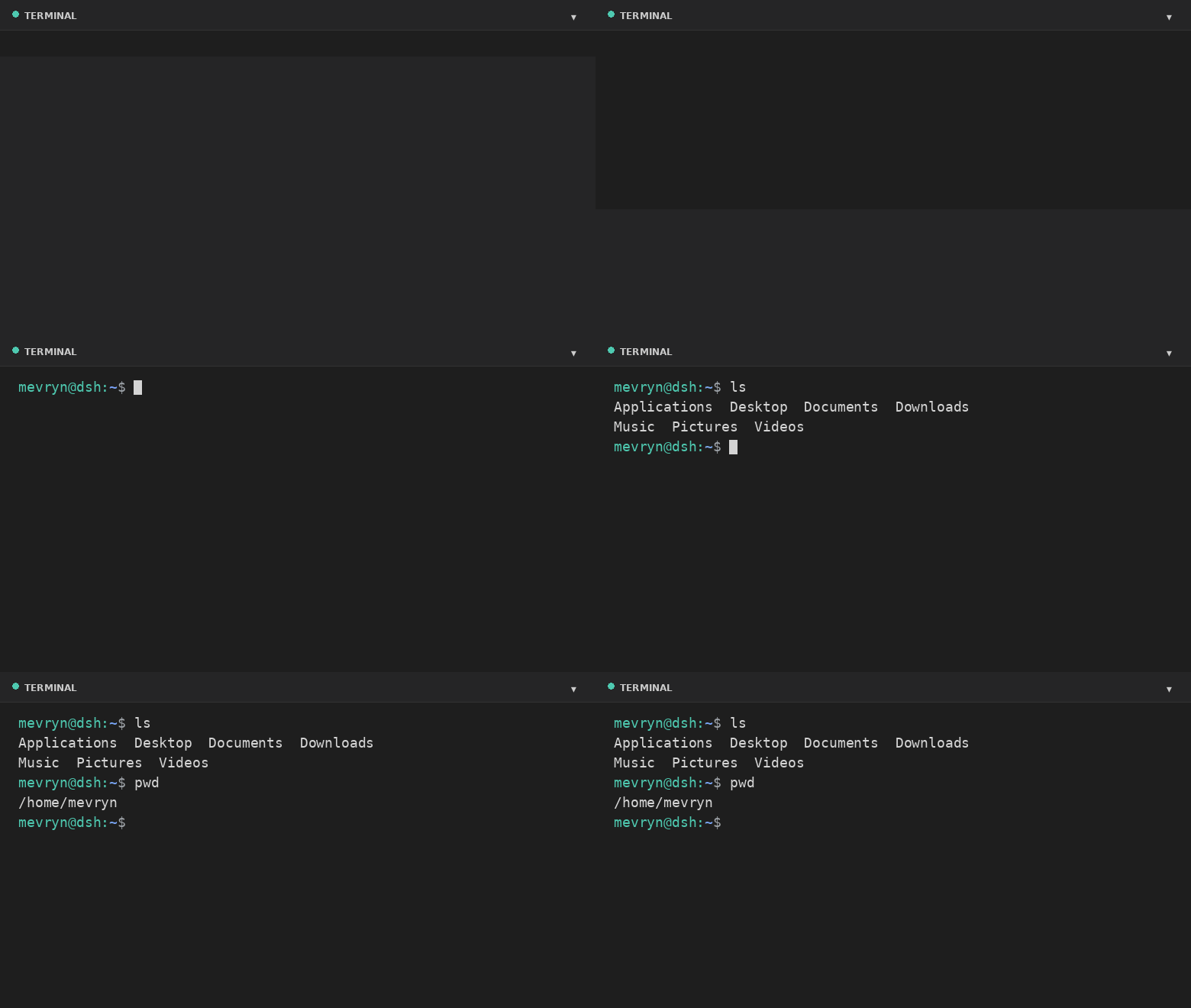
plugin that adds a real interactive terminal — a VS Code-style collapsible
panel docked to the footer. This plugin runs an actual shell in a PTY
and streams the raw terminal bytes to the browser. It is a persistent bundle
plugin (a host half plus a browser half) that loads on every boot.
Demo
What it does
- Actual terminal — a real interactive shell (PowerShell on Windows,
$SHELL//bin/bashelsewhere, by default) running in a PTY via the harness'ssubprocess.spawnTerminalprimitive (node-pty). - Full terminal rendering — xterm.js renders ANSI colors, cursor movement,
full-screen apps (vim,htop,top, …), and 256-color output. - VS Code-style footer panel — a collapsible bottom panel with a header,
drag-to-resize top edge, restart button, and collapse toggle. - Keyboard shortcut — `Ctrl+
- Live resize — the PTY reflows when you resize the panel.
- A Terminal settings card under Settings → Plugins configures theme, font
size, panel height, opacity, start-collapsed, shell, and working directory at
runtime. - Graceful fallback — if xterm.js cannot load (offline), a plain streaming
view still exposes the real shell.
Files
| File | Purpose |
|---|---|
lib/index.js |
Host half — spawns the PTY and bridges it over the /api/terminal WebSocket. |
lib/client.js |
Browser half — the footer panel and the settings card. |
cordis.patch.yml |
Composition patch that inserts the plugin row. |
package.json |
Package metadata (dsh.bundle + dsh.client manifest). |
Install
dsh plugin --profile web add github:mervyn-teo/dsh-plugin-terminal
Then restart dsh web — host bundles load at boot.
Defaults live in cordis.patch.yml. Change them there (or in the profile's owncordis.patch.yml) and restart, or adjust them at runtime from the settings
card. The host half serves two same-origin routes the browser half uses:GET|POST /api/terminal/config and the /api/terminal WebSocket upgrade.
Requirements
- DSH with the
subprocessandwebServerservices mounted. - Network access to jsDelivr the first time the terminal renders xterm.js
(the plain fallback works without it).
Settings
Settings → Plugins → Terminal exposes:
| Setting | Description |
|---|---|
| Theme | dark or light terminal theme (applied live). |
| Font size | Terminal font size in pixels (applied live). |
| Max height | Maximum panel height in pixels. |
| Opacity | Terminal background opacity 0–100% (100 = fully opaque). |
| Start collapsed | Whether the panel starts collapsed. |
| Shell | Shell executable for new sessions. |
| Working directory | Default directory for new sessions (empty = home directory). |
Shell and working directory apply the next time you open the terminal; theme,
opacity, font size, and max height apply immediately.
Notes and limitations
- The terminal renders xterm.js from the jsDelivr CDN; the first expansion
requires network access. The plain fallback still works offline. - A session is process-local and does not survive a harness restart.
- The WebSocket route is loopback-bound like the rest of the Web GUI.
- Windows — on Windows the default shell is
powershell.exe(setshelltocmd.exefor Command Prompt, withshellArgs: []). It needs a Windows-builtnode-pty(conpty/winpty) from the DSH host.
License
安装
装一次目录插件,之后本站所有插件都能让 DeepSeek Harness 自动找、自动装:
dsh plugin add dshbase-catalog然后对 agent 说「帮我装 dsh-plugin-terminal」,它会在目录里找到并自动安装。文档:dshbase-catalog · 已验证场景包。
该插件是 GitHub 源码(未发 npm)——直接从仓库装:
Web profile:
dsh plugin --profile web add github:mervyn-teo/dsh-plugin-terminalHeadless(CLI)profile:
dsh plugin --profile headless add github:mervyn-teo/dsh-plugin-terminal实测报告
尚未 L3 验证——若已跑过,见下方失败备注。
备注:验证: runtime-fail (0.1.0-rc.6) 浏览全部待验证失败 →
使用场景
改善终端体验——TUI、命令面板或 shell 集成——让 dsh 在终端里如原生一般。
适合谁
终端优先、从命令行驱动 dsh、想让它像熟悉的 CLI agent 一样工作的开发者。
二次开发建议
TUI 布局和 shell 集成是缝——加面板、快捷键或新的 shell 钩子。
分享徽章
把这枚徽章粘进 README——它会链回本页,实测状态变化时自动更新:

[](https://dshbase.com/zh/plugins/dsh-plugin-terminal/)<a href="https://dshbase.com/zh/plugins/dsh-plugin-terminal/"><img src="https://dshbase.com/badges/dsh-plugin-terminal.svg" alt="dshbase 已收录"></a>