
插件目录 / Developer / @wanghailong0419/dsh-toolkit
@wanghailong0419/dsh-toolkit
已验证 · 实测可装 LongSir0419
功能简介
DeepSeek Harness (DSH) 插件工具包——一条命令安装两个常用插件:mcp管理 与 Skill管理。装完即用,设置页自动出现 mcp管理 与 Skill管理 两个分区。
可用 — 实测通过,早期项目
DeepSeek Harness (DSH) 插件工具包——一条命令安装两个常用插件:mcp管理 与 Skill管理。装完即用,设置页自动出现 mcp管理 与 Skill管理 两个分区。 实测能干净安装、正常启动。早期项目,但功能可用。
「已验证」表示我们的自动化 CI 在干净 profile 里实际执行了 dsh plugin add 并启动成功——仅此而已。功能描述与版本兼容性均为作者声明。这不是安全审计,也不代表对第三方代码的背书。
README
dsh-toolkit
A DeepSeek Harness (DSH) plugin toolkit — install two essential plugins with one command: MCP Manager and Skill Manager. Ready to use right after install; the settings page automatically gains MCP Manager and Skill Manager sections.





Screenshots
| MCP Manager | Skill Manager |
|---|---|
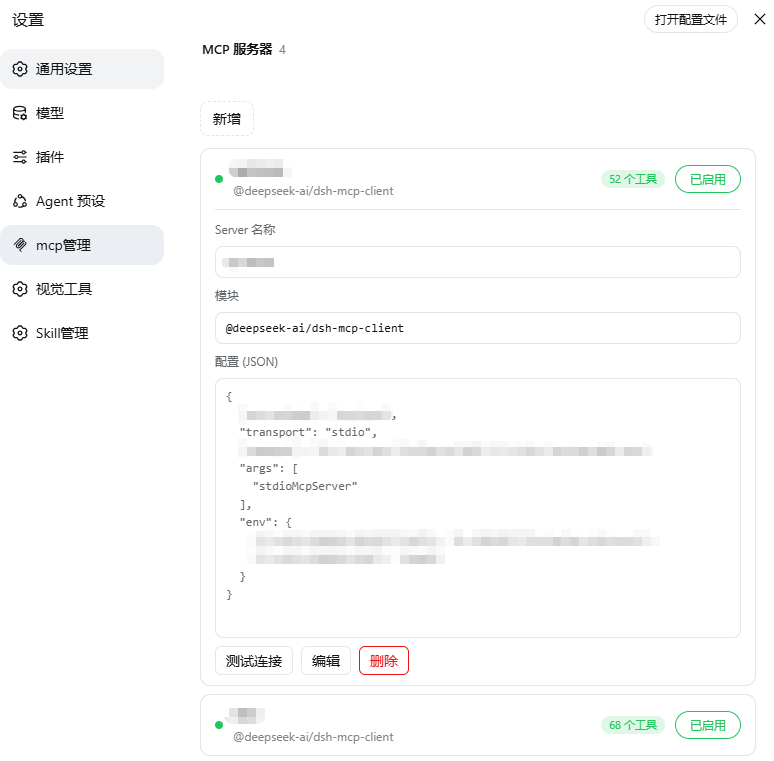 |
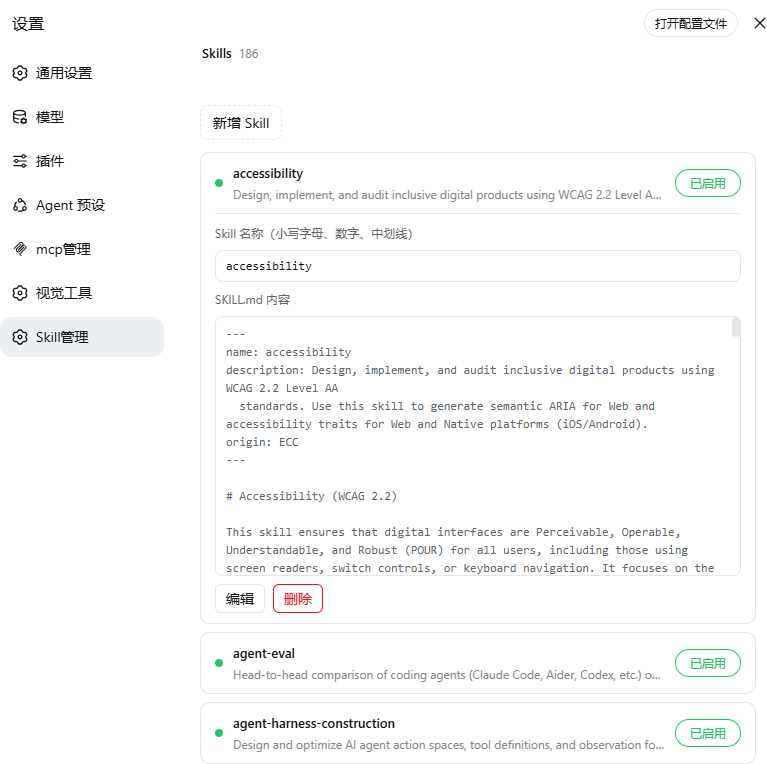 |
Features
🧩 MCP Manager — Settings → MCP Manager
- List overview: each server shows connection status (green dot) + registered tool count
- Click to expand / collapse: click anywhere on a row to expand details (Server name / module / config JSON), click again to collapse (input fields and buttons excluded)
- Add / edit / delete / rename / enable-disable: inline form to configure MCP servers, enable/disable toggle, writes to
$DSH_HOME/profiles/web/cordis.patch.yml - Connection test: independent MCP handshake (initialize + tools/list) to verify reachability, tool count and latency
- Cache optimization: re-entering the page is instant (stale-while-revalidate); add/edit/delete updates state locally without flicker
🎯 Skill Manager — Settings → Skill Manager
- List overview: lists all Skills under
$DSH_HOME/skills(name + description) - Click to expand / collapse: click anywhere on a row to expand details (Skill name + SKILL.md content)
- Edit / rename / add / delete: inline editing of name and content; rename syncs the directory name; delete has a confirmation step
- Enable / disable: toggle takes effect immediately; disabling adds
disable-model-invocation: trueto the frontmatter and the watcher instantly excludes it from the model directory — no restart needed
Installation
dsh plugin --profile web add @wanghailong0419/dsh-toolkit
dsh web   # restart to take effect
Included Packages
| Package | Version | Entry |
|---|---|---|
| @wanghailong0419/dsh-mcp-manager | ^0.1.3 | Settings → MCP Manager |
| @wanghailong0419/dsh-skill-manager | ^0.1.4 | Settings → Skill Manager |
Install Individually / Remove
# Install individually
dsh plugin --profile web add @wanghailong0419/dsh-mcp-manager
dsh plugin --profile web add @wanghailong0419/dsh-skill-manager

# Remove the whole toolkit
dsh plugin --profile web remove @wanghailong0419/dsh-toolkit

# Upgrade
dsh plugin --profile web update @wanghailong0419/dsh-toolkit
License
MIT
安装
装一次目录插件,之后本站所有插件都能让 DeepSeek Harness 自动找、自动装:
dsh plugin add dshbase-catalog然后对 agent 说「帮我装 @wanghailong0419/dsh-toolkit」,它会在目录里找到并自动安装。文档:dshbase-catalog · 已验证场景包。
Web profile:
dsh plugin --profile web add @wanghailong0419/dsh-toolkitHeadless(CLI)profile:
dsh plugin --profile headless add @wanghailong0419/dsh-toolkit包信息
npm:@wanghailong0419/dsh-toolkit · 版本 0.1.6 · 实测环境 dsh 0.1.0-rc.6
实测报告
端到端验证通过:dsh 0.1.0-rc.6 上 L1 安装 + L2 加载 + L3 运行问答。
使用场景
一条命令同时装上 MCP 管理与 Skill 管理,设置页自动出现对应分区,不用分别安装两个插件。
适合谁
想在 DSH 设置页里管 MCP 和 Skill、又不想分别找两个插件的人。
二次开发建议
拉起两个 manager 的 bundle 是缝——可替换包含的插件,或收紧设置页分区的注册方式。
分享徽章
把这枚徽章粘进 README——它会链回本页,实测状态变化时自动更新:

[](https://dshbase.com/zh/plugins/wanghailong0419-dsh-toolkit/)<a href="https://dshbase.com/zh/plugins/wanghailong0419-dsh-toolkit/"><img src="https://dshbase.com/badges/wanghailong0419-dsh-toolkit.svg" alt="dshbase 实测可装"></a>