
Plugin directory / Developer / @wanghailong0419/dsh-toolkit
@wanghailong0419/dsh-toolkit
Verified · install-tested on dsh LongSir0419
What it does
DSH toolkit that installs MCP manager and Skill manager in one command; Settings then shows MCP and Skill sections.
Works — verified, early-stage project
DSH toolkit that installs MCP manager and Skill manager in one command; Settings then shows MCP and Skill sections. It installs cleanly and boots without issues in our testing. It's early-stage but functional.
“Verified” means our automated CI actually ran dsh plugin add in a clean profile and it booted — nothing more. Feature descriptions and version compatibility are the author’s claims. This is not a security audit and not an endorsement of third-party code.
README
dsh-toolkit
A DeepSeek Harness (DSH) plugin toolkit — install two essential plugins with one command: MCP Manager and Skill Manager. Ready to use right after install; the settings page automatically gains MCP Manager and Skill Manager sections.





Screenshots
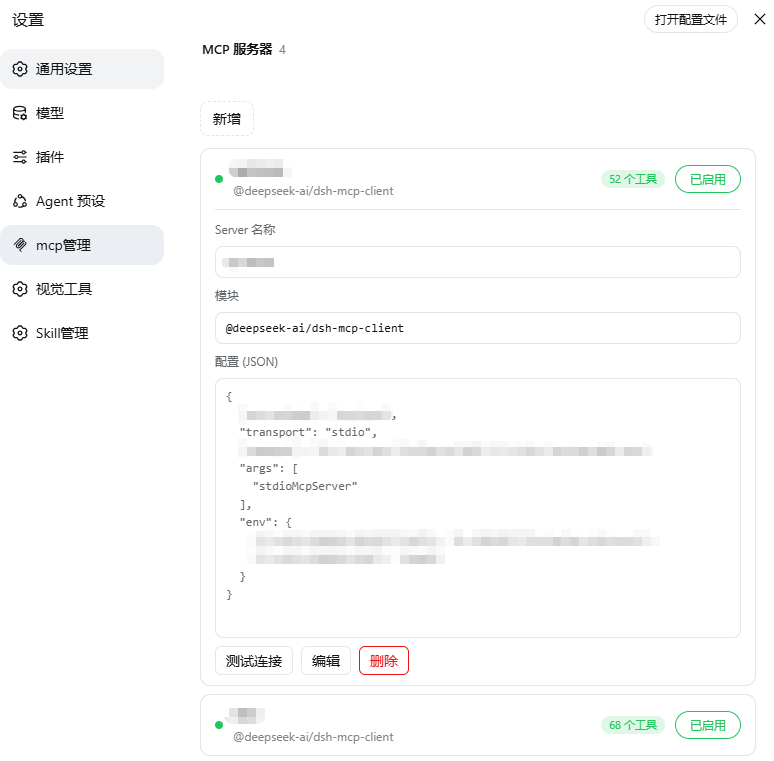
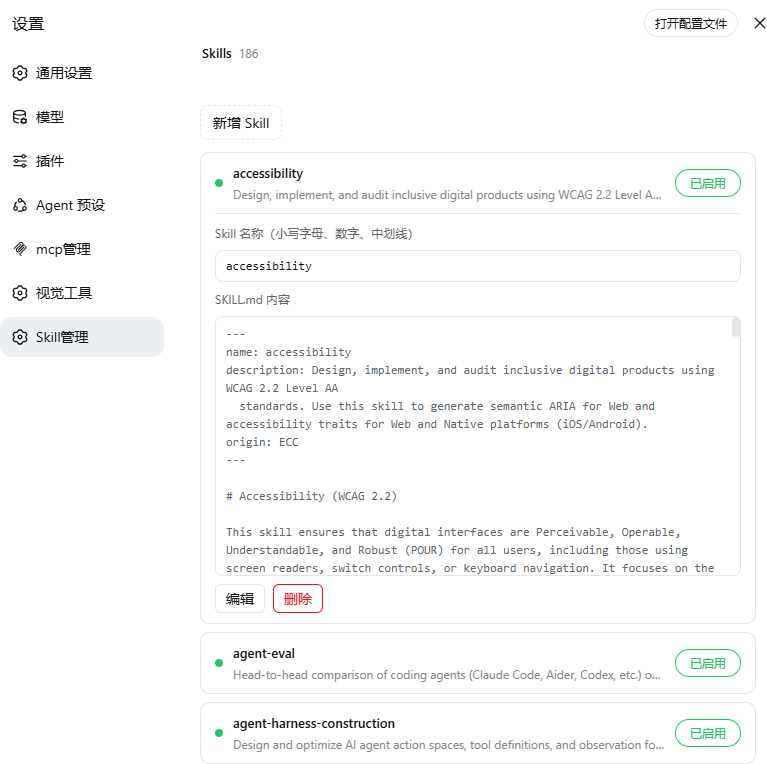
| MCP Manager | Skill Manager |
|---|---|
 |
 |
Features
🧩 MCP Manager — Settings → MCP Manager
- List overview: each server shows connection status (green dot) + registered tool count
- Click to expand / collapse: click anywhere on a row to expand details (Server name / module / config JSON), click again to collapse (input fields and buttons excluded)
- Add / edit / delete / rename / enable-disable: inline form to configure MCP servers, enable/disable toggle, writes to
$DSH_HOME/profiles/web/cordis.patch.yml - Connection test: independent MCP handshake (initialize + tools/list) to verify reachability, tool count and latency
- Cache optimization: re-entering the page is instant (stale-while-revalidate); add/edit/delete updates state locally without flicker
🎯 Skill Manager — Settings → Skill Manager
- List overview: lists all Skills under
$DSH_HOME/skills(name + description) - Click to expand / collapse: click anywhere on a row to expand details (Skill name + SKILL.md content)
- Edit / rename / add / delete: inline editing of name and content; rename syncs the directory name; delete has a confirmation step
- Enable / disable: toggle takes effect immediately; disabling adds
disable-model-invocation: trueto the frontmatter and the watcher instantly excludes it from the model directory — no restart needed
Installation
dsh plugin --profile web add @wanghailong0419/dsh-toolkit
dsh web   # restart to take effect
Included Packages
| Package | Version | Entry |
|---|---|---|
| @wanghailong0419/dsh-mcp-manager | ^0.1.3 | Settings → MCP Manager |
| @wanghailong0419/dsh-skill-manager | ^0.1.4 | Settings → Skill Manager |
Install Individually / Remove
# Install individually
dsh plugin --profile web add @wanghailong0419/dsh-mcp-manager
dsh plugin --profile web add @wanghailong0419/dsh-skill-manager

# Remove the whole toolkit
dsh plugin --profile web remove @wanghailong0419/dsh-toolkit

# Upgrade
dsh plugin --profile web update @wanghailong0419/dsh-toolkit
License
MIT
Install
Install the catalog once, then DeepSeek Harness can find and install any plugin from this site automatically:
dsh plugin add dshbase-catalogThen say "install @wanghailong0419/dsh-toolkit for me" — your agent finds it in the directory and installs it. Docs: dshbase-catalog · verified packs.
Web profile:
dsh plugin --profile web add @wanghailong0419/dsh-toolkitHeadless (CLI) profile:
dsh plugin --profile headless add @wanghailong0419/dsh-toolkitPackage
npm: @wanghailong0419/dsh-toolkit · version 0.1.6 · tested on dsh 0.1.0-rc.6
Test report
Verified end-to-end: L1 install + L2 load + L3 runtime Q&A on dsh 0.1.0-rc.6.
When to use it
Install MCP manager and Skill manager with one command so Settings grows MCP and Skill sections without adding each plugin separately.
Who it's for
Users who want MCP and Skill management in the DSH Settings UI without hunting two separate plugins.
For developers — extending it
The bundle that pulls in the two managers is the seam — swap included plugins, or tighten how Settings sections are registered.
Share this badge
Drop this badge into your README — it links back here and updates automatically when our test status changes:

[](https://dshbase.com/plugins/wanghailong0419-dsh-toolkit/)<a href="https://dshbase.com/plugins/wanghailong0419-dsh-toolkit/"><img src="https://dshbase.com/badges/wanghailong0419-dsh-toolkit.svg" alt="dshbase install-tested"></a>