
插件目录 / Developer / session-archive-manager
session-archive-manager
已验证 · 实测可装 my-dsh-plugin
功能简介
在设置中查看并管理归档会话,支持取消归档/删除/批量删除
可用 — 实测通过,早期项目
在设置中查看并管理归档会话,支持取消归档/删除/批量删除 实测能干净安装、正常启动。早期项目,但功能可用。
「已验证」表示我们的自动化 CI 在干净 profile 里实际执行了 dsh plugin add 并启动成功——仅此而已。功能描述与版本兼容性均为作者声明。这不是安全审计,也不代表对第三方代码的背书。
README
session-archive-manager
Manage archived sessions from DeepSeek Harness Settings: view, unarchive, delete, batch delete, or delete all — the archived-session surface the harness itself does not ship.
中文:README.zh.md
Features
- View every archived session in Settings — title, workspace, working directory, and last-updated time — even though the harness hides archived sessions from every grouping surface.
- Unarchive one session or a selection: each reappears in its retained workspace accounting slot.
- Delete one session, delete a selection, or delete all archived sessions at once, each with an inline confirmation.
- Live refresh: the list follows the host's archive set and session summaries while the page is open; actions reflect immediately through the runtime stores.
- Capability gate: on a harness without the core APIs the page degrades to a read-only list with a clear upgrade notice instead of broken buttons.
How it works
The plugin is UI-only. It derives the archived-session rows by cross-referencing the live workspaces.list archive set with sessions.list summaries, and every action rides the core workspace.unarchiveSession / workspace.deleteSession RPCs through the workspaces runtime service. Nothing polls, and nothing runs on the host side beyond the RPCs themselves.
Screenshot
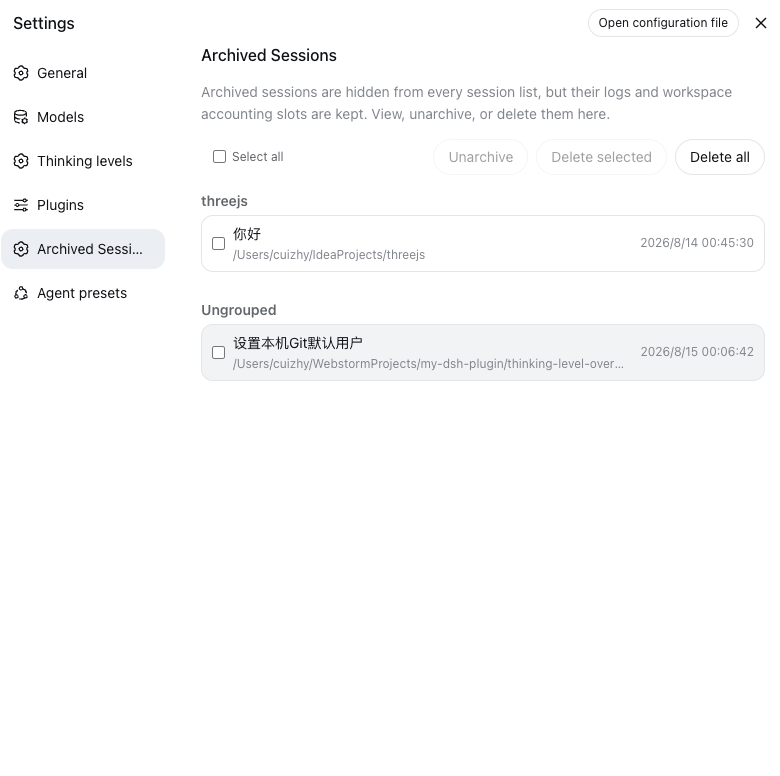
The Archived Sessions entry sits in Settings right after Plugins. Rows are grouped by workspace with a small group title; sessions no workspace accounts fall into the Ungrouped bucket at the end. Batch actions — unarchive, delete selected, delete all — live in the toolbar above the list.
Requirements
The harness does not ship the unarchive/delete APIs yet (no upstream release channel), so a source checkout of deepseek-harness with the bundled patch applied is required today. On a harness without the APIs the settings page shows the archive list read-only with an upgrade notice.
Install
The plugin itself never needs to be built. The repository ships the prebuilt host entry and browser bundle in lib/ (committed), so installing is a clone/pull plus one CLI command — no pnpm install in this repo, no prepare scripts, no allowBuilds approvals. The only build in the whole flow is the harness's own, for the core patch in step 1.
1. Patch the harness core
From this repository, against your deepseek-harness checkout (pinned to base commit 47f943859b; a different commit may need git apply -3):
node scripts/apply-patch.mjs /path/to/deepseek-harness
cd /path/to/deepseek-harness
npm run build:lib:host
npm run build:lib:client
The patch (patches/dsh-core-unarchive-delete.patch) adds the two workspace RPCs, the session-persistence delete seam with JSONL/SQLite backends, the client-runtime actions, and their tests. It is additive only — no existing behavior changes.
2. Install the plugin (no build needed)
From a local clone (recommended for iterating) — installs as a link: the committed lib/ is served as-is, and git pull in the clone updates the plugin without any build:
git clone https://github.com/my-dsh-plugin/session-archive-manager.git
pnpm dsh plugin add --profile web /path/to/session-archive-manager
(dsh CLI from your harness checkout; set DSH_HOME to your harness home if it is not the default ~/.dsh.)
Straight from git — pnpm fetches the repository and uses the committed lib/; no build script runs:
pnpm dsh plugin add --profile web github:my-dsh-plugin/session-archive-manager
dsh plugin add adds the dependency and reconciles the dsh.profile.bundles layer list. The manual equivalent is editing the profile's package.json:
"dependencies": {
  "dsh-session-archive-manager": "link:/path/to/session-archive-manager"
}
"dsh": {
  "profile": {
    "bundles": ["@deepseek-ai/dsh-base", "@deepseek-ai/dsh-web-app", "dsh-session-archive-manager"]
  }
}
then pnpm install inside the profile directory.
3. Restart and verify
Restart the harness (npx @deepseek-ai/dsh web or however you launch it). The Archived Sessions entry appears in Settings, after Plugins.
- The page shows the read-only notice → the core patch is not active in the running build (check the rebuild step, or that the old process was fully stopped).
- The menu entry is missing entirely → the plugin is not in the running profile's bundle layer (re-run
dsh plugin add, verify the bundles list).
DeepSeek Harness Desktop — one-shot install
Desktop users need neither a harness checkout nor the core patch: the desktop harness is
built from the my-dsh-plugin fork, which already carries the archive/unarchive/delete core
support. Run this once in a normal terminal (not inside the app's own harness shell —
the app bundle and app-data dir are sandboxed/read-only from there, especially on macOS):
bash <(curl -Ls https://raw.githubusercontent.com/my-dsh-plugin/session-archive-manager/main/scripts/install-desktop.sh) --restart
The script is idempotent: pulls the plugin from GitHub (prebuilt lib/, nothing to build),
appends "session-archive-manager" to the embedded harness WEB_SETTINGS_NAMESPACES
allowlist if missing, installs it into the desktop web profile, registers the bundle, and
restarts the app (--restart). The Archived Sessions entry then appears in Settings.
Overrides: DSH_DESKTOP_APP, DSH_DESKTOP_HOME, DSH_SKILL_SOURCE_DIR.
End users of a released desktop build need no manual steps — upgrade and restart; the
plugin is seeded and the allowlist is already in the shipped harness.
Maintenance
The patch is pinned to a harness base commit, so it drifts as the harness upstream moves. When your checkout updates, regenerate and re-verify the patch before committing:
node scripts/regenerate-patch.mjs /path/to/deepseek-harness
git -C /path/to/deepseek-harness stash
git -C /path/to/deepseek-harness apply --check /path/to/session-archive-manager/patches/dsh-core-unarchive-delete.patch
git -C /path/to/deepseek-harness stash pop
The regeneration covers only this plugin's core extension (unrelated local changes are excluded automatically). Bump the base via DSH_PATCH_BASE=<commit> when the extension is re-based onto a newer upstream commit.
Development
Building is only for changing the plugin itself — consumers never build. It requires the sibling deepseek-harness checkout (../deepseek-harness) because the client bundle is produced by the shared harness preset:
pnpm install
pnpm test       # vitest: controller and row-assembly suites
pnpm typecheck  # tsc -b over src + tests against the harness checkout
pnpm build      # tsc declarations + tsdown host + client bundle into lib/
After a build, commit lib/ so consumers keep getting the prebuilt artifacts (a git pull is all a link-installed profile needs to pick up a change).
Known Limitations and Deferred Work
- Deleting a session refuses only while its agent is running a turn; stop the turn first, then delete.
- Attachments written by a deleted session are not garbage-collected; they remain in the attachment store, which is content-addressed and shared by log export.
- The session-search index drops a deleted session on its next reconciliation; the running web client's sidebar refreshes from its own stores and may show the row until the next list refresh.
License
Apache-2.0
安装
装一次目录插件,之后本站所有插件都能让 DeepSeek Harness 自动找、自动装:
dsh plugin add dshbase-catalog然后对 agent 说「帮我装 session-archive-manager」,它会在目录里找到并自动安装。文档:dshbase-catalog · 已验证场景包。
该插件是 GitHub 源码(未发 npm)——直接从仓库装:
Web profile:
dsh plugin --profile web add github:my-dsh-plugin/session-archive-managerHeadless(CLI)profile:
dsh plugin --profile headless add github:my-dsh-plugin/session-archive-manager实测报告
验证通过:从 GitHub 源码完成 L1 安装 + L2 加载 + L3 运行(dsh 0.1.0-rc.6)。
使用场景
扩展 agent 的编码能力面——给它一个新工具、工作流或集成,让它接手以前做不了的开发任务。
适合谁
想让 dsh 在真实代码库上像队友一样干活的开发者——能改、能跑、能验证,而不只是回答问题。
二次开发建议
工具/命令面就是缝:暴露更多 SDK 能力、加更聪明的上下文接线,或收紧改代码与验证之间的循环。
分享徽章
把这枚徽章粘进 README——它会链回本页,实测状态变化时自动更新:

[](https://dshbase.com/zh/plugins/session-archive-manager/)<a href="https://dshbase.com/zh/plugins/session-archive-manager/"><img src="https://dshbase.com/badges/session-archive-manager.svg" alt="dshbase 实测可装"></a>