
Plugin directory / Developer / session-archive-manager
session-archive-manager
Verified · install-tested on dsh my-dsh-plugin
What it does
DeepSeek Harness plugin: view and manage archived sessions in settings, support unarchive, delete, batch delete, and delete all. Manage archived sessions from DeepSeek Harness Settings: view, unarchive, delete, batch delete, delete all.
Works — verified, early-stage project
DeepSeek Harness plugin: view and manage archived sessions in settings, support unarchive, delete, batch delete, and delete all. Manage archived sessions from DeepSeek Harness Settings: view, unarchive, delete, batch delete, delete all. It installs cleanly and boots without issues in our testing. It's early-stage but functional.
“Verified” means our automated CI actually ran dsh plugin add in a clean profile and it booted — nothing more. Feature descriptions and version compatibility are the author’s claims. This is not a security audit and not an endorsement of third-party code.
README
session-archive-manager
Manage archived sessions from DeepSeek Harness Settings: view, unarchive, delete, batch delete, or delete all — the archived-session surface the harness itself does not ship.
中文:README.zh.md
Features
- View every archived session in Settings — title, workspace, working directory, and last-updated time — even though the harness hides archived sessions from every grouping surface.
- Unarchive one session or a selection: each reappears in its retained workspace accounting slot.
- Delete one session, delete a selection, or delete all archived sessions at once, each with an inline confirmation.
- Live refresh: the list follows the host's archive set and session summaries while the page is open; actions reflect immediately through the runtime stores.
- Capability gate: on a harness without the core APIs the page degrades to a read-only list with a clear upgrade notice instead of broken buttons.
How it works
The plugin is UI-only. It derives the archived-session rows by cross-referencing the live workspaces.list archive set with sessions.list summaries, and every action rides the core workspace.unarchiveSession / workspace.deleteSession RPCs through the workspaces runtime service. Nothing polls, and nothing runs on the host side beyond the RPCs themselves.
Screenshot
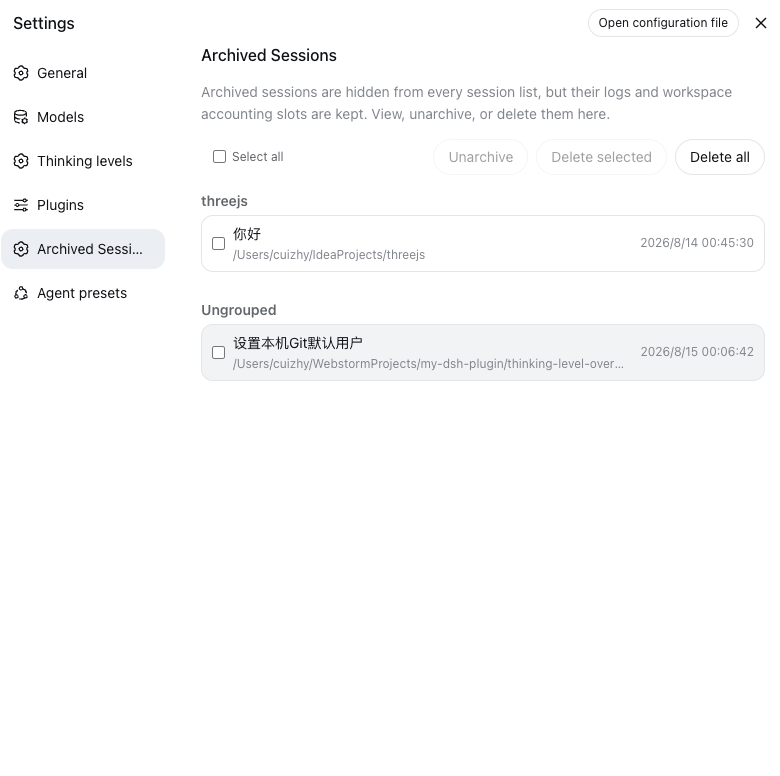
The Archived Sessions entry sits in Settings right after Plugins. Rows are grouped by workspace with a small group title; sessions no workspace accounts fall into the Ungrouped bucket at the end. Batch actions — unarchive, delete selected, delete all — live in the toolbar above the list.
Requirements
The harness does not ship the unarchive/delete APIs yet (no upstream release channel), so a source checkout of deepseek-harness with the bundled patch applied is required today. On a harness without the APIs the settings page shows the archive list read-only with an upgrade notice.
Install
The plugin itself never needs to be built. The repository ships the prebuilt host entry and browser bundle in lib/ (committed), so installing is a clone/pull plus one CLI command — no pnpm install in this repo, no prepare scripts, no allowBuilds approvals. The only build in the whole flow is the harness's own, for the core patch in step 1.
1. Patch the harness core
From this repository, against your deepseek-harness checkout (pinned to base commit 47f943859b; a different commit may need git apply -3):
node scripts/apply-patch.mjs /path/to/deepseek-harness
cd /path/to/deepseek-harness
npm run build:lib:host
npm run build:lib:client
The patch (patches/dsh-core-unarchive-delete.patch) adds the two workspace RPCs, the session-persistence delete seam with JSONL/SQLite backends, the client-runtime actions, and their tests. It is additive only — no existing behavior changes.
2. Install the plugin (no build needed)
From a local clone (recommended for iterating) — installs as a link: the committed lib/ is served as-is, and git pull in the clone updates the plugin without any build:
git clone https://github.com/my-dsh-plugin/session-archive-manager.git
pnpm dsh plugin add --profile web /path/to/session-archive-manager
(dsh CLI from your harness checkout; set DSH_HOME to your harness home if it is not the default ~/.dsh.)
Straight from git — pnpm fetches the repository and uses the committed lib/; no build script runs:
pnpm dsh plugin add --profile web github:my-dsh-plugin/session-archive-manager
dsh plugin add adds the dependency and reconciles the dsh.profile.bundles layer list. The manual equivalent is editing the profile's package.json:
"dependencies": {
  "dsh-session-archive-manager": "link:/path/to/session-archive-manager"
}
"dsh": {
  "profile": {
    "bundles": ["@deepseek-ai/dsh-base", "@deepseek-ai/dsh-web-app", "dsh-session-archive-manager"]
  }
}
then pnpm install inside the profile directory.
3. Restart and verify
Restart the harness (npx @deepseek-ai/dsh web or however you launch it). The Archived Sessions entry appears in Settings, after Plugins.
- The page shows the read-only notice → the core patch is not active in the running build (check the rebuild step, or that the old process was fully stopped).
- The menu entry is missing entirely → the plugin is not in the running profile's bundle layer (re-run
dsh plugin add, verify the bundles list).
DeepSeek Harness Desktop — one-shot install
Desktop users need neither a harness checkout nor the core patch: the desktop harness is
built from the my-dsh-plugin fork, which already carries the archive/unarchive/delete core
support. Run this once in a normal terminal (not inside the app's own harness shell —
the app bundle and app-data dir are sandboxed/read-only from there, especially on macOS):
bash <(curl -Ls https://raw.githubusercontent.com/my-dsh-plugin/session-archive-manager/main/scripts/install-desktop.sh) --restart
The script is idempotent: pulls the plugin from GitHub (prebuilt lib/, nothing to build),
appends "session-archive-manager" to the embedded harness WEB_SETTINGS_NAMESPACES
allowlist if missing, installs it into the desktop web profile, registers the bundle, and
restarts the app (--restart). The Archived Sessions entry then appears in Settings.
Overrides: DSH_DESKTOP_APP, DSH_DESKTOP_HOME, DSH_SKILL_SOURCE_DIR.
End users of a released desktop build need no manual steps — upgrade and restart; the
plugin is seeded and the allowlist is already in the shipped harness.
Maintenance
The patch is pinned to a harness base commit, so it drifts as the harness upstream moves. When your checkout updates, regenerate and re-verify the patch before committing:
node scripts/regenerate-patch.mjs /path/to/deepseek-harness
git -C /path/to/deepseek-harness stash
git -C /path/to/deepseek-harness apply --check /path/to/session-archive-manager/patches/dsh-core-unarchive-delete.patch
git -C /path/to/deepseek-harness stash pop
The regeneration covers only this plugin's core extension (unrelated local changes are excluded automatically). Bump the base via DSH_PATCH_BASE=<commit> when the extension is re-based onto a newer upstream commit.
Development
Building is only for changing the plugin itself — consumers never build. It requires the sibling deepseek-harness checkout (../deepseek-harness) because the client bundle is produced by the shared harness preset:
pnpm install
pnpm test       # vitest: controller and row-assembly suites
pnpm typecheck  # tsc -b over src + tests against the harness checkout
pnpm build      # tsc declarations + tsdown host + client bundle into lib/
After a build, commit lib/ so consumers keep getting the prebuilt artifacts (a git pull is all a link-installed profile needs to pick up a change).
Known Limitations and Deferred Work
- Deleting a session refuses only while its agent is running a turn; stop the turn first, then delete.
- Attachments written by a deleted session are not garbage-collected; they remain in the attachment store, which is content-addressed and shared by log export.
- The session-search index drops a deleted session on its next reconciliation; the running web client's sidebar refreshes from its own stores and may show the row until the next list refresh.
License
Apache-2.0
Install
Install the catalog once, then DeepSeek Harness can find and install any plugin from this site automatically:
dsh plugin add dshbase-catalogThen say "install session-archive-manager for me" — your agent finds it in the directory and installs it. Docs: dshbase-catalog · verified packs.
This plugin is GitHub source (not published to npm) — install it straight from the repo:
Web profile:
dsh plugin --profile web add github:my-dsh-plugin/session-archive-managerHeadless (CLI) profile:
dsh plugin --profile headless add github:my-dsh-plugin/session-archive-managerTest report
Verified: L1 install + L2 load + L3 runtime from GitHub source on dsh 0.1.0-rc.6.
When to use it
Extend the agent's coding surface — give it a new tool, workflow, or integration so it handles a dev task it couldn't before.
Who it's for
Developers who want dsh to behave like a teammate on real codebases — editing, running, and verifying changes rather than just answering.
For developers — extending it
The tool/command surface is the seam: expose more of the SDK, add smarter context wiring, or tighten the loop between code changes and verification.
Share this badge
Drop this badge into your README — it links back here and updates automatically when our test status changes:

[](https://dshbase.com/plugins/session-archive-manager/)<a href="https://dshbase.com/plugins/session-archive-manager/"><img src="https://dshbase.com/badges/session-archive-manager.svg" alt="dshbase install-tested"></a>