
插件目录 / Knowledge / dsh-bookmarks
dsh-bookmarks
已验证 · 实测可装 penguin-oo
功能简介
DSH书签助手回复:每条消息书签带笔记/标签,跨会话中心,一键导出Markdown
可用 — 实测通过,早期项目
DSH书签助手回复:每条消息书签带笔记/标签,跨会话中心,一键导出Markdown 实测能干净安装、正常启动。早期项目,但功能可用。
「已验证」表示我们的自动化 CI 在干净 profile 里实际执行了 dsh plugin add 并启动成功——仅此而已。功能描述与版本兼容性均为作者声明。这不是安全审计,也不代表对第三方代码的背书。
README
dsh-bookmarks


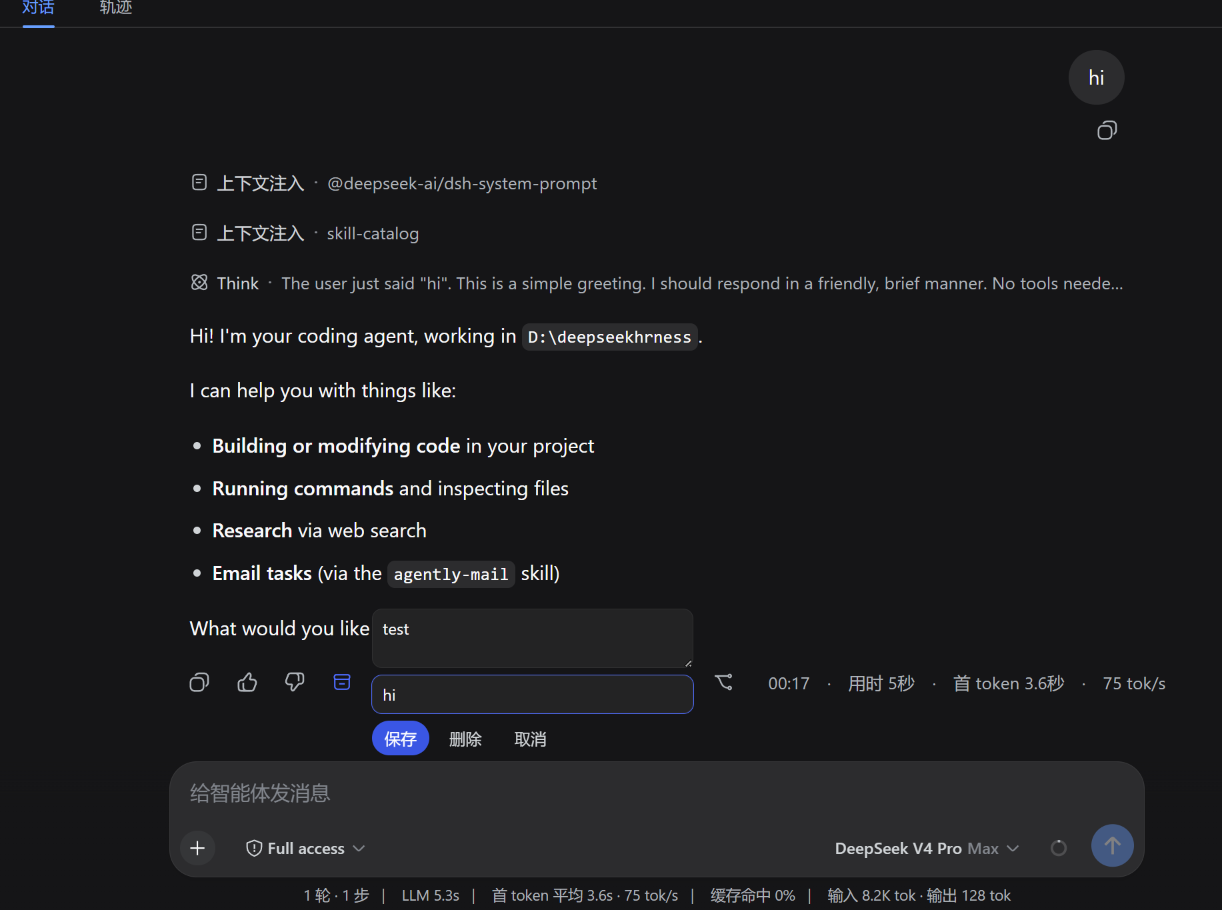
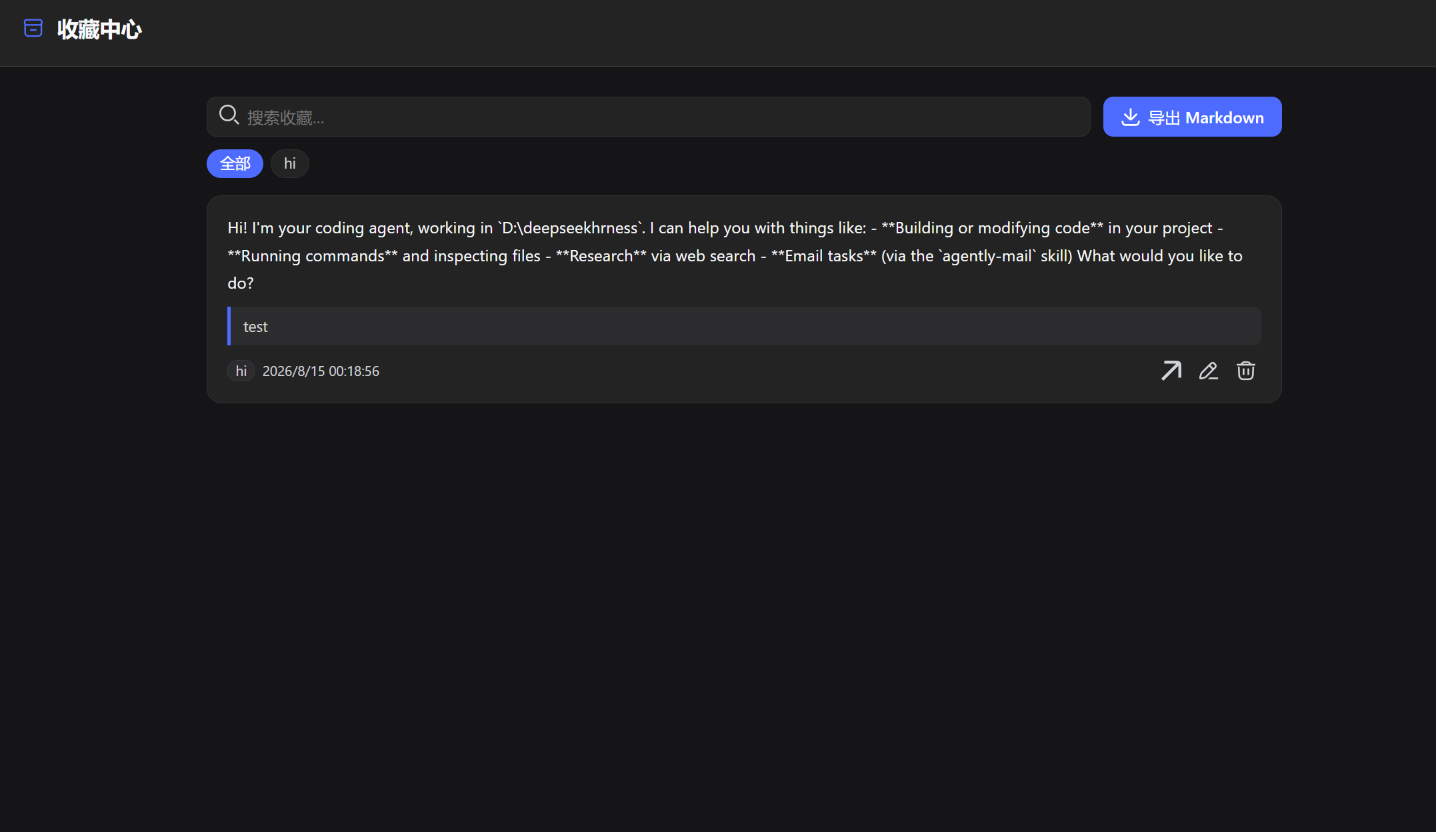
Bookmark assistant replies in DeepSeek Harness (DSH) Web UI: bookmark any finalized assistant reply with a note and tags, browse every bookmark from every session in one center panel, and export them to Markdown in one click.
Screenshots
Features
- Per-message bookmark — an archive button on each finalized assistant reply (right next to the 👍/👎 feedback buttons), with an inline editor for a note and comma-separated tags.
- Server-derived snippet — the bookmark stores a text preview of the actual reply, so the center stays useful even without a note.
- Cross-session center — one panel listing bookmarks from all sessions and workspaces, with full-text search, tag filter, inline editing and deletion.
- Jump back — every entry opens its session in one click.
- Markdown export — one click downloads all bookmarks as
dsh-bookmarks.md. - Keyboard —
Alt+Btoggles the center from anywhere. - Safe writes — per-item compare-and-set versions (multi-tab safe), server-side validation, and durable storage via the DSH storage domain.
Install
dsh plugin --profile web add dsh-bookmarks
Then restart DSH (dsh web). The plugin appends itself to the profile bundle layer automatically; nothing else to configure.
For a local checkout:
# from the plugin repo
dsh plugin --profile web add file:./        # relative file spec, anchored to your cwd
Config
The bundle row exposes three limits (all optional):
| Key | Default | Meaning |
|---|---|---|
maxNoteBytes |
4096 |
Max UTF-8 bytes of one note ("" clears a note; omitting the field keeps it). |
maxSnippetChars |
300 |
Max characters of the server-derived reply snippet. |
maxTags |
8 |
Max tags per bookmark; each tag ≤ 32 chars, trimmed and deduplicated. |
Override them in the profile patch layer ($DSH_HOME/profiles/web/cordis.patch.yml):
- id: bookmarks
  config:
    maxNoteBytes: 2048
    maxSnippetChars: 200
    maxTags: 5
How it works
One npm package hosts both halves of the plugin:
- Host half (
lib/index.js) — thebookmarksRemote service (Typert), backed by a storage-domain table ($DSH_HOME/storages/bookmarks.json).putinspects the persisted session log to validate the target reply and derive its snippet, mirrors the officialmessage-feedbackdurability barrier, and serializes mutations with per-item version tokens. - Browser half (
src/client, bundled tolib/client.js) — mounts the Remote contribution throughctx.remote.$mount, then registers two UI slots:conversation.chat.assistant-actions(the per-message button) andsidebar.footer.action(the center toggle).
Development
npm install            # zod + esbuild (dev only)
npm run build          # bundles src/client into lib/client.js
lib/client.js is committed and shipped; no build step runs on install.
Limitations
- Bookmarks are stored in one global row: fine for personal use, not a shared multi-user store.
- The center panel jumps to the bookmarked session; it does not auto-scroll to the exact message yet.
- The panel toggle lives in the sidebar footer; use
Alt+Bwhen the sidebar is collapsed.
License
Acknowledgements
This project is promoted on the LINUX DO community.
安装
装一次目录插件,之后本站所有插件都能让 DeepSeek Harness 自动找、自动装:
dsh plugin add dshbase-catalog然后对 agent 说「帮我装 dsh-bookmarks」,它会在目录里找到并自动安装。文档:dshbase-catalog · 已验证场景包。
Web profile:
dsh plugin --profile web add dsh-bookmarksHeadless(CLI)profile:
dsh plugin --profile headless add dsh-bookmarks包信息
npm:dsh-bookmarks · 版本 0.1.0 · 实测环境 dsh 0.1.0-rc.6
实测报告
端到端验证通过:dsh 0.1.0-rc.6 上 L1 安装 + L2 加载 + L3 运行问答。
使用场景
给 agent 一套记忆、知识库或检索层,让它不再跨会话丢上下文。
适合谁
跑长项目、想让 agent 记住决策、文档和偏好而不用每次重讲的人。
二次开发建议
记忆/检索后端是缝——插新存储、调蒸馏策略,或加引用与审计轨迹。
分享徽章
把这枚徽章粘进 README——它会链回本页,实测状态变化时自动更新:

[](https://dshbase.com/zh/plugins/dsh-bookmarks/)<a href="https://dshbase.com/zh/plugins/dsh-bookmarks/"><img src="https://dshbase.com/badges/dsh-bookmarks.svg" alt="dshbase 实测可装"></a>