
Plugin directory / Developer / dsh-vision-api-localorweb
dsh-vision-api-localorweb
Unverified TIPSONG
What it does
A plugin in the Developer category for DeepSeek Harness.
Unverified — not yet verified
A plugin in the Developer category for DeepSeek Harness. Not yet verified — install and test it yourself.
“Unverified” means our automated CI has not yet installed this plugin. Feature descriptions and version compatibility are the author’s claims. This is not a security audit and not an endorsement of third-party code.
README
🖼 dsh-vision-api-localorweb
接入本地识图模型 API —— 给你的 DSH 助手装上一双「本地眼睛」。
用 LM Studio / vLLM / Ollama 里的多模态模型来识图,数据不出本机。




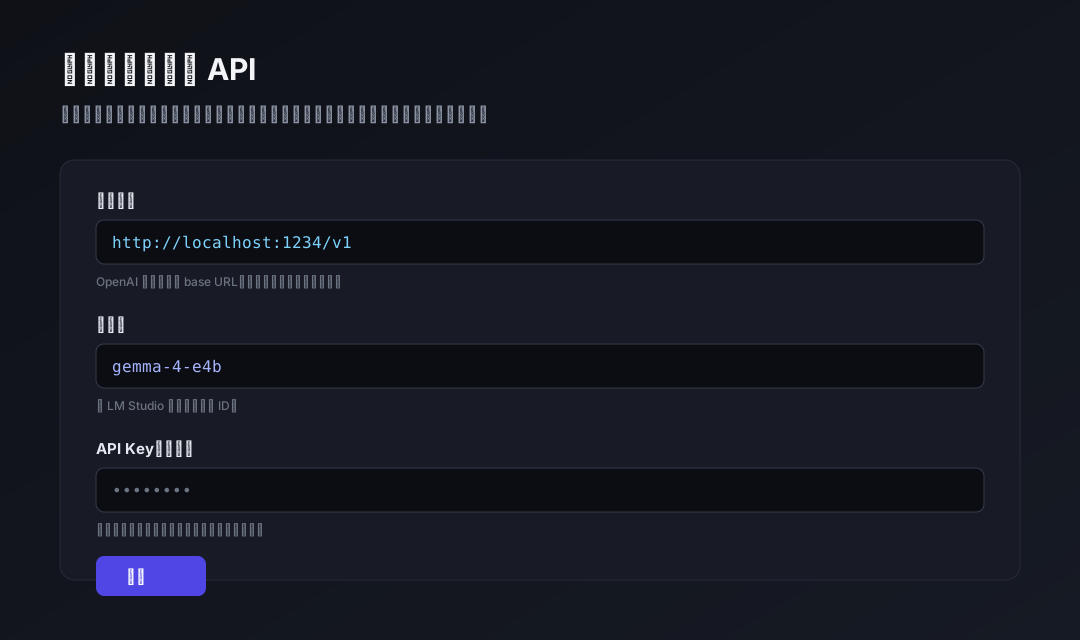
✨ 为什么需要它
DSH 助手默认不「看」图片。这个插件把你本地已有的识图模型(比如 LM Studio 里跑着的 Gemma 4E)接进来:
- 🔌 一行接入:填个 OpenAI 兼容接口地址 + 模型名,即可启用
- 🔒 数据不出本机:图片只发给你自己的模型,不经过任何云端
- ⚙️ 留空即关闭:接口地址留空 = 不启用识图,零副作用
- 🎛 图形化配置:设置界面里直接填,不用碰配置文件
🚀 快速开始
dsh plugin --profile web add "github:TIPSONG/dsh-vision-api-localorweb#main"
本插件声明了
dsh.bundle.patch,dsh plugin add会自动挂进 profile 层栈,无需手写 insert 行。装完重启 web 生效。
重启后打开 设置 → 可接入识图模型 API:
| 字段 | 填什么 | 示例 |
|---|---|---|
| 接口地址 | OpenAI 兼容 base URL | http://localhost:1234/v1 |
| 模型名 | 本地加载的模型 ID | gemma-4-e4b |
| API Key | 本地服务留空即可 | (空) |
点保存,然后对助手说「看看这张图」——助手会调用 local_vision 把图片交给你本地的模型。
👁 怎么看图:两种方式
方式一:直接告诉助手图片路径(推荐,任何对话模型都可用)
把图片放在本地磁盘上,然后在对话里给出图片路径,例如:
看看这张图:
C:\Users\me\Desktop\photo.png,描述一下内容
助手会调用 local_vision 工具读取该路径的图片、交给本地识图模型,并把文字描述带回来。这条路不依赖对话模型是否支持图片输入——哪怕对话模型是纯文本模型(如 deepseek-v4),识图也完全正常。
⚠️ 为什么拖拽发图不一定可行:DSH 会在消息提交时检查当前对话模型是否声明支持图片输入。如果对话模型不支持图片(如 deepseek-v4),拖拽/粘贴发图会被拒绝(提示「当前模型不支持图片」),且这个检查发生在插件无法拦截的位置。详见 issue #1。因此当对话模型不支持图片时,请用路径识图。
方式二:拖拽/粘贴发图(要求对话模型本身支持图片)
如果你的对话模型支持图片输入(例如把对话模型切换为本地多模态模型),直接拖图进对话框即可,图片会原样交给对话模型。此时本插件的转译钩子会自动跳过,不做干预。
🧭 工作原理
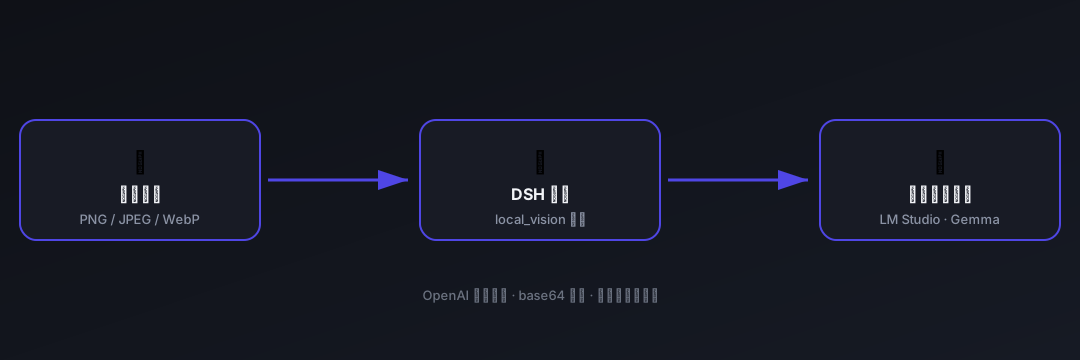
📦 能力面
| Tools | 说明 |
|---|---|
local_vision |
读取本地图片 → 交给 OpenAI 兼容识图接口 → 返回文字描述;接口留空时返回「未配置」提示 |
| UI | 说明 |
|---|---|
| 设置 → 可接入识图模型 API | 三个输入框(接口地址 / 模型名 / API Key),留空接口地址即禁用识图 |
🔧 配置字段
| 字段 | 说明 |
|---|---|
baseUrl |
OpenAI 兼容接口的 base URL(http://host:port/v1)。留空 = 禁用识图 |
model |
模型 ID(LM Studio 里加载的名字,如 gemma-4-e4b) |
apiKey |
可选鉴权头;留空则不发送 |
📄 安装说明
git 源(推荐,一行):
dsh plugin --profile web add "github:TIPSONG/dsh-vision-api-localorweb#main"
本地目录:
git clone https://github.com/TIPSONG/dsh-vision-api-localorweb.git
cd dsh-vision-api-localorweb
npm install
npm run build          # 产出 lib/index.js + lib/client.js
dsh plugin --profile web add .
本插件声明
dsh.bundle.patch(组合层)+dsh.client(platform: web)+exports["./client"](浏览器设置页),main提供 Node 工具半。安装后重启 web 生效。
🛠 开发
npm install
npm run build          # 重新构建 lib/
| 文件 | 说明 |
|---|---|
src/index.ts |
Node 半:settings namespace + local_vision 工具 |
src/client.ts |
浏览器半:设置页 |
scripts/build.mjs |
esbuild 构建脚本(ESM host + __ModuleLoader__ client bundle) |
🔌 支持的模型
任何 OpenAI 兼容 /v1/chat/completions 接口且支持图片输入的多模态模型:
- LM Studio(Gemma、Qwen-VL、LLaVA 等)
- Ollama(
http://localhost:11434/v1) - vLLM / llama.cpp server
📄 License
Install
Install the catalog once, then DeepSeek Harness can find and install any plugin from this site automatically:
dsh plugin add dshbase-catalogThen say "install dsh-vision-api-localorweb for me" — your agent finds it in the directory and installs it. Docs: dshbase-catalog · verified packs.
This plugin is GitHub source (not published to npm) — install it straight from the repo:
Web profile:
dsh plugin --profile web add github:TIPSONG/dsh-vision-api-localorwebHeadless (CLI) profile:
dsh plugin --profile headless add github:TIPSONG/dsh-vision-api-localorwebTest report
Not yet L3-verified — see failure note below if we already ran it.
2026-08-26 · flagged webonly Note: 验证: web-only;待 L4 web CDP;L4 web CDP runtime-fail on dsh 0.1.0-rc.8. Browse all pending failures →
Share this badge
Drop this badge into your README — it links back here and updates automatically when our test status changes:

[](https://dshbase.com/plugins/dsh-vision-api-localorweb/)<a href="https://dshbase.com/plugins/dsh-vision-api-localorweb/"><img src="https://dshbase.com/badges/dsh-vision-api-localorweb.svg" alt="dshbase listed"></a>