
Plugin directory / Developer / dsh-file-explorer-preview-sequence
dsh-file-explorer-preview-sequence
Unverified wolfsonliu
What it does
DSH Web file-explorer preview plugin: renders FASTA / GenBank / JBEI / SnapGene / SBOL sequences with the SeqViz viewer | DSH Web 文件浏览器预览插件:用 SeqViz 查看器渲染 FASTA / GenBank / JBEI / SnapGene / SBOL 序列文件
Unverified — not yet verified
DSH Web file-explorer preview plugin: renders FASTA / GenBank / JBEI / SnapGene / SBOL sequences with the SeqViz viewer | DSH Web 文件浏览器预览插件:用 SeqViz 查看器渲染 FASTA / GenBank / JBEI / SnapGene / SBOL 序列文件 Not yet verified — install and test it yourself.
“Unverified” means our automated CI has not yet installed this plugin. Feature descriptions and version compatibility are the author’s claims. This is not a security audit and not an endorsement of third-party code.
README
dsh-file-explorer-preview-sequence
中文 | English
A DSH Web plugin that adds a SeqViz sequence viewer to dsh-file-explorer, overriding its plain-text previews for FASTA, GenBank, JBEI, SnapGene, and SBOL files.
Select a .gb / .fasta (or any supported format below) in the file explorer and the preview panel renders an interactive sequence viewer instead of raw text.
Screenshots
| Dark theme | Light theme |
|---|---|
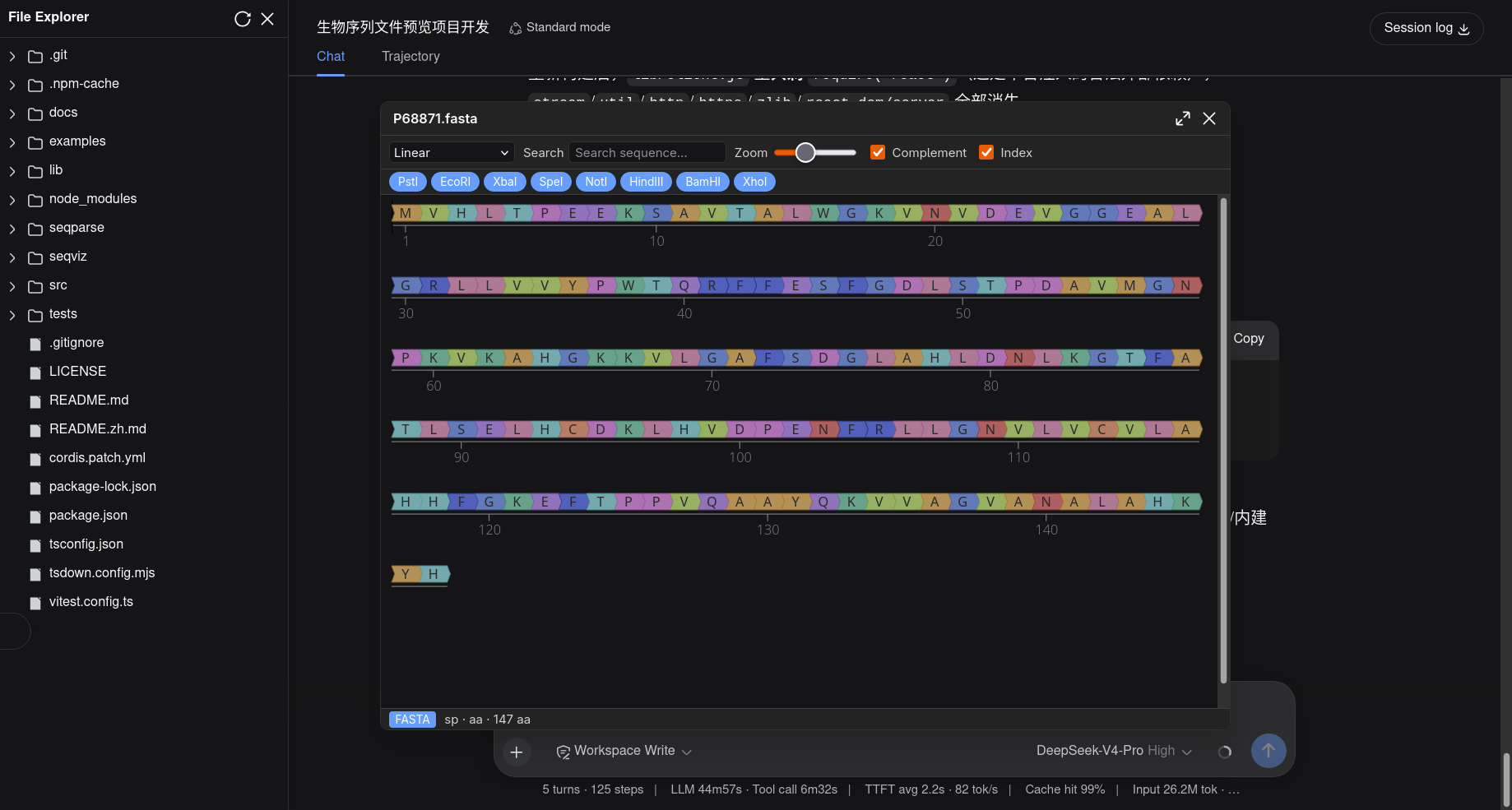 |
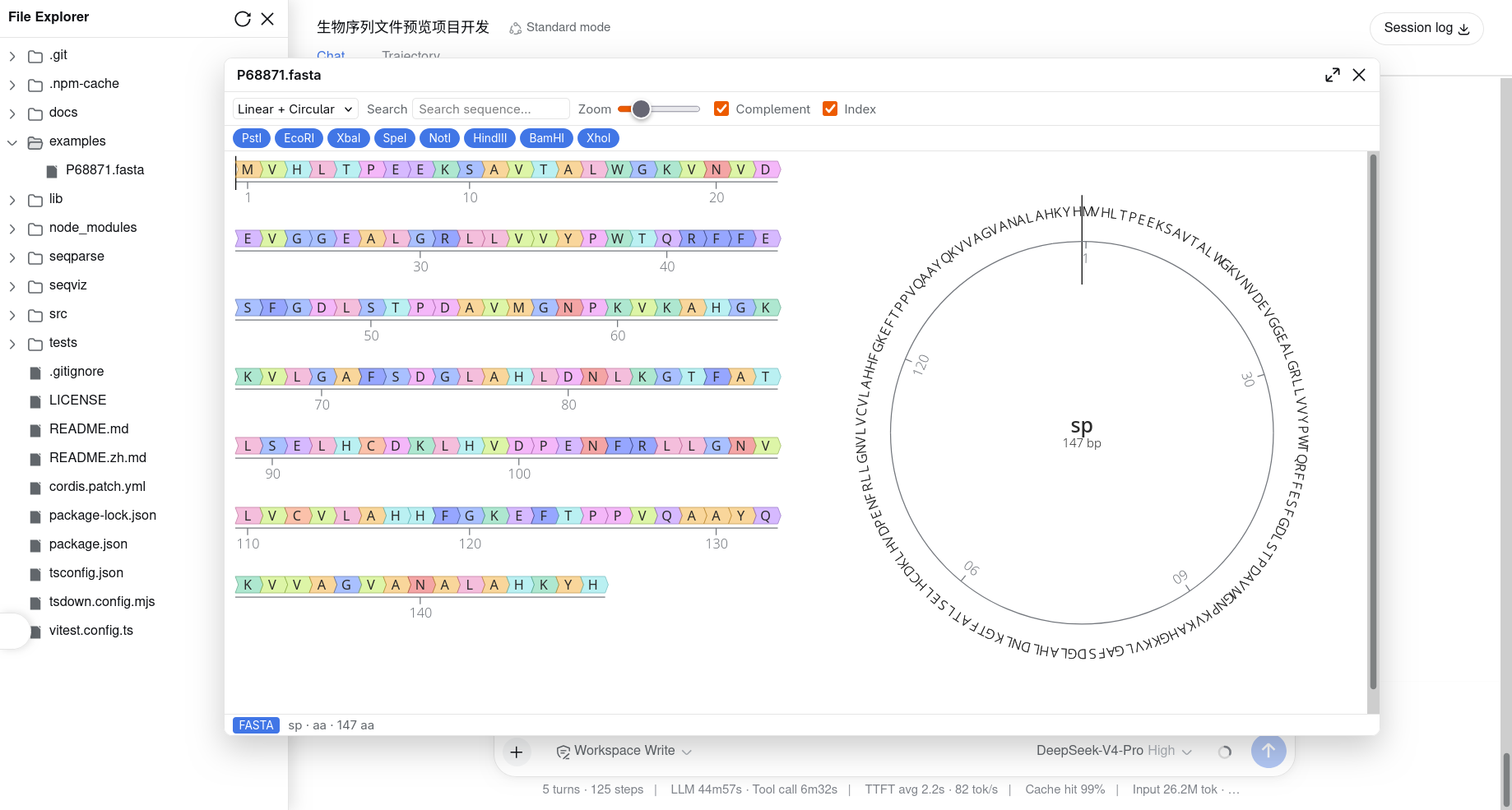 |
Features
- Interactive viewer built on
seqviz(<SeqViz>), with parsing byseqparse. - Topologies: circular / linear / both / both-flip.
- Feature annotations with colors, search with highlight, enzyme cut sites, complement & index toggles, and linear zoom.
- Status bar with the format badge, name, sequence type, and length.
- Localized toolbar/status copy (中文 / English).
- Dark/light aware: follows DSH's
data-ds-dark-theme.
Supported formats
| Extension | Format |
|---|---|
fasta fa fas fna faa ffn |
FASTA |
gb gbk genbank gp |
GenBank / GenPept |
dna |
SnapGene |
seq |
JBEI SEQ |
sbol xml |
SBOL v1/v2 |
Install
From the Git repository
dsh plugin --profile web add github:wolfsonliu/dsh-file-explorer-preview-sequence
dsh web
From source
git clone https://github.com/wolfsonliu/dsh-file-explorer-preview-sequence
cd dsh-file-explorer-preview-sequence
npm install
npm run build
dsh plugin --profile web add .
dsh web
Dependencies
This plugin requires @dsh-external/dsh-file-explorer (v0.1.0+) — it injects the fileExplorer cordis service (registerPreview / writeFile / readRawFile). Install and enable dsh-file-explorer before this plugin:
# install the core from git
dsh plugin --profile web add github:wolfsonliu/dsh-file-explorer

# or, from source
git clone https://github.com/wolfsonliu/dsh-file-explorer
cd dsh-file-explorer
npm install && npm run build
dsh plugin --profile web add .
For local development, this repo's
devDependenciesresolves@dsh-external/dsh-file-explorer's./clienttype definitions. Point it at your checkout or your registry's published package beforenpm install.
For files ≤ 2 MiB the plugin parses the text preview content directly. SnapGene .dna (binary) and files larger than 2 MiB are handled via readRawFile (available in dsh-file-explorer v0.1.0+). When readRawFile is absent (older core versions), the plugin degrades gracefully: text formats ≤ 2 MiB still preview, .dna and larger files show an unsupported status.
Limitations
- Read-only preview (no editing).
- SnapGene
.dnaand > 2 MiB files require dsh-file-explorer v0.1.0+ (older versions degrade gracefully). .xmland.seqare ambiguous extensions; files in those extensions that aren't SBOL / JBEI fall back to a plain-text view.
Development
npm run check   # tsc type check
npm test        # vitest unit tests
npm run build   # tsc + tsdown (single-file lib/client.js bundling seqviz + seqparse)
The real SeqViz canvas cannot run under jsdom; verify it with dsh web and a sequence file in examples/.
After
npm run build, hard-refresh the browser (Ctrl/Cmd+Shift+R):dsh webmay keep serving a cached plugin bundle, so a soft reload can leave your latest build unused.
License
Install
Install the catalog once, then DeepSeek Harness can find and install any plugin from this site automatically:
dsh plugin add dshbase-catalogThen say "install dsh-file-explorer-preview-sequence for me" — your agent finds it in the directory and installs it. Docs: dshbase-catalog · verified packs.
This plugin is GitHub source (not published to npm) — install it straight from the repo:
Web profile:
dsh plugin --profile web add github:wolfsonliu/dsh-file-explorer-preview-sequenceHeadless (CLI) profile:
dsh plugin --profile headless add github:wolfsonliu/dsh-file-explorer-preview-sequenceTest report
Not yet L3-verified — see failure note below if we already ran it.
Share this badge
Drop this badge into your README — it links back here and updates automatically when our test status changes:

[](https://dshbase.com/plugins/dsh-file-explorer-preview-sequence/)<a href="https://dshbase.com/plugins/dsh-file-explorer-preview-sequence/"><img src="https://dshbase.com/badges/dsh-file-explorer-preview-sequence.svg" alt="dshbase listed"></a>