
Plugin directory / Developer / dsh-cloudflare-browser-run
dsh-cloudflare-browser-run
Unverified RealAlexandreAI
What it does
dsh browser-run: CF Browser Run web tools (markdown/screenshot/pdf) for DeepSeek Harness
Unverified — not yet verified
dsh browser-run: CF Browser Run web tools (markdown/screenshot/pdf) for DeepSeek Harness Not yet verified — install and test it yourself.
“Unverified” means our automated CI has not yet installed this plugin. Feature descriptions and version compatibility are the author’s claims. This is not a security audit and not an endorsement of third-party code.
README
dsh-cloudflare-browser-run
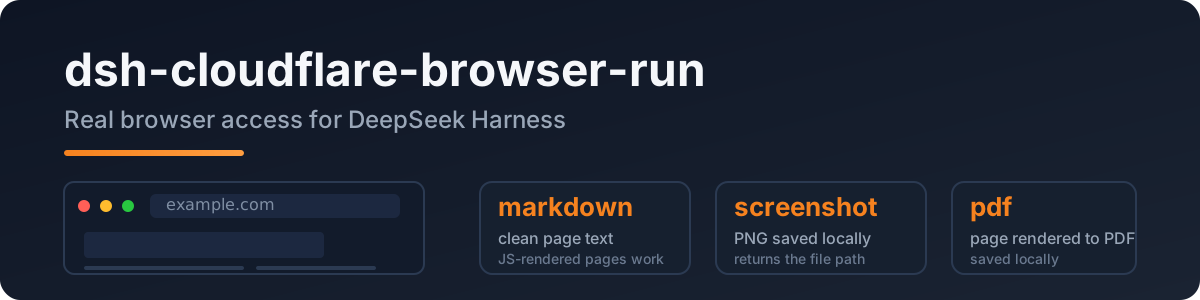
A DeepSeek Harness plugin that gives the agent real browser access: headless Chrome on Cloudflare's network, so JS-rendered pages, screenshots, and PDFs all just work.
Port of pi-cloudflare-browser-run, built to the dsh (Cordis) plugin spec.
Why
The built-in web_fetch is a plain HTTP fetch — JS pages come back empty and SSRF protection is deferred upstream. This plugin adds a real browser:
- clean markdown from any public page (SPA/JS included)
- screenshots (PNG) and PDFs
- login-capable sessions and WebMCP sites
Quick start
dsh plugin --profile web add dsh-cloudflare-browser-run
Configure credentials in your profile/settings layer:
- id: cloudflare-browser-run
  name: dsh-cloudflare-browser-run
  config:
    cf_api_token: <your token>
    cf_account_id: <your account id>
Token: Cloudflare dashboard → API Tokens → Browser Rendering: Edit template.
Account id: dash.cloudflare.com/<ACCOUNT_ID>/....
Tools
| tool | what it does |
|---|---|
browse |
fetch a public URL → clean markdown (default); action = screenshot | pdf |
screenshot |
save the page as PNG locally, returns the file path |
pdf |
save the page as PDF locally, returns the file path |
Config
| key | required | meaning |
|---|---|---|
cf_api_token |
✅ | your API token (Browser Rendering:Edit) |
cf_account_id |
✅ | your Cloudflare account id |
cf_api_base |
– | API base override |
output_dir |
– | where screenshots/PDFs land (default OS temp) |
Privacy
- Public web only: every URL passes an SSRF guard (localhost / private IPs / IPv6 literals / userinfo rejected) before the API is called.
- The token lives only in your config file — never logged, never stored by the plugin.
- Browser Run identifies itself as a well-behaved bot, the compliant way to fetch.
Development
npm install
npm run typecheck
npm test          # SSRF guard / config / API shape
npm run build
Live API test (not part of npm test):
DSH_TEST_CF_TOKEN=<token> DSH_TEST_CF_ACCOUNT=<account> node --import tsx tests/real/real-cf.mjs
License
MIT
Install
Install the catalog once, then DeepSeek Harness can find and install any plugin from this site automatically:
dsh plugin add dshbase-catalogThen say "install dsh-cloudflare-browser-run for me" — your agent finds it in the directory and installs it. Docs: dshbase-catalog · verified packs.
Web profile:
dsh plugin --profile web add dsh-cloudflare-browser-runHeadless (CLI) profile:
dsh plugin --profile headless add dsh-cloudflare-browser-runPackage
npm: dsh-cloudflare-browser-run · version — · tested on dsh 0.1.0-rc.6
Test report
Not yet L3-verified — see failure note below if we already ran it.
Note: 验证: runtime-fail (0.1.0-rc.6) Browse all pending failures →
When to use it
Extend the agent's coding surface — give it a new tool, workflow, or integration so it handles a dev task it couldn't before.
Who it's for
Developers who want dsh to behave like a teammate on real codebases — editing, running, and verifying changes rather than just answering.
For developers — extending it
The tool/command surface is the seam: expose more of the SDK, add smarter context wiring, or tighten the loop between code changes and verification.
Share this badge
Drop this badge into your README — it links back here and updates automatically when our test status changes:

[](https://dshbase.com/plugins/dsh-cloudflare-browser-run/)<a href="https://dshbase.com/plugins/dsh-cloudflare-browser-run/"><img src="https://dshbase.com/badges/dsh-cloudflare-browser-run.svg" alt="dshbase listed"></a>