
Plugin directory / Network / deepseek-harness-mobile
deepseek-harness-mobile
Verified · install-tested on dsh sorsama
What it does
Android companion for DeepSeek Harness | chat, goals, approvals & notifications from your phone, over your LAN. Kotlin + Jetpack Compose.
Works — verified, growing community
Android companion for DeepSeek Harness | chat, goals, approvals & notifications from your phone, over your LAN. Kotlin + Jetpack Compose. It installs cleanly and boots without issues in our testing. It has a growing community — a solid choice.
“Verified” means our automated CI actually ran dsh plugin add in a clean profile and it booted — nothing more. Feature descriptions and version compatibility are the author’s claims. This is not a security audit and not an endorsement of third-party code.
README

DSH Mobile — DeepSeek Harness Remote
An open-source Android companion that puts your DeepSeek Harness in your pocket.
Drive sessions, review plans and goals, answer approvals and questions, and get notified
when the harness finishes — from your phone, over your local network.




DSH Mobile is an unofficial companion app for the
DeepSeek Harness (MIT), mirroring its web GUI
feature-for-feature in the harness's own visual language. Android only, Kotlin + Jetpack Compose.
Its companion on the other end is
dsh-relay — a harness plugin that adds the
authentication layer the harness says it lacks, so this app can reach a harness with a real
credential and a pinned key instead of an open port. See
Relay.
dshm.zyphite.com is the project site — what the app is, what it
looks like, and how to get it running, on one page.
The wiki is the user-facing guide:
getting started,
connecting,
troubleshooting,
a feature tour and an
FAQ.
Screenshots
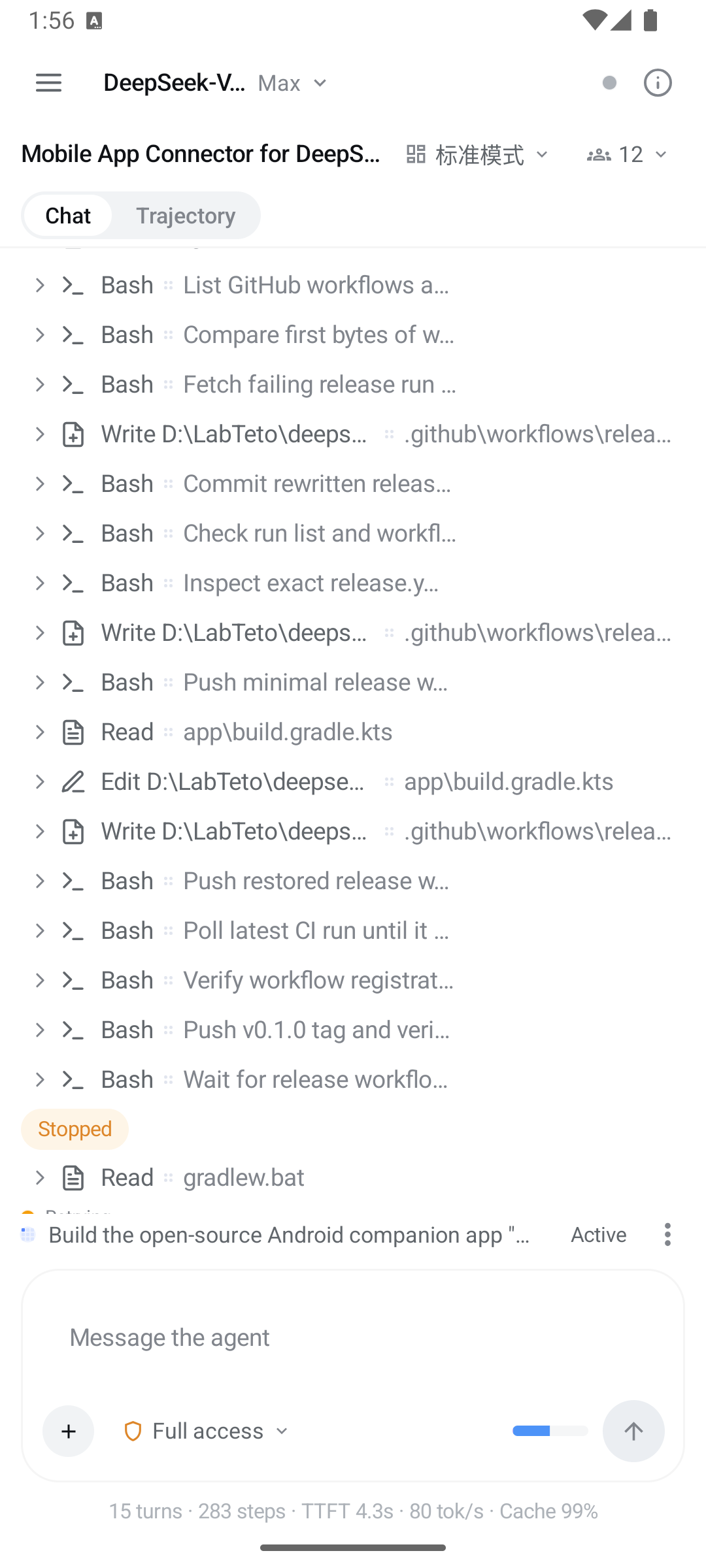
| Connect | Chat | Trajectory |
|---|---|---|
 |
 |
 |
Recent harnesses with live reachability, LAN discovery, manual host:port, auto-connect. |
Streamed turns, a glyph per tool, expandable tool cards, permission picker. | The same session as a per-turn ledger with usage totals. |
| Session details | Subagents |
|---|---|
 |
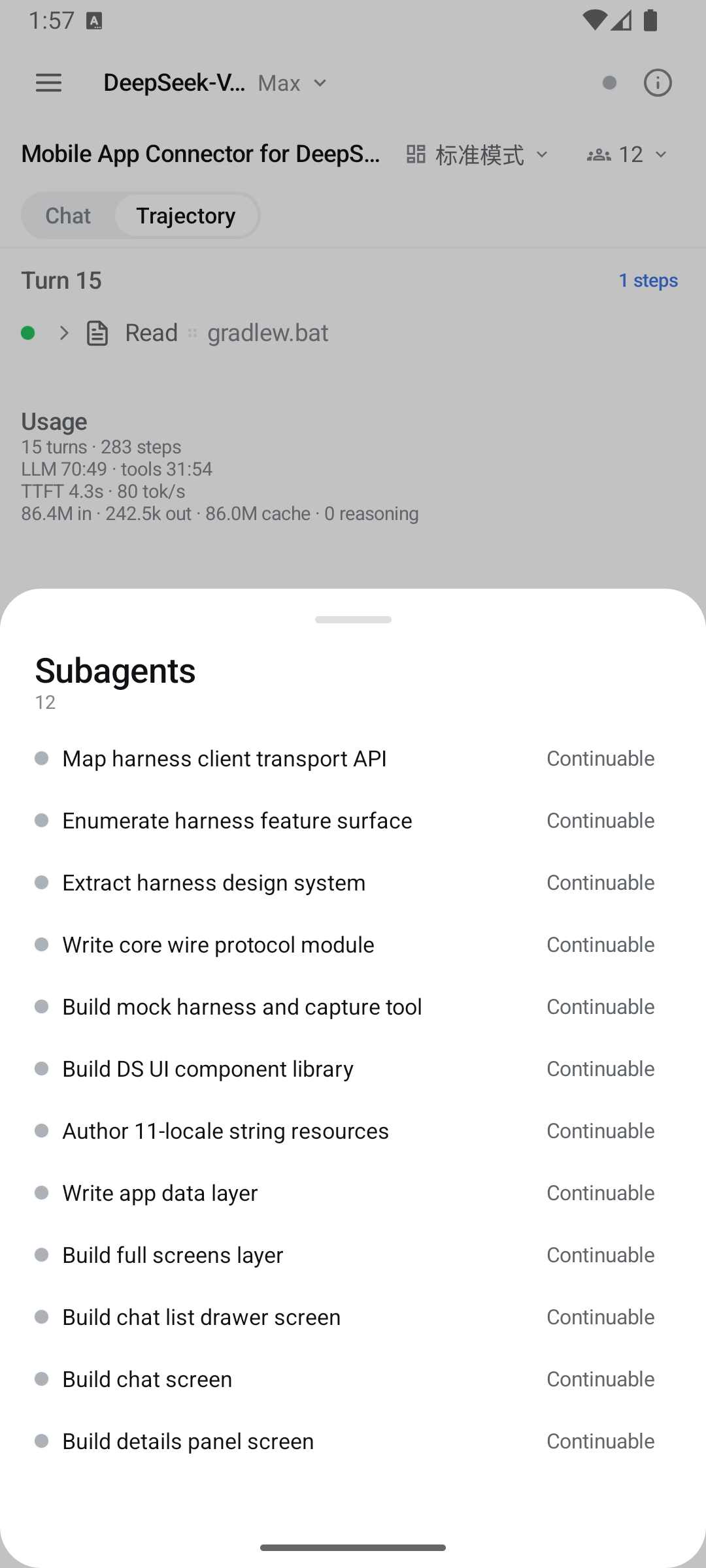 |
| Context breakdown, goal, plan mode, background jobs, queued turns, host info, session-log export. | The subagent catalog — open a child's transcript, follow up, or interrupt it. |
Features
- Connect effortlessly — auto-discovers a harness on your Wi-Fi (active subnet scan +
readiness handshake), remembers hosts and probes them for liveness on the way in, supports
manualhost:portentry, loopback for same-device setups, and auto-connect toggles
(last used / LAN / same device). - Discord-style navigation — swipe right from the left edge to open the workspace-grouped
chat list, swipe left to close it, swipe left from the right edge for the session details panel. - Full chat experience — streamed turns with reasoning disclosure, markdown,
terminal/diff/read/search/web tool cards, queue dock (edit / remove / steer), history paging,
image attachments. - Slash commands and skills — the composer adjudicates a
/line against the session's own
command catalog and runs it through the harness's command gateway; anything the catalog does not
claim is sent as a prompt, which is how skills are invoked. - Everything the GUI does — goals (phases, rounds, pause/resume/edit), plan mode + plan review,
permission approvals, user questions, todo dock, subagents (catalog, follow-ups, interrupt),
background jobs, workflow runs, skills, model selection, agent presets, session search,
trajectory ledger, session export, message feedback. - Notifications — turn complete, goal complete / blocked, review or question waiting for you;
background connection via a foreground service. - Looks like the harness — the exact DeepSeek Harness design tokens (colors, type, radii,
disclosure rows, shimmer, ink buttons) with light / dark / system themes. - 11 languages — English, 中文, हिन्दी, Español, Français, العربية, বাংলা, Português, Русский,
اردو, ไทย (RTL aware).
Requirements
- Android 8.0+ (minSdk 26).
- A running DeepSeek Harness
(tested against0.1.1-rc.2).
Quick start
Install the latest APK from
Releases.Open the app and choose how to connect. The two are not variations of one
setting — pick the one that matches what you set up on the computer.Relay — encrypted, authenticated, and works from outside your Wi-Fi.
Installdsh-relayinto
the harness web profile:dsh plugin --profile web add dsh-relay dsh webOpen the printed URL on that computer, set a password, then open
/relay/pair. In the app: Relay → Pair a relay, scan the QR. Once every
client you use has paired, turn off the relay'scompat.addressGrants—
nothing here needs it.Local network — no setup on the phone, no authentication at all. Apply
the one-file LAN patch inharness/README.md, restartdsh web, then tap Scan network. Only on networks you trust.Behind your own HTTPS reverse proxy — paste the
https://address into
local-network mode. The proxy can forward to loopback, so the harness needs
no patch; but it encrypts the link without authenticating anyone. Seeharness/README.md.USB / emulator —
dsh web, thenadb reverse tcp:3080 tcp:3080, and
connect to127.0.0.1:3080in local-network mode. No patch needed.Pick a session, chat, and get notified when the harness is done.
If a connect attempt fails, the app names the cause; the wiki's
Troubleshooting page is
keyed on that exact sentence.
Compatibility & security
- See docs/COMPATIBILITY.md for the harness version matrix and
loopback-only surfaces. - Read docs/SECURITY.md first. The bare harness has no authentication, so
local-network mode is for trusted networks only — the app says so on the connect screen for the
same reason. Relay mode adds a real credential and a pinned certificate, but authenticating still
grants the same power as a shell on that computer, because the agent runs commands there.
Building
./gradlew :app:assembleDebug      # debug APK
./gradlew :app:assembleRelease    # release APK (signed when keystore env is set)
The shipped version comes from the git tag: the release workflow exports DSH_VERSION_NAME from
the tag name, and versionCode is derived from it. A local build falls back to the literal inapp/build.gradle.kts.
See CONTRIBUTING.md for the development loop against a real harness, the module
layout, and the release workflow.
Repository
| Path | What |
|---|---|
core/ |
Pure-JVM protocol core: wire DTOs, RPC client, WebSocket downlinks, reconnect loop, session folding, notification classifier |
app/ |
Android UI: screens, discovery/connection, foreground service, notifications, i18n |
mock-harness/ |
Ktor mock of the harness /api server for tests |
tools/capture/ |
Records real harness traffic into conformance fixtures |
harness/ |
Companion patch + guide for LAN mode |
| — | The relay itself lives in sorsama/deepseek-harness-relay |
docs/ |
Architecture, protocol notes, compatibility, security |
License
MIT. Bundled third-party material is listed in
THIRD_PARTY_NOTICES.md. The DeepSeek Harness and its brand are property
of their respective owners; this project is an independent, community-built remote.
Install
Install the catalog once, then DeepSeek Harness can find and install any plugin from this site automatically:
dsh plugin add dshbase-catalogThen say "install deepseek-harness-mobile for me" — your agent finds it in the directory and installs it. Docs: dshbase-catalog · verified packs.
This plugin is GitHub source (not published to npm) — install it straight from the repo:
Web profile:
dsh plugin --profile web add github:sorsama/deepseek-harness-mobileHeadless (CLI) profile:
dsh plugin --profile headless add github:sorsama/deepseek-harness-mobileTest report
Verified: L1 install + L2 load + L3 runtime from GitHub source on dsh 0.1.0-rc.6.
When to use it
Give the agent network access — requests, APIs, proxies, or protocols — so it can reach external systems.
Who it's for
Users whose tasks touch the network — calling APIs, fetching resources, or talking to remote services.
For developers — extending it
Adapters and request shaping are the seams — add protocols, auth handlers, retries, and endpoint abstractions.
Share this badge
Drop this badge into your README — it links back here and updates automatically when our test status changes:

[](https://dshbase.com/plugins/deepseek-harness-mobile/)<a href="https://dshbase.com/plugins/deepseek-harness-mobile/"><img src="https://dshbase.com/badges/deepseek-harness-mobile.svg" alt="dshbase install-tested"></a>