
Plugin directory / Network / dsh-usage-stats
dsh-usage-stats
Verified · install-tested on dsh Ychris12138
What it does
Token usage heatmap, per-model breakdowns, and DeepSeek account balance for the DeepSeek Harness Web GUI (dsh web).
Recommended — verified working and popular
Token usage heatmap, per-model breakdowns, and DeepSeek account balance for the DeepSeek Harness Web GUI (dsh web). It installs cleanly and boots without issues in our testing. With 125+ stars it's a community-endorsed, low-risk pick.
“Verified” means our automated CI actually ran dsh plugin add in a clean profile and it booted — nothing more. Feature descriptions and version compatibility are the author’s claims. This is not a security audit and not an endorsement of third-party code.
README
dsh-usage-stats


为 DeepSeek Harness 网页端提供多供应商账户监测与 Token 用量分析。
Provider balances, subscription quotas, and token-usage analytics for the DeepSeek Harness Web GUI (dsh web).
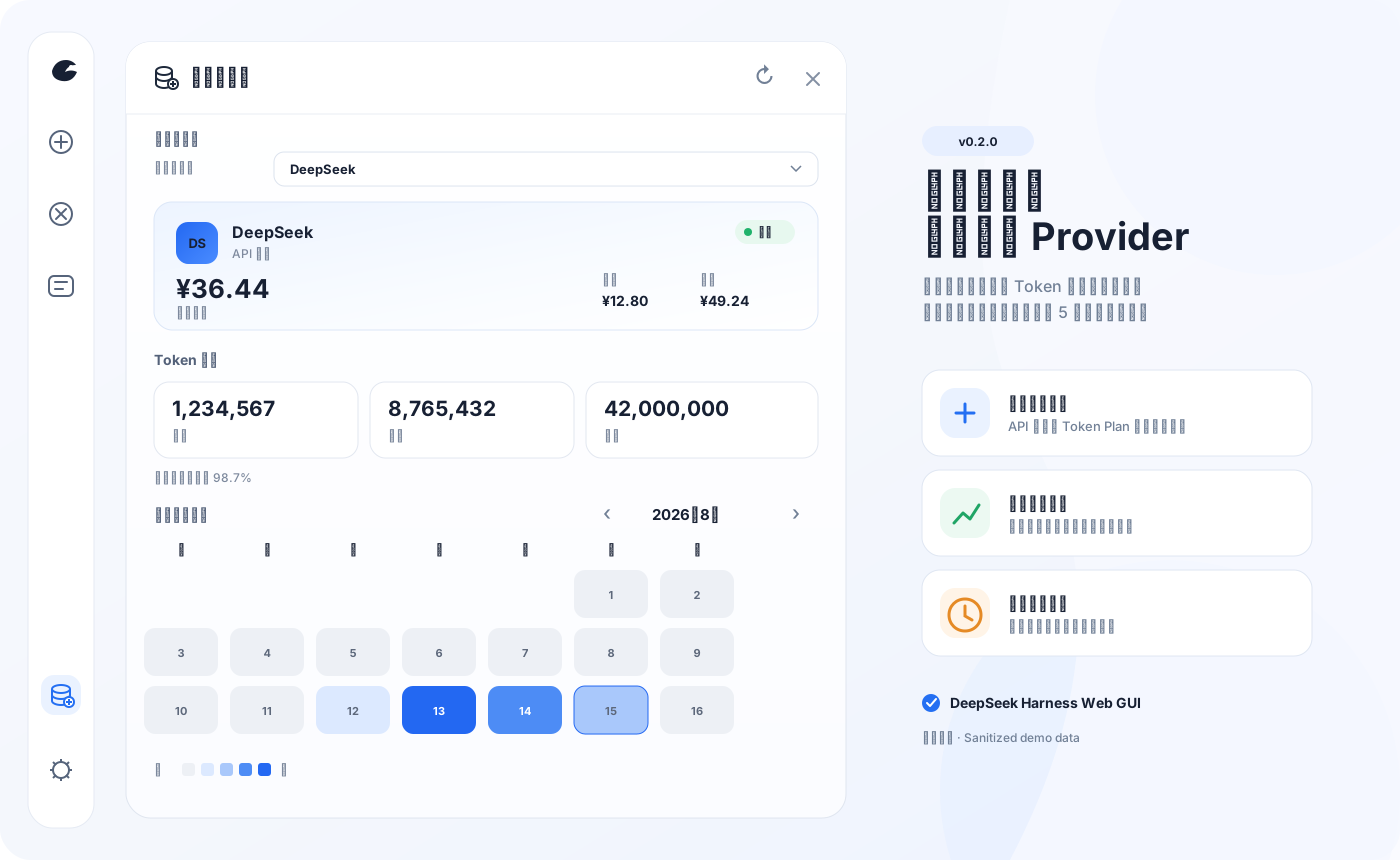
展示图使用脱敏演示数据;插件不会把 API Key、Cookie、管理 PAT 或上游原始响应发送到浏览器。
一眼看懂 / At a glance
| 能力 | 说明 | |
|---|---|---|
| 💳 | 统一账户卡片 | API 供应商显示余额,Token Plan 显示分窗口额度;面板一次只呈现当前供应商 |
| 📊 | Token 用量分析 | 今日、本月、累计、缓存命中率、月历热图,以及按日期/供应商/模型下钻 |
| 🔄 | 后台监测 | 服务端启动即刷新,之后每五分钟更新全部已配置账户与本地 Token 聚合 |
| 🧩 | 可扩展适配器 | 支持 New API、Sub2API、通用余额模板,以及声明式 JSON Pointer 自定义查询 |
| 🔒 | 本机安全边界 | 五个端点仅接受回环 GET;凭据只在服务端解析并发往校验后的供应商地址 |
界面支持中文和英文。浏览器只请求当前选择的 provider;后台刷新与面板是否打开无关。手动刷新会更新用量、供应商列表,并强制刷新当前账户,不会批量强制请求其他供应商。
快速安装 / Quick start
需要 DeepSeek Harness web profile(@deepseek-ai/dsh >= 0.1.0-rc.6)。
dsh plugin --profile web add "github:Ychris12138/dsh-usage-stats"
然后重启已经运行的 dsh web,并在浏览器中硬刷新。侧边栏底部会出现“用量/余额”(Usage/Balance)入口。
插件市场 GUI 安装(DSH Community Market,Path A 标准来源)
本仓库按 DSH Community Market 目录 adapter 指南 的标准来源(Path A) 接入,无需修改 Market 代码。内置两份目录数据:
catalog/catalog-source.json— 来源 manifest(catalog-source.schema.jsonv1.0.0)catalog/v1/plugins.json— 标准 provider page(catalog-provider-page.schema.jsonv1.0.0)
使用前提(重要):市场托管安装只接受 npm registry 的精确稳定版本,git 条目仅可浏览。dsh-usage-stats 这个 npm 名已被其他项目占用,因此目录条目身份使用 @ychris12138/dsh-usage-stats(当前可用)。要启用 GUI「安装」按钮,需先发布:
- 仓库包身份已统一为
@ychris12138/dsh-usage-stats;每次发版需同步package.json/package-lock.json/catalog/v1/plugins.json的版本。 - 发布 scoped 公共包:
npm publish --access public。 - 把
catalog/v1/plugins.json内容发布到https://ychris12138.github.io/dsh-usage-stats/v1/plugins(GitHub Pages,manifest 与 endpoint 必须同源、HTTPS 443、无凭据)。 - 在 DSH 插件市场 → 来源管理 → 添加来源,粘贴 manifest URL:
https://ychris12138.github.io/dsh-usage-stats/catalog-source.json,选择后即可走「可恢复安装边界」GUI 安装。
若最终包名不同,请同步修改
catalog-source.json的providerId/transport.endpoint与catalog/v1/plugins.json的身份字段。发布前目录条目可浏览但安装保持禁用(fail-closed,属预期)。
升级或卸载:
dsh plugin --profile web update "@ychris12138/dsh-usage-stats"
dsh plugin --profile web remove "@ychris12138/dsh-usage-stats"
兼容安装器:无法使用 dsh plugin 时展开
PowerShell、命令提示符和 macOS/Linux 终端使用同一条命令:
npx --yes github:Ychris12138/dsh-usage-stats
安装器会把运行文件复制到 ~/.dsh/profiles/node_modules/@ychris12138/dsh-usage-stats,并在 profiles/web/cordis.patch.yml 中以带引号的 scoped identity 幂等启用插件。重复运行即可更新,不会重复追加配置;旧版 name: dsh-usage-stats 和未加引号的 name: @ychris12138/dsh-usage-stats 会自动迁移。设置了 DSH_HOME 时使用该目录。
dsh plugin 与 npx 是两条独立安装路径,请选择其中一种;不要同时保留手工 Cordis entry 和 bundle 注册,否则会重复挂载。
# 预览,不修改文件
npx --yes github:Ychris12138/dsh-usage-stats --dry-run

# 检查现有安装
npx --yes github:Ychris12138/dsh-usage-stats --check

# 安装但不修改 Cordis patch
npx --yes github:Ychris12138/dsh-usage-stats --no-enable
无法使用 npx 时可从源码运行 node scripts/install.mjs。
支持的账户类型 / Providers
插件自动发现官方 DeepSeek 路由和 llm-pi-ai 中的 provider profile。只有存在公开账户接口或显式 monitor 的供应商才会查询远端账户;Token 用量统计不需要额外凭据。
| Provider / adapter | 模式 | 默认凭据 | 上游接口 |
|---|---|---|---|
| DeepSeek | 余额 | provider apiKeyEnv |
/user/balance |
| OpenRouter | 余额 | OPENROUTER_MANAGEMENT_KEY |
/api/v1/credits |
| Moonshot / Kimi API | 余额 | provider apiKeyEnv |
/v1/users/me/balance |
| OpenCode Go | 订阅 | OPENCODE_GO_API_KEY 或本地 auth.json |
/zen/go/v1/usage |
| Z.ai / 智谱 | 订阅 | ZAI_API_KEY |
Coding Plan quota/subscription |
| Kimi For Coding | 订阅 | KIMI_API_KEY |
/coding/v1/usages |
| MiniMax Coding Plan | 订阅 | MINIMAX_API_KEY |
/v1/token_plan/remains |
| Ollama 云 | 订阅 | OLLAMA_API_KEY |
/api/usage(5小时 + 周窗口) |
| New API | 余额 | provider 推理 Token | /api/usage/token/ |
| Sub2API / Passion | 自动判别 | provider apiKeyEnv |
/v1/usage |
| Sub2API 面板(真实) | 余额 | provider 推理 Token | /user/balance(复用 apiKey) |
| General / Declarative | 余额或订阅 | 配置中的 credential ref | 受限 GET + JSON |
没有公开账户接口的供应商仍会正常统计 Token;账户卡片会明确显示“不支持”,不会猜测余额。
凭据与供应商配置 / Configuration
凭据由 Harness 从 ~/.dsh/.credentials.yaml 解析。安装器不会读取、创建或修改该文件。不要把真实 Key、Cookie 或管理令牌提交到 Git、公开 issue,或粘贴给编码 Agent。
余额型供应商
DeepSeek、Moonshot 等默认复用对应 provider profile 的 apiKeyEnv。例如:
# ~/.dsh/.credentials.yaml
DEEPSEEK_API_KEY: sk-your-key-here
OpenRouter 是明确的例外:官方账户 credits 接口要求 Management Key,不能复用普通推理 OPENROUTER_API_KEY。插件默认读取独立引用;未配置时显示“未配置”,不会拿推理 Key 试探:
# ~/.dsh/.credentials.yaml
OPENROUTER_MANAGEMENT_KEY: sk-or-v1-your-management-key
插件按 total_credits - total_usage 显示 OpenRouter 余额,并同时展示累计已用和总 credits。普通 Key 的 /api/v1/key 只描述单个 Key 的 spending limit,不会被当作账户余额。自定义引用可在 monitors.openrouter 中设置 adapter: openrouter-balance 与 credentialRef。
Token Plan 供应商
# ~/.dsh/.credentials.yaml
OPENCODE_GO_API_KEY: sk-opencode-your-key
ZAI_API_KEY: your-zai-key
# 中国区 Z.ai 用户可选;默认 global
ZAI_API_REGION: bigmodel-cn
KIMI_API_KEY: your-kimi-key
MINIMAX_API_KEY: your-minimax-key
# 中国区 MiniMax 用户可选;默认 global
MINIMAX_API_REGION: cn
OLLAMA_API_KEY: sk-ollama-your-key
OpenCode Go 依次尝试 Harness credential、~/.local/share/opencode/auth.json,最后才使用显式 OPENCODE_GO_AUTH_COOKIE + OPENCODE_GO_WORKSPACE_ID 兼容回退。Bearer usage endpoint 目前不是公开 API,可能随上游变化;Cookie 等同登录凭据,不应进入日志或 issue。
Ollama 云读取 OLLAMA_API_KEY,调用 /api/usage 展示两个订阅窗口(5 小时会话 + 每周),无余额;usage 按 0..1 比例换算为进度条。
Ollama 适配器只对已配置的 provider 生效,不会自动添加账户:当 provider 的 id 为 ollama,或其 baseURL 主机为 ollama.com(含子域)时自动选用;本地 Ollama(localhost:11434)不会被当作云配额账户。特殊代理/自定义端点可用显式 monitor 绑定:
# ~/.dsh/profiles/web/cordis.patch.yml
- insert:
    - id: usage-stats
      name: dsh-usage-stats
      config:
        monitors:
          relay-ollama:            # 你配置的 provider id
            adapter: ollama
            usageBaseURL: https://ollama.example.com
            credentialRef: OLLAMA_API_KEY   # 非已配置 provider 时必填
Z.ai 全球区使用 api.z.ai,中国区使用 open.bigmodel.cn。MiniMax 优先使用官方 www.minimax.io / www.minimaxi.com Token Plan 地址,并解析 5 小时与周窗口的剩余比例和重置时间。
New API、Sub2API 与自定义 monitor
在现有 name: "@ychris12138/dsh-usage-stats" Cordis entry 下合并 config,不要追加第二个插件 entry。monitor 键必须是 Harness 中真实存在的 provider id;未知 provider、adapter 或非法映射会在路由和 timer 注册前阻止插件启动。例外:monitor 同时显式提供 usageBaseURL 与 credentialRef 时视为自包含,会在 provider 注册可见前临时物化为 provider(适用于 Harness 设置页里后加载的 provider),此时不要求该 provider 已出现在注册表中。
展开 monitor 配置示例
New API 默认用 provider 推理 Token 查询 /api/usage/token/,并从 /api/status 读取实例自己的 quota_per_unit:
# ~/.dsh/profiles/web/cordis.patch.yml
- insert:
    - id: usage-stats
      name: "@ychris12138/dsh-usage-stats"
      config:
        monitors:
          relay-a:                 # Harness provider id
            adapter: new-api
            # 仅旧实例的 /api/user/self 回退需要:
            fallbackCredentialRef: RELAY_A_MANAGEMENT_PAT
只有 /api/usage/token/ 返回 404/405 且配置了独立管理 PAT 才会 fallback;不会把推理 Token 当管理凭据。旧实例需要 User ID 时可增加 fallbackUserIdRef。
CC Switch 风格通用余额:
        monitors:
          relay-a:
            adapter: general
            warning:
              warnBelow: 5
              criticalBelow: 1
Sub2API 风格 /v1/usage:
        monitors:
          relay-a:
            adapter: sub2api
            warning:
              warnBelow: 5
              criticalBelow: 1
注意:
sub2api适配器对应一部分 Sub2API 部署暴露的/v1/usage协议。真实 Sub2API 面板(Wei-Shaw/sub2api 系)不提供该公开接口,改用sub2api-auth适配器读取面板自己的余额(见下)。
真实 Sub2API 面板余额(sub2api-auth):Sub2API 面板把上游订阅统一暴露成 API,但上游供应商通常没有公开余额接口。sub2api-auth 用 provider 自己的推理 API Key 查询面板余额,同 CC Switch 的 General 模板:GET {baseUrl}/user/balance,Authorization: Bearer {apiKey},读取 body.balance。无需单独的面板凭据 —— provider 在 DSH 模型页里配置的那个 API Key 会被直接复用:
        monitors:
          relay-b:
            adapter: sub2api-auth
(可选)若 /user/balance 返回 UTF-8 金额对应 body.unit,会显示该币种;否则默认 USD。今日已用额度尽量从 GET /api/v1/usage/stats?period=today 的 total_actual_cost 补充,查询不到也不影响余额展示。
自动识别真实 Sub2API 面板(sub2api-auth):只要把 Sub2API 面板作为普通 provider 配置进 DSH(带入它的 API Key),插件会探测该 provider 的 GET /api/v1/settings/public。若指纹命中真实 Sub2API 面板(返回 data.affiliate_enabled: boolean),就自动按 sub2api-auth 用该 provider 的 API Key 读取余额,无需为该 provider 单独写 adapter,也无需额外凭据。显式 adapter 始终优先于自动识别;没有配置 API Key 的 provider 绝不会被探测。
# 只要这些(不需要单独的 SUB2API_* 凭据)
# DSH 模型页里为 Sub2API 面板配置 provider,baseURL 指向面板,API Key 填可用的密钥
Passion(provider id 为 passion 或域名为 *.passionapi.com)会自动识别。钱包响应显示余额;quota_limited 或包含 subscription 的响应自动切换为额度窗口。
声明式自定义查询只支持受限 GET + JSON Pointer,不执行 JavaScript:
        monitors:
          private-model:
            adapter: declarative
            mode: balance
            request:
              path: /account/balance
              auth:
                type: bearer
                credentialRef: PRIVATE_MODEL_API_KEY
            extract:
              root: /data
              remaining: /available_balance
              used: /used_balance
              total: /total_balance
              currency: /currency
支持的 adapter:deepseek-balance、openrouter-balance、moonshot-balance、zai-balance、new-api、sub2api、sub2api-auth、general、opencode-go、zai-token-plan、kimi-token-plan、minimax-token-plan、declarative。
warning.warnBelow 与 warning.criticalBelow 是余额绝对值阈值。具有总额度的余额和 Token Plan 会自动产生 normal / warning / critical 剩余比例状态(默认 30% / 10%)。
使用 / Usage
- 点击侧边栏“用量/余额”。
- 用“当前供应商”切换账户卡片;一次只显示一个 provider。
- 使用
‹/›切换月份,点击热图日期查看当天的 provider/model 明细。 - 标题栏刷新会更新 Token、provider 列表,并强制刷新当前账户。
“最近 14 天”按本地日历计算,只显示窗口内存在用量的日期;未来时间戳不会计入。同一模型来自不同 provider 时会分别统计,例如 deepseek-official · deepseek-chat 与 ark · deepseek-chat。
Agent 友好安装 / Agent-friendly installation
复制给 Codex、Claude Code 或其他本地编码 Agent
Install or update dsh-usage-stats from:
https://github.com/Ychris12138/dsh-usage-stats

Constraints:
- Resolve DSH_HOME from the environment; otherwise use ~/.dsh.
- Do not read, print, edit, or request .credentials.yaml, auth.json, cookies, or any API key.
- Do not expose the plugin through a reverse proxy.
- Do not restart or terminate an existing dsh process without asking me.

Procedure:
1. Confirm node, npx, and dsh are available.
2. Prefer `dsh plugin --profile web update "@ychris12138/dsh-usage-stats"` when already installed; otherwise use `dsh plugin --profile web add "github:Ychris12138/dsh-usage-stats"`.
3. If unavailable, use: npx --yes github:Ychris12138/dsh-usage-stats
4. Do not combine bundle installation with an existing manual dsh-usage-stats Cordis entry.
5. For npx, require a verified package and exactly one Cordis entry, then run again with --check.
6. Report the installation path and resolved profile paths.
7. If dsh web is running, report that a restart is needed and stop.

Optional account setup (never handle secret values yourself):
- OpenRouter account balance requires OPENROUTER_MANAGEMENT_KEY, not the inference key.
- OpenCode Go may reuse local auth.json or use OPENCODE_GO_API_KEY.
- Z.ai uses ZAI_API_KEY; China accounts may set ZAI_API_REGION=bigmodel-cn.
- Kimi and MiniMax use KIMI_API_KEY and MINIMAX_API_KEY.
- Never ask me to paste a key or browser cookie into chat.

Optional monitor setup:
- Read configured Harness provider ids and ask which id should receive a monitor.
- Add only non-secret config under the existing dsh-usage-stats Cordis entry.
- Store credential reference names, never credential values.
- Validate relative request.path and JSON Pointer fields beginning with /.
- Do not enable cross-origin, insecure HTTP, or private-network access unless I explicitly request it.
只获准检查而不能修改时运行:
npx --yes github:Ychris12138/dsh-usage-stats --check
安装器退出码:未知参数返回 2;文件、版本或配置验证失败返回非零;成功时输出已验证版本、安装目录和 patch 路径。Agent 无需自行解析或重写 YAML。
隐私与安全 / Privacy & security
- API Key、OpenCode
auth.json、Cookie 与管理 PAT 不会进入浏览器响应、插件缓存或日志。 - Sub2API
sub2api-auth复用 provider 自己的推理 API Key(模型页已配置的那个),不会再引入或落盘额外的面板凭据。 - 自定义 monitor 默认要求 HTTPS、同源相对路径、手动 redirect 和 JSON 响应,body 上限为 1 MiB。
- 发凭据前会筛选域名的 IPv4/IPv6 解析结果并固定一个允许的连接地址,优先使用公网地址;HTTPS 域名解析到
198.18.0.0/15时可作为 Clash/Mihomo 等代理的 synthetic fake-IP 使用。字面量198.18/15、其他私网/特殊地址仍默认拒绝,防止 DNS rebinding 绕过私网限制。 usageBaseURL禁止内嵌 username/password;Authorization、X-API-Key、API-Key等 header 必须由 credential ref 注入。- 五个端点仅接受 GET,并同时校验 peer socket 与 Host;支持 IPv4、IPv4-mapped IPv6 和
[::1]:port。 - 用量缓存
~/.dsh/storages/usage-stats-cache.json只保存聚合 Token、会话 id、不透明 revision 与折叠游标,不保存提示词、回复或文件路径。
本机反向代理会让插件看到代理自身的回环地址。请勿把端点经反向代理暴露到局域网或公网;确需代理时必须在代理层增加可靠认证与访问控制。安全问题请按 SECURITY.md 私下报告。
正确性与数据口径 / Correctness
统计值来自 assistant/chunk 或 assistant/message 中 provider-reported usage,不是本地估算。相同 turn/step 的后续样本会替换旧样本,并按 provider/model 归集。
- 活跃会话只处理新追加事件。
- 持久化会话使用不透明 revision;未变化时不重复读取日志。
- seq 缺口、日志重写或 live/persisted 切换时完整重折叠该会话。
- 聚合采用 single-flight,并在同一临界区原子保存缓存。
validate:live会逐会话比较 raw artifact、session.history、插件端点与官方 token projection;缺文件或不一致会返回非零。
API
| Method | Path | Response |
|---|---|---|
GET |
/api/usage-stats/usage |
按日期/provider/model 聚合的 Token 与缓存命中率 |
GET |
/api/usage-stats/providers |
provider 列表、account mode、adapter、状态与预警摘要 |
GET |
/api/usage-stats/account?provider=<id> |
当前 provider 的统一余额或 Token Plan 快照;refresh=1 强制刷新 |
GET |
/api/usage-stats/balance?provider=<id> |
0.1.x 余额兼容路由 |
GET |
/api/usage-stats/subscriptions |
0.1.x Token Plan 兼容路由 |
非 GET 返回 405,非回环请求返回 403;所有响应均为 JSON 并带 Cache-Control: no-cache。
开发与验证 / Development
npm install
npm run check
npm test
npm pack --dry-run
npm test 完全离线,覆盖 bundle、客户端渲染与请求竞态、服务端安全边界、余额/Token Plan adapter、缓存和安装器幂等性。真实数据验证需先运行 dsh web:
npm run validate:live
node scripts/check-balance.mjs
所有服务端脚本均遵循 DSH_HOME。check-balance.mjs 可能显示真实余额,不要把输出粘贴到公开 issue。
兼容性与致谢 / Compatibility & credits
当前版本为 0.2.0。插件依赖 Harness 客户端模块加载器、Cordis 服务与 session persistence;Harness 预发布接口变化时可能需要同步适配。
- Javis603/token-monitor:参考多 provider 配额归一化与 Z.ai 限额解析。
- xiaoqi20/dsh-opencode-go-usage:参考 DSH 凭据接入、OpenCode
auth.json回退与 Bearer usage endpoint。
本项目重新实现统一 account protocol、adapter 与单供应商 UI,不复制参考项目界面。
License
Install
Install the catalog once, then DeepSeek Harness can find and install any plugin from this site automatically:
dsh plugin add dshbase-catalogThen say "install dsh-usage-stats for me" — your agent finds it in the directory and installs it. Docs: dshbase-catalog · verified packs.
Web profile:
dsh plugin --profile web add dsh-usage-statsHeadless (CLI) profile:
dsh plugin --profile headless add dsh-usage-statsPackage
npm: dsh-usage-stats · version — · tested on dsh 0.1.0-rc.6
Test report
Verified end-to-end: L1 install + L2 load + L3 runtime Q&A on dsh 0.1.0-rc.6.
When to use it
See a token-usage heatmap, per-model breakdown, and your DeepSeek account balance right in the web GUI.
Who it's for
Users watching costs who want to know which sessions and models are burning budget.
For developers — extending it
Add metrics — latency, cache hit rate, per-session cost — to the analytics surface.
Share this badge
Drop this badge into your README — it links back here and updates automatically when our test status changes:

[](https://dshbase.com/plugins/dsh-usage-stats/)<a href="https://dshbase.com/plugins/dsh-usage-stats/"><img src="https://dshbase.com/badges/dsh-usage-stats.svg" alt="dshbase install-tested"></a>