
插件目录 / Developer / dsh-token-usage-sidebar
dsh-token-usage-sidebar
未验证 y2zyyr
功能简介
Persistent Today / Yesterday / Total token usage sidebar for DeepSeek Harness.
未验证 — 尚未实测
Persistent Today / Yesterday / Total token usage sidebar for DeepSeek Harness. 尚未验证——请自行安装测试。
「未验证」表示我们的自动化 CI 尚未安装过该插件。功能描述与版本兼容性均为作者声明。这不是安全审计,也不代表对第三方代码的背书。
README
dsh-token-usage-sidebar
English | 简体中文
A community DeepSeek Harness (DSH) web-profile plugin that keeps provider-reported token usage locally. It provides both a persistent sidebar summary and a native Token Usage settings page.

TOKEN USAGE
Today       …
Yesterday   …
Total       …
This is a community plugin, not an official DeepSeek plugin.
Features
- Sidebar summary: Today, Yesterday, and lifetime Total.
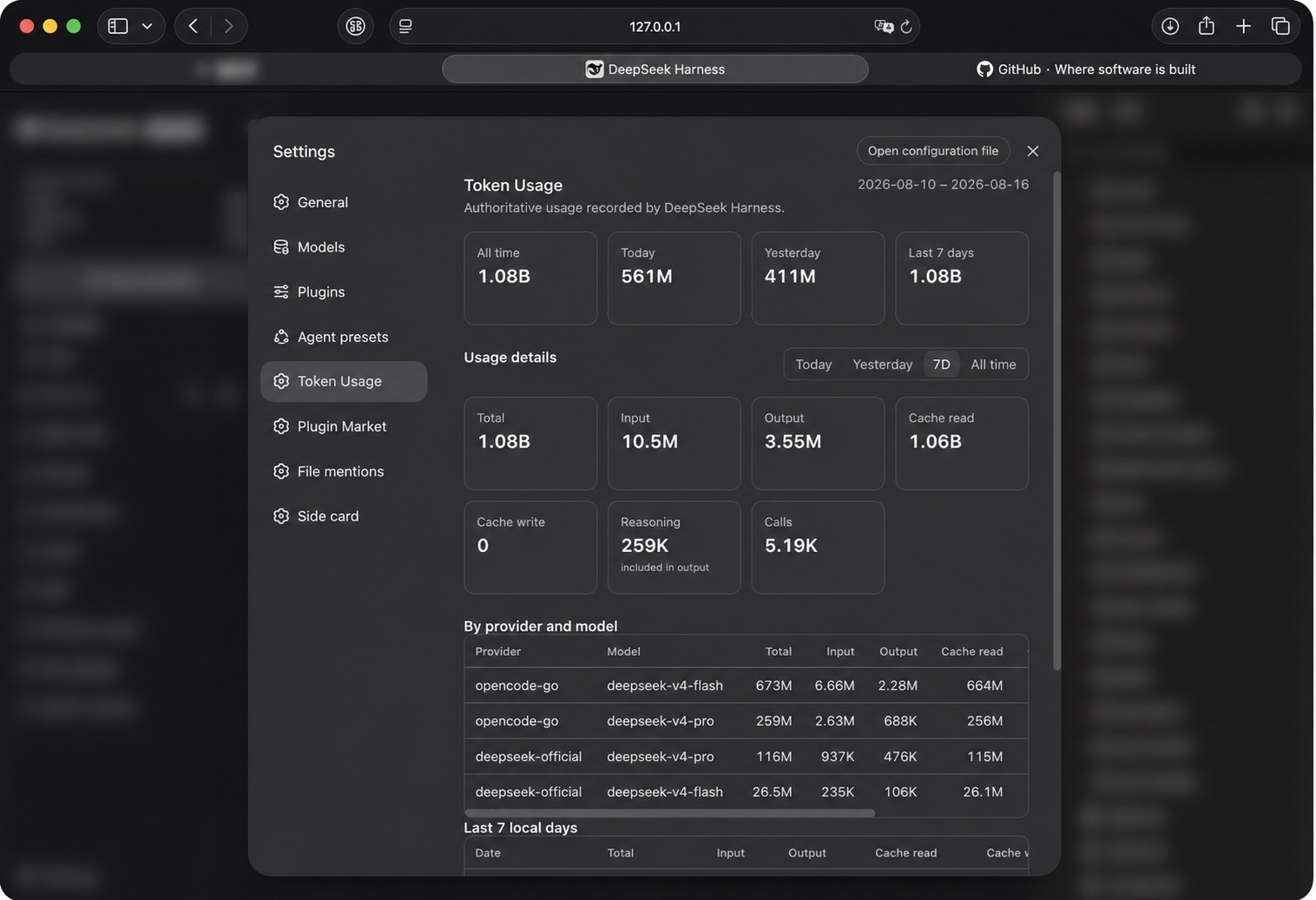
- Native Settings → Token Usage page, placed after Agent Presets and before Plugin Market.
- Four overview cards: All time, Today, Yesterday, and Last 7 days.
- Detail range selector: Today, Yesterday, 7D, and All time.
- Per-range totals for Input, Output, Cache Read, Cache Write, Reasoning, and call count.
- Provider/model table, sorted by Total, plus a seven-local-day table that retains zero-value days.
- Persistent local accounting that survives DSH restarts.
- Scalable durable ledger (v1.1). The lifetime accounting store is backed by a
plugin-owned SQLite database (Node's built-innode:sqlite, WAL journal) instead
of a monolithic JSON root. A new invocation is one small row-level upsert, so write
latency stays effectively flat no matter how many historical records accumulate. - Automatic verified migration (v1.1). Existing v1.0.1 totals are migrated into the
new ledger automatically, verified for exact equivalence (lifetime total, record
count, per-day and provider/model), and only then cut over. No totals are lost or
double-counted, and a backup of the v1 ledger is made before cutover. - Shutdown-safe persistence: dirty usage is flushed before the store closes, so
a usage event followed by a quick DSH restart is not lost. - Historical recovery from available authoritative session usage records, with
honest scan/coverage reporting (a partial or failed scan never claims complete
lifetime coverage). - Replay-safe, deduplicated accounting: an invocation is counted once.
- Native placement in the DSH web sidebar.
Installation
Recommended package: @y2zyyr/dsh-token-usage-sidebar (published on the npm registry).
Recommended — DeepSeek Harness
Install the plugin into the DSH web profile, then restart DSH:
dsh plugin --profile web add @y2zyyr/dsh-token-usage-sidebar
# Restart `dsh web` after installation.
dsh plugin accepts the scoped package name directly; the plugin is added to the
profile's bundle list and its loader entry keeps the stable id token-usage-sidebar.
You can also ask an agent that can access your DSH installation to install the npm
package @y2zyyr/dsh-token-usage-sidebar into the web profile (source: https://github.com/y2zyyr/dsh-token-usage-sidebar). Review
third-party source before authorizing an agent to install it. Pin a commit when your
workflow requires a reproducible dependency revision.
npm
The package can be installed from npm directly:
npm install @y2zyyr/dsh-token-usage-sidebar
Source
GitHub is the source repository (code, issues, release history, source inspection):
https://github.com/y2zyyr/dsh-token-usage-sidebar
A direct GitHub install also keeps working
(dsh plugin --profile web add github:y2zyyr/dsh-token-usage-sidebar), but the npm
scoped package is the recommended distribution channel.
Update
Update the installed plugin, then restart DSH:
dsh plugin --profile web update @y2zyyr/dsh-token-usage-sidebar
# Restart `dsh web` after updating.
The plugin is versioned on npm with semantic versions.
Removal
Removing the plugin does not reset its separately persisted local accounting data.
dsh plugin --profile web remove @y2zyyr/dsh-token-usage-sidebar
# Restart `dsh web` after removal.
Upgrading from a v1.1.0 GitHub install
Existing v1.1.0 installs keep their complete ledger. Switch the profile bundle
from the old package name to the scoped one — the plugin keeps the same loader
entry ID, exported plugin name, client module ID, and SQLite ledger path, so no
data migration is needed:
dsh plugin --profile web remove dsh-token-usage-sidebar
dsh plugin --profile web add @y2zyyr/dsh-token-usage-sidebar
# Restart `dsh web` after the switch.
How it works
DSH/provider usage records
        ↓
historical and live collection
        ↓
deduplication
        ↓
persistent local accounting
        ↓
sidebar summary
The plugin uses provider/runtime-reported usage records rather than tokenizer estimates. Total is input + cache read + cache write + output; Reasoning is displayed as an output subdivision and is never added to Total a second time. It uses the final committed assistant message's message.source.provider and message.source.model when available.
All day-based ranges use the DSH host's local calendar days. Last 7 days includes today plus the previous six local days. The settings page receives aggregate results only; it never receives the individual invocation ledger.
Migration and historical coverage
v1.0.0/v1.0.1 performs one idempotent replay of recoverable persistent DSH session events to enrich existing calls with their exact buckets and model metadata. A previously recorded call is only enriched, or replaced by a higher-sequence final message: it is not added to lifetime usage again.
Some legacy calls may have a reliable All time total but no recoverable date, bucket, provider, or model. Those tokens remain included in All time and are explicitly shown as unclassified coverage. They are never invented into a date or model row.
History reporting is honest (v1.0.1). The plugin keeps two distinct signals:
- Source scan status — whether every session the plugin could enumerate was read successfully (complete / partial / failed / unknown). Any session that fails to read downgrades the scan to partial; it can never claim complete.
- Historical coverage — whether we can assert that the recovered records represent the plugin's full lifetime history (complete / partial / unknown). Because enumerating today's session logs does not prove there are no older, deleted, or out-of-window sessions, coverage almost always remains partial (or unknown when nothing is recoverable). The plugin never labels a scan as complete simply because some sessions were found.
Total's meaning: Lifetime Total is the deduplicated union of every authoritative usage record the plugin recovered from durable sources plus usage recorded after tracking began — it reflects what the plugin can recover, not a claim about the DSH account's full lifetime usage when not all history is provably recoverable.
v1.0.1 → v1.1 upgrade migration
On first startup after upgrading to v1.1, the plugin detects the v1.0.1 JSON ledger and:
- Validates the legacy ledger read-only (never modifies it).
- Backs up the v1 ledger to a timestamped, immutable
.pre-v1.1-<timestamp>.bak
file in the same data directory. - Creates/opens the v1.1 SQLite ledger and inserts the canonical records.
- Derives all aggregate tables (global, daily, provider/model) from the records.
- Verifies exact accounting equivalence (lifetime total, record count, and
sum(records) == global). - Cutover — only if verification passes. Any mismatch marks the migration
failed, no cutover happens, and the v1 source is left untouched.
The migration is idempotent: a completed migration is a no-op on later restarts,
and no records are duplicated. New usage recorded after cutover is exactly-once.
See docs/migrations/v1.0.1-to-v1.1.0.md for the full design.
Data & Privacy
Usage accounting stays local to the DSH runtime. The source repository does not receive, contain, or upload a user's token ledger. Runtime persistence is separate from the source code and release artifacts.
The plugin stores accounting metadata needed for reliable totals, such as deduplication identity, date bucket, and token totals. It does not persist prompts, assistant text, tool output, API keys, credentials, or conversation content as part of its ledger.
Where v1.1 stores data (v1.1)
- Local only. All persistent data lives under the DSH data home. Nothing is uploaded.
- SQLite ledger. v1.1 stores the accounting ledger in a plugin-owned SQLite database:
${DSH_HOME:-~/.dsh}/storages/dsh_token_usage_sidebar.sqlite, plus its WAL/shm
companions. The exact path respects theDSH_HOMEenvironment variable when set.
It is never the source repo or the package install directory, so it survives
upgrades, re-installs, and restarts. - No conversation contents. The DB holds only deduplication ids (
sessionId:turn:step),
token bucket totals, provider/model labels, local dates, and accounting metadata.
It never stores prompts, assistant text, tool output, API keys, credentials, or
conversation content. - Upgrade backup. Before cutover the v1.0.1 JSON ledger is copied to a timestamped
.pre-v1.1-<timestamp>.bakfile in the same directory. The v1 source is never deleted. - Uninstall. Removing the plugin does not delete this data.
- Downgrade to v1.0.1. The v1.1 SQLite ledger is not read by v1.0.1. To return to
v1.0.1, restore the pre-upgrade v1 JSON backup (or the untouched v1 source) after
reinstalling v1.0.1.
Compatibility and Status
Current release: v1.1.2 (npm package @y2zyyr/dsh-token-usage-sidebar; source on GitHub).
Verified with DeepSeek Harness 0.1.0-rc.6 and its web profile, on a runtime whose
Node.js provides the built-in node:sqlite module (Node with node:sqlite).
No broader DSH-version or operating-system compatibility is claimed. Running against
later desktop builds (e.g. DSH Desktop 2.0.0 / Node 26) has been observed locally but
is not formally claimed.
Reliability guarantees (v1.1)
- Flat write latency. A new invocation is one small row-level SQLite upsert in WAL
mode, independent of lifetime history size. Summary reads come from maintained
aggregate tables, not a scan of the full record set. - Exactly-once accounting. Canonical identity is
sessionId:turn:step; the final
committedassistant/message.usagesupersedes an earlierassistant/chunksample, and
replays/duplicates never double-count (higher-seq wins). - Source of truth = records.
usage_recordsis authoritative; aggregate tables are a
derived, rebuildable cache. If an aggregate drifts, it is rebuilt from records. - Verified migration. v1.0.1 totals are migrated and verified for exact equivalence
before cutover; a mismatch fails closed and keeps the v1 source intact. - Crash-safe migration. The v1 source is only ever read/copied; a partial or failed
migration never leaves unverified records visible and resumes cleanly. - No lost writes on shutdown. Dirty usage is flushed and the SQLite ledger is
committed/checkpointed before the store closes.
Reliability guarantees (v1.0.1)
- No lost writes on shutdown. Dirty usage is flushed before the store closes; the persistence write is serialized so concurrent saves never race or reorder, and a transient write failure keeps the data recoverable for a later flush or close.
- No silent reset on corrupt storage. If the persisted ledger fails validation, the plugin warns, does not overwrite the corrupt source, and never presents a silent new Total of zero.
- Source-scan invariants. The live/historical split is recomputed from the authoritative records so lifetimeTotal = live + historical always holds.
- Honest history reporting. See Migration and historical coverage; a partial or failed scan is never mislabeled complete.
Development
npm install
npm test
npm run build
npx tsc --noEmit   # typecheck (v1.1 adds this gate)
npm test runs the accounting, historical-recovery, insights, durable SQLite, migration,
and property/equivalence tests. npm run build writes the shipped host and browser
bundles to lib/ and keeps the root-compatibility client.js byte-aligned. GitHub
Actions CI (.github/workflows/ci.yml) runs npm ci, npm test, npm run build, and
a git diff --exit-code so committed artifacts must always match source.
License
安装
装一次目录插件,之后本站所有插件都能让 DeepSeek Harness 自动找、自动装:
dsh plugin add dshbase-catalog然后对 agent 说「帮我装 dsh-token-usage-sidebar」,它会在目录里找到并自动安装。文档:dshbase-catalog · 已验证场景包。
该插件是 GitHub 源码(未发 npm)——直接从仓库装:
Web profile:
dsh plugin --profile web add github:y2zyyr/dsh-token-usage-sidebarHeadless(CLI)profile:
dsh plugin --profile headless add github:y2zyyr/dsh-token-usage-sidebar实测报告
尚未 L3 验证——若已跑过,见下方失败备注。
2026-08-26 · 标记 webonly 备注:验证: web-only;待 L4 web CDP;L4 web CDP runtime-fail on dsh 0.1.0-rc.8. 浏览全部待验证失败 →
分享徽章
把这枚徽章粘进 README——它会链回本页,实测状态变化时自动更新:

[](https://dshbase.com/zh/plugins/dsh-token-usage-sidebar/)<a href="https://dshbase.com/zh/plugins/dsh-token-usage-sidebar/"><img src="https://dshbase.com/badges/dsh-token-usage-sidebar.svg" alt="dshbase 已收录"></a>