
插件目录 / Developer / dsh-sound-alert
dsh-sound-alert
未验证 mxl2498
功能简介
DSH Web 插件:助手回答结束时播放「叮咚」提示音 | DSH plugin that plays a chime when the assistant finishes replying
未验证 — 尚未实测
DSH Web 插件:助手回答结束时播放「叮咚」提示音 | DSH plugin that plays a chime when the assistant finishes replying 尚未验证——请自行安装测试。
「未验证」表示我们的自动化 CI 尚未安装过该插件。功能描述与版本兼容性均为作者声明。这不是安全审计,也不代表对第三方代码的背书。
README
声音提醒(@dsh-external/声音提醒)
DSH Web 客户端插件:助手回答结束时播放一段清脆的“叮咚”提示音。
纯浏览器端实现,零音频资源依赖(用 Web Audio API 运行时合成提示音),
不需要服务端逻辑,也不需要重新构建任何官方包。
截图
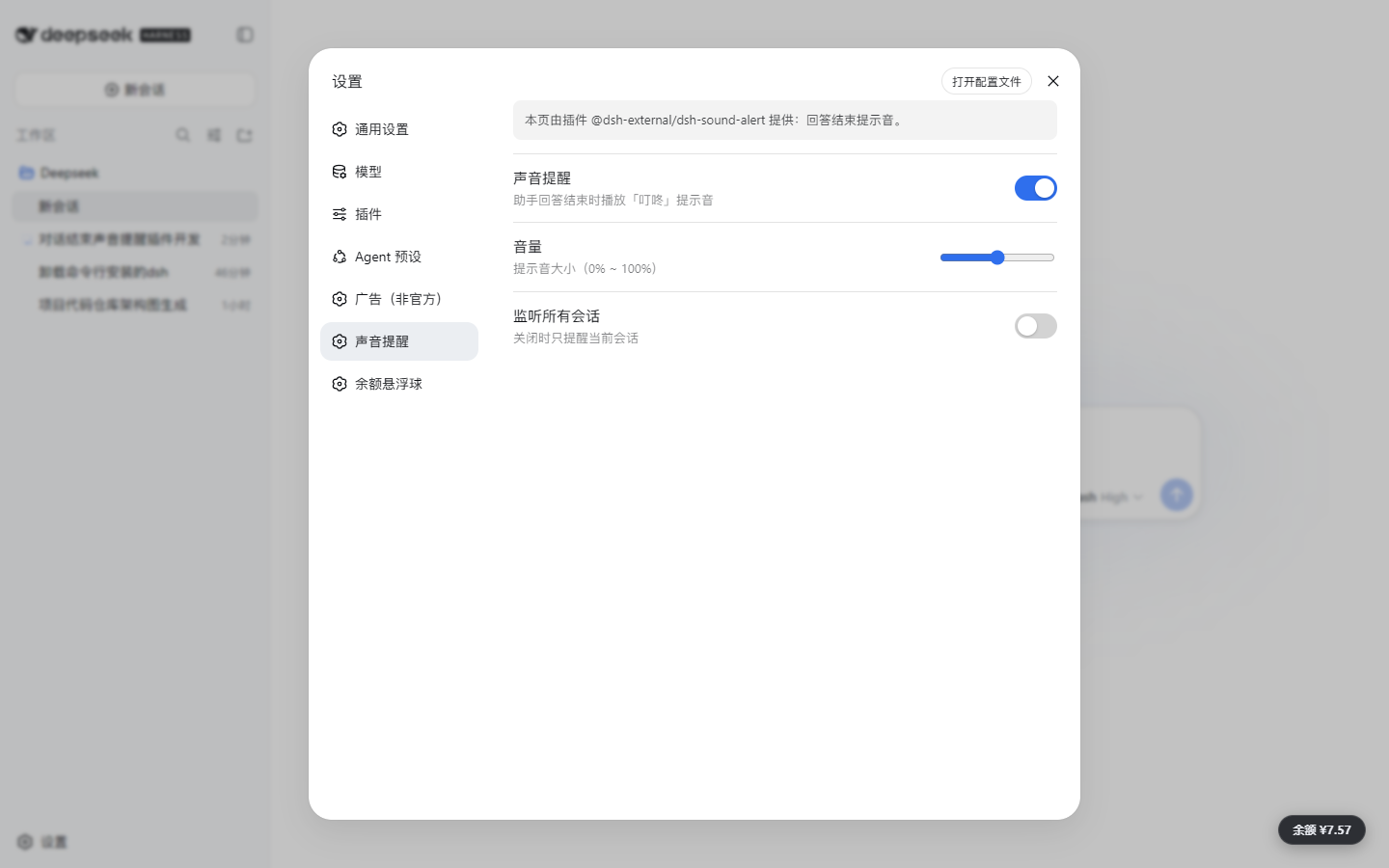
设置 → 「声音提醒」页(总开关 / 音量 / 监听所有会话):
工作原理
- 通过
dsh.client(platform: "web")接入 Web 客户端 Loader 树; - 订阅
ctx.sessions的会话列表与当前会话快照; - 检测会话快照
running状态 true → false 的边缘 —— 即助手结束回答的时刻 —— 播放提示音; - 因浏览器自动播放策略,首次播放需要一次用户手势(点击/按键),之后即可随时提醒。
配置
在 profile 的插件 patch(本包的 cordis.patch.yml,可被 profile 覆盖)中调整:
| 配置项 | 默认值 | 说明 |
|---|---|---|
enabled |
true |
是否启用声音提醒 |
volume |
0.5 |
音量 0~1 |
allSessions |
false |
false 只监听当前会话;true 监听所有会话的回答结束 |
示例(在 profile 的 cordis.patch.yml 中覆盖):
- id: sound-alert
  config:
    enabled: true
    volume: 0.7
    allSessions: true
安装(从 GitHub)
# 1. 把插件加入 web profile 的依赖(dsh plugin 会转发给 pnpm 并自动追加进 bundles)
dsh plugin --profile web add github:mxl2498/dsh-sound-alert

# 2. 重启 DSH Desktop / dsh web,使 Loader 树重载
本地开发时也可用 dsh plugin --profile web add file:../dsh-sound-alert 安装本地目录。
安装后 dsh plugin 的 reconcile 会自动把本包追加进dsh.profile.bundles(因为它声明了 dsh.bundle.patch),随后其cordis.patch.yml 的 insert 条目把插件挂进 Loader 树,
Node 半区扫描到 dsh.client 声明后即会服务浏览器端产物。
文件
lib/index.js—— 服务端占位插件(Loader 条目)lib/client.js—— 浏览器端实现(__ModuleLoader__lazy-CJS 包)cordis.patch.yml—— bundle patch(insert + 默认配置)
安装
装一次目录插件,之后本站所有插件都能让 DeepSeek Harness 自动找、自动装:
dsh plugin add dshbase-catalog然后对 agent 说「帮我装 dsh-sound-alert」,它会在目录里找到并自动安装。文档:dshbase-catalog · 已验证场景包。
该插件是 GitHub 源码(未发 npm)——直接从仓库装:
Web profile:
dsh plugin --profile web add github:mxl2498/dsh-sound-alertHeadless(CLI)profile:
dsh plugin --profile headless add github:mxl2498/dsh-sound-alert实测报告
尚未 L3 验证——若已跑过,见下方失败备注。
分享徽章
把这枚徽章粘进 README——它会链回本页,实测状态变化时自动更新:

[](https://dshbase.com/zh/plugins/dsh-sound-alert/)<a href="https://dshbase.com/zh/plugins/dsh-sound-alert/"><img src="https://dshbase.com/badges/dsh-sound-alert.svg" alt="dshbase 已收录"></a>