
插件目录 / Productivity / dsh-side-workspace
dsh-side-workspace
未验证 invalidnaaaame
功能简介
Codex风格侧边对话与工作区
未验证 — 尚未实测
Codex风格侧边对话与工作区 尚未验证——请自行安装测试。
「未验证」表示我们的自动化 CI 尚未安装过该插件。功能描述与版本兼容性均为作者声明。这不是安全审计,也不代表对第三方代码的背书。
README
dsh-side-workspace
English | 中文
A DeepSeek Harness (DSH) plugin built in the spirit of the ChatGPT / Codex trio —
side conversations · integrated workspace · pinned notes (置顶摘要小黑板)
- Repository:
dsh-side-workspace - Plugin ID / npm package:
@dsh-external/dsh-side(unchanged)
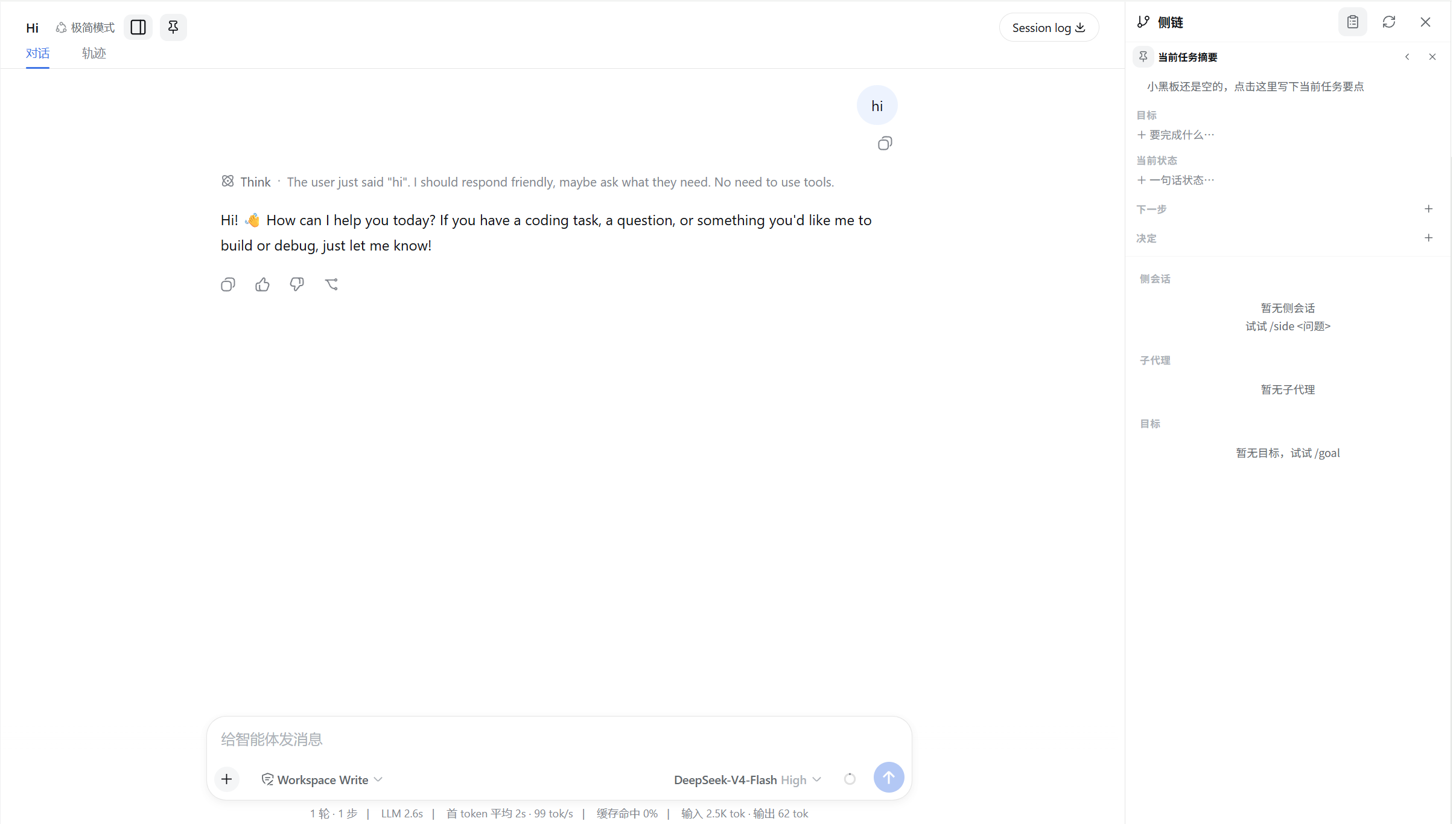
Disclaimer: an independent open-source project. Not affiliated with,
endorsed by, or sponsored by OpenAI or DeepSeek. "ChatGPT" and "Codex" are
trademarks of their respective owners, referenced only to describe feature
parity.
Official naming reference (the basis for the repo name):
| This plugin's feature | Official name | Source |
|---|---|---|
/side conversations |
Codex side conversations | openai/codex#18190 |
| Integrated right workspace | ChatGPT Workspace | OpenAI workspace agent |
| Pinned summary board | ChatGPT Notes (pinned message notes) | Pin a Note to Any Message |
Features
1. Side conversations /side — Codex side conversations
/side <question> forks the current conversation's full history into a
background side conversation via a boundary context, while the main
conversation stays focused — the two never block each other; /btw <question>
is a one-shot side question (read-only). The child is an ordinary top-level
session (ctx.agents.create) that inherits the parent's agent preset, model,
and cwd, and goes through the deployment's own approval/sandbox policy — side
output never flows back into the main conversation's log.
- Default
ephemeral: archived on creation, never enters the ordinary session
list; idle children past the TTL (default 60 min) are swept by the host;
running/approval-waiting children never expire; a new/sidereplaces idle
older/sidechildren of the same parent. - Cleanup is a small state machine (active → expiring → removed /
cleanup-failed with bounded backoff retries) — a failed dispose never loses
the management record. - Bare
/sideopens an EMPTY side conversation: no question is injected,
the child waits in areadystate, and you type the question directly in
the panel composer; afterwards it returns to the normal run/complete flow. - Per-side model and reasoning-effort picker: expand the "Model" row at
the top of the side detail page — models are grouped by provider; picking a
model reveals that model's reasoning-effort options. It goes through the
host'ssession.selectModel, persists on that child, and applies to its
next step.
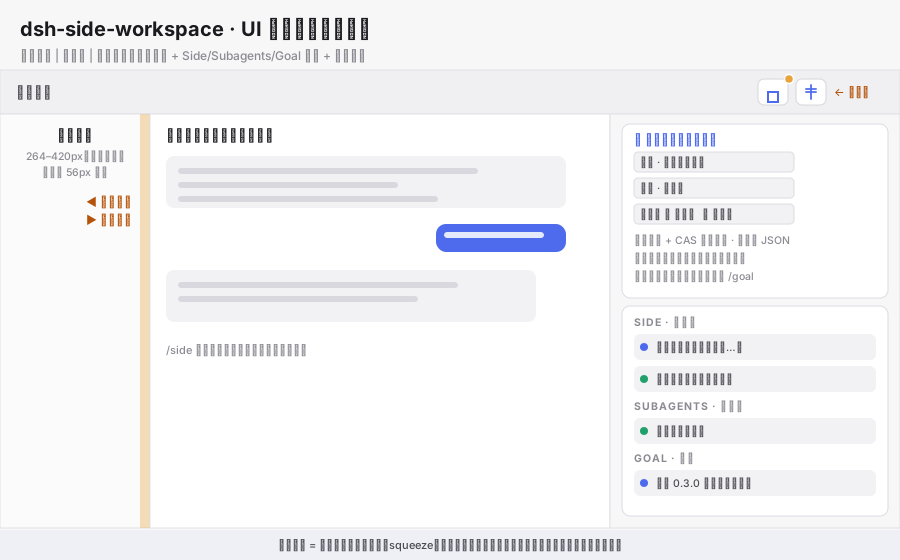
2. Integrated right workspace — ChatGPT Workspace
The session-header toggle opens the shell's right column (the details column;
the main conversation is squeezed), hosting a grouped list + detail pages:
- Side: this session's side conversations (run status, activity line,
failed/cleanup-failed markers); clicking opens the detail page (full
transcript + follow-up composer;/btwis read-only). - Subagents: the session's subagent catalog (reference-counted live feed;
the header badge shares the same source). - Goal: the session goal (pause/resume/complete/clear via the goal RPC).
- Any entry opens its detail page inside the same right column — the left
sidebar and the main conversation never switch; Escape unwinds step by step
(detail → list → close panel). - New-status notifications: when a side conversation settles (completed /
failed / cleanup-failed), a warning dot appears on the small panel button
above the main conversation (unseen count in the tooltip); opening the
panel marks them read. History already present when you open a session is a
silent baseline — never replayed as notifications.
3. Pinned summary board — ChatGPT Notes
A per-session board pinned to the top of the right workspace with its own pin
toggle: a slim chip when collapsed; when expanded it edits a small structured
document — title / objective / one-line status / next steps (checkable) /
decisions and any other non-empty section.
- User edits win: in this phase AI never writes to the board; every edit
goes through the same CAS domain function the server uses (optimistic
local apply + a serialized PATCH behind it), so the UI and the server can
never disagree about what a patch means. - Conflict handling: a stale-revision response resyncs the board and parks
the edit with a banner + retry; patch ids make retries idempotent, and a
lost-but-applied response is detected by content comparison so nothing is
double-applied. - Persisted at
$DSH_HOME/dsh-side-boards.json(atomic write, tolerant of
corrupt files); route/plugins/dsh-side/board
(GET/PATCH/DELETE, same-origin, follows the deployment's ordinary access
rules). - A record only — never touches /goal automatically: only the manual
button on the objective section syncs —goals.createwhen no goal exists,
orgoals.editon the projection's CAS revision when one does; non-empty
next steps ride along as a compact "下一步" list appended to the objective
text.
4. Sidebar collapse hotzone (best-effort)
A thin drag strip just inside the left sidebar's right edge: drag left past
the threshold to fully collapse the sidebar to its 56px rail, drag right from
the rail to expand. Everything delegates to the host's own toggleSidebar();
geometry discovery is structural (never shadows the sidebar slot, the host
handle, or internal stores).
Install (DSH web profile)
The plugin mounts into the web profile via link:. You must restart dsh web yourself after changes (this plugin ships no HMR):
# 1. add the dependency (and register the client bundle under the profile's
#    dsh.profile.bundles list) to the profile package.json
"@dsh-external/dsh-side": "link:<absolute path to this repo>"

# 2. add the insert row to the profile cordis.patch.yml (this repo's
#    cordis.patch.yml is exactly that row)
# 3. install in the profile directory
pnpm install --config.confirmModulesPurge=false
Config
| Key | Default | Description |
|---|---|---|
retention |
ephemeral |
ephemeral (archive + TTL expiry) / persistent (ordinary durable top-level sessions) |
idleTtlMinutes |
60 |
Idle minutes before an ephemeral side is swept (1–1440) |
Usage
/side <question>   Start a continuable side conversation (runs in the
                   background; the right panel reveals it when it settles)
/side              Open an EMPTY side conversation and ask directly in the panel
/btw <question>    One-shot side question (read-only, no follow-ups)
/side list         List this session's side conversations
Diagrams
UI layout (three-column grid + right workspace + pinned board + notification dot)
Architecture & data flow (browser/host halves + shell services + lifecycle)
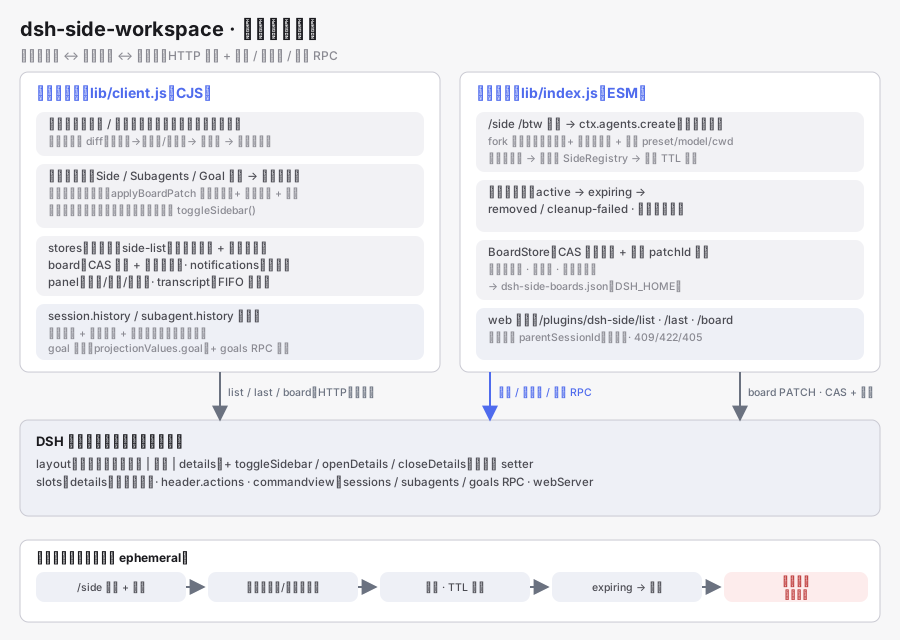
The hero screenshot lives at
assets/screenshot-workspace.png; to replace
it, capture a new full-window shot with one running/sideand the board
expanded, then overwrite that file.
Architecture
src/
  index.ts              node half: create/archive/cleanup state machine + TTL
                        sweep + web routes (/plugins/dsh-side/list, /last,
                        /board) + command wiring
  side.ts               fork cut (host fork RPC contract), model inheritance,
                        message shapes
  prompts.ts            boundary prompt / persona / mode line (self-written
                        equivalent of the /side contract)
  registry.ts           parent → child registry + cleanup lifecycle + pure
                        TTL/retry decisions
  board.ts              pure board domain: sections, items, CAS patch engine,
                        locked-item protection, size caps
  board-persistence.ts  BoardStore: one atomic JSON file under DSH_HOME,
                        per-board save chains, patch idempotency
  client/               browser half: right workspace (Side/Subagents/Goal +
                        board), transcript layer (paged history readers with
                        seed cut, streaming merge, FIFO cache), catalog
                        refcount, action gates, session-fenced pollers,
                        sidebar collapse hotzone
tests/                  165 unit tests (domain / persistence / client stores /
                        registry / transcript / …)
Development
pnpm install --config.confirmModulesPurge=false   # see the link notes below
pnpm check    # typecheck (node + client) && vitest && build
pnpm build emits lib/index.js (ESM node half) + lib/index.d.ts +lib/client.js (CJS browser half wrapped in window.__ModuleLoader__.load;
react/cordis/dsh-client-* externalized, lucide imported per-icon, bundle
≈195kB / gzip 43kB).
Dependency notes: devDependencies reference a local DSH install through
relative link:./dsh-dev/* entries (the official packages are injected by the
profile's pnpm closure — never use the bare cordis/schemastery npm
packages as substitutes). dsh-dev/ is a gitignored junction directory; after
cloning, create it before pnpm install:
# run at the repo root; first confirm `npm root -g` contains @deepseek-ai/dsh
$dsh = (npm root -g) + '\@deepseek-ai\dsh\node_modules'
New-Item -ItemType Junction -Path dsh-dev/ai        -Target "$dsh\@deepseek-ai"
New-Item -ItemType Junction -Path dsh-dev/react     -Target "$dsh\react"
New-Item -ItemType Junction -Path dsh-dev/react-dom -Target "$dsh\react-dom"
pnpm-lock.yaml embeds absolute paths and is not committed (regenerated per
machine).
Known limitations (honest notes)
- Single details track: the shell has one right column — the board and the
workspace share it vertically (no "double squeeze"); a second column would
require host support. - No width setter:
ctx.layoutexposes onlytoggleSidebar/openDetails/closeDetails; the sidebar handle is clamped to
264–420px — "free drag to any width + full collapse below the threshold" is
best-effort, andctx.layout.setSidebar(widthPx)plus a zero-width collapse
mode have been suggested upstream. - The side registry is process-local: after a
dsh webrestart sides no
longer appear in the panel (that is the default semantics — see the
retention contract below).
Roadmap
- Optionally inject board content into the side boundary context (let a side
work against the objective/next steps); - AI proposals for the board (the
assistant-proposaldata model and locked
items are ready; the proposal entry point is pending); - True free-drag sidebar (waiting on host
ctx.layout.setSidebar); - Notification extension: subagent/goal phase changes into the same unseen
queue.
Retention contract (read before changing)
Default is ephemeral (ChatGPT-style temporary side threads): archived on
creation (never in the left session list), registry is process-local (forgotten
on restart), idle past TTL is swept by the host (running children are never
swept), and cleanup failures stay visible with bounded retries. Setretention: persistent for the pre-0.2 durable top-level-session behavior.
License
MIT. Third-party notices in
licenses/THIRD-PARTY-NOTICES.md.
安装
装一次目录插件,之后本站所有插件都能让 DeepSeek Harness 自动找、自动装:
dsh plugin add dshbase-catalog然后对 agent 说「帮我装 dsh-side-workspace」,它会在目录里找到并自动安装。文档:dshbase-catalog · 已验证场景包。
该插件是 GitHub 源码(未发 npm)——直接从仓库装:
Web profile:
dsh plugin --profile web add github:invalidnaaaame/dsh-side-workspaceHeadless(CLI)profile:
dsh plugin --profile headless add github:invalidnaaaame/dsh-side-workspace实测报告
尚未 L3 验证——若已跑过,见下方失败备注。
备注:验证: runtime-fail (0.1.0-rc.6) 浏览全部待验证失败 →
使用场景
把 dsh 接进你真正在用的工具——办公文档、任务板或聊天软件——让它融入你的工作流。
适合谁
想让 agent 在既有生产力工具栈里干活、而非被隔离在孤岛的人。
二次开发建议
集成和适配器是缝——加新的应用连接器、更丰富的读写或工作流触发。
分享徽章
把这枚徽章粘进 README——它会链回本页,实测状态变化时自动更新:

[](https://dshbase.com/zh/plugins/dsh-side-workspace/)<a href="https://dshbase.com/zh/plugins/dsh-side-workspace/"><img src="https://dshbase.com/badges/dsh-side-workspace.svg" alt="dshbase 已收录"></a>