
插件目录 / Developer / dsh-playwright
dsh-playwright
未验证 JeremyGuo
功能简介
Use one shared Playwright browser together with your DeepSeek Harness AI
未验证 — 尚未实测
Use one shared Playwright browser together with your DeepSeek Harness AI 尚未验证——请自行安装测试。
「未验证」表示我们的自动化 CI 尚未安装过该插件。功能描述与版本兼容性均为作者声明。这不是安全审计,也不代表对第三方代码的背书。
README
dsh-playwright
English | 中文
Use a real browser together with your DeepSeek Harness AI. You and the model share one isolated Playwright page per DSH session: you watch and interact in the Browser Use panel while the model reads, sees, clicks, types, and navigates the same live page.
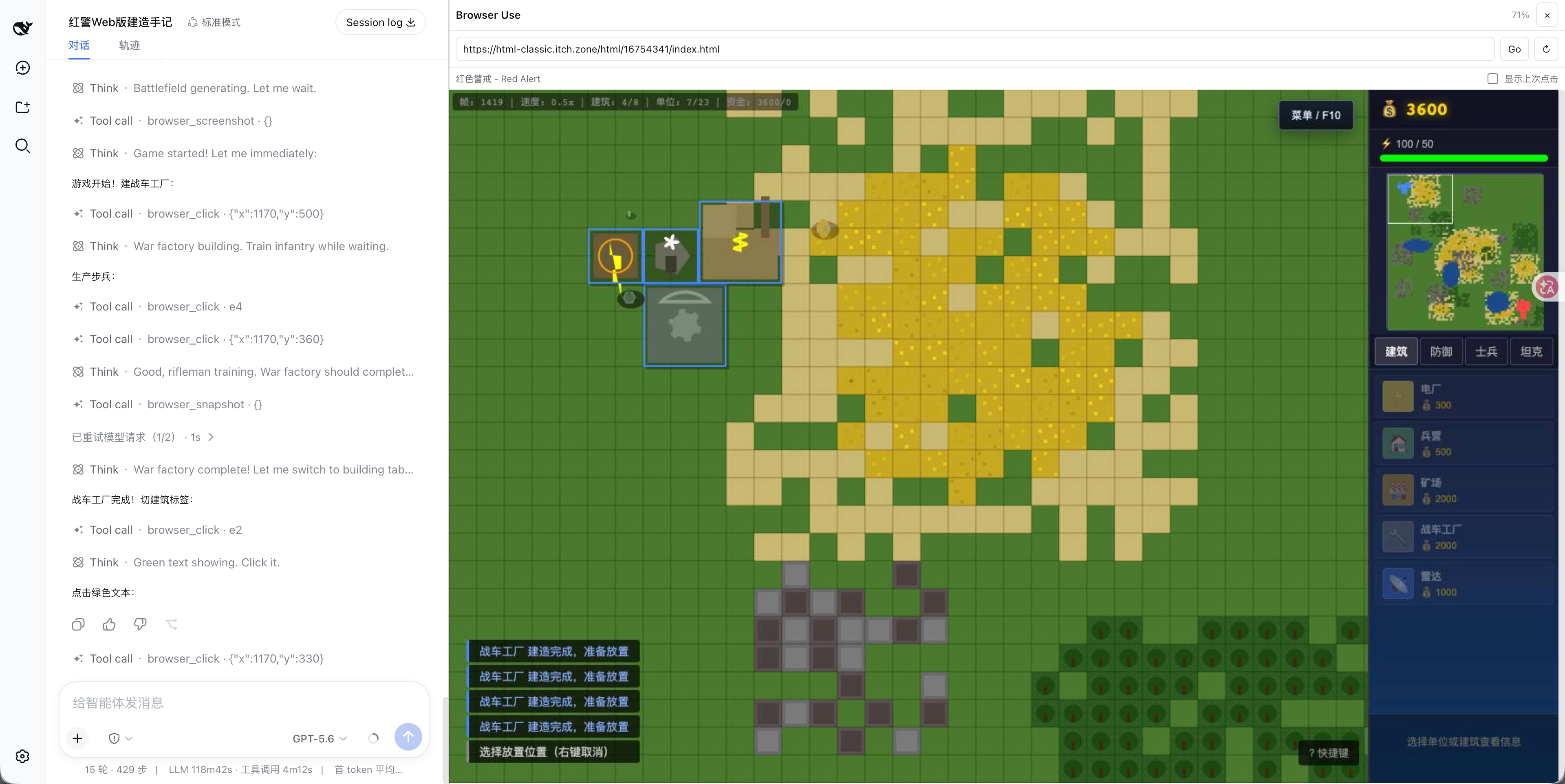
What you and the AI can do
The Browser Use panel and the model tools operate on the same page state.
- Watch together: Chrome CDP pushes repaint frames through a loopback-only binary WebSocket into a stable canvas. The panel shares width with the conversation and has a draggable percentage divider.
- Navigate: open HTTP(S) URLs and reload the current page.
- Read pages: get the URL, title, visible text, and temporary ids for visible links, buttons, inputs, and other interactive elements.
- Use the pointer: target a visible element id or screenshot coordinates; move the pointer; click, press, and release the left, right, or middle button.
- Drag: send
down, one or moremoveactions, thenupwith the same mouse button. - Use the keyboard: type text; press keys and chords such as
Enter,ArrowUp,Control+A, orMeta+K; hold a game key withdownand release it withup. - See screenshots: return a durable PNG image block to an image-capable model.
- Confirm clicks: optionally draw a post-processed RGB square at the last successful click. The user has an independent 显示上次点击 switch in the panel.
- Work by session: every DSH session owns a separate BrowserContext and Page. The plugin restores the last top-level URL after an unexpected Chrome exit.
Model tools
browser_navigate
Open a URL and return a semantic snapshot.
{"url":"https://example.com"}
browser_snapshot
Return bounded page text plus ids such as e1. Ids are valid only for that snapshot; take another snapshot after navigation or dynamic UI changes.
browser_click
The default is a left click. Target either element_id or both x and y.
{"element_id":"e1"}
{"action":"click","button":"right","x":640,"y":400}
Move without clicking:
{"action":"move","x":640,"y":400,"steps":20}
Drag:
{"action":"down","button":"left","x":200,"y":200}
{"action":"move","x":600,"y":400,"steps":30}
{"action":"up","button":"left","x":600,"y":400}
Supported buttons: left, right, middle. Supported actions: click, down, move, up.
browser_type
Replace the value of a visible editable element and optionally submit with Enter.
{"element_id":"e3","text":"DeepSeek Harness","submit":true}
browser_keyboard
Simulate keyboard events on the current focus or focus one element first.
{"action":"type","value":"hello","element_id":"e3","delay_ms":50}
{"action":"press","value":"Control+A"}
{"action":"down","value":"ArrowRight"}
{"action":"up","value":"ArrowRight"}
Supported actions: type, press, down, up.
browser_screenshot
Return a PNG through DSH's native attachment and image-block pipeline. A model route must declare image input.
Optionally mark the last click without modifying the page DOM:
{
  "show_last_click": true,
  "marker_r": 0,
  "marker_g": 255,
  "marker_b": 0,
  "marker_size": 60
}
RGB channels are integers from 0 to 255. show_last_click is optional and defaults to false.
Requirements
- DeepSeek Harness
0.1.0-rc.6. - Node.js
^22.19.0or>=24.0.0. - Google Chrome or Chromium installed on the Host.
- An image-capable model route for
browser_screenshot.
Install
After publication:
dsh plugin --profile web add dsh-playwright
dsh web --port 3081
For local development:
pnpm install
pnpm run verify
dsh plugin --profile web add link:/absolute/path/to/dsh-playwright
dsh web --port 3081
Use the Browser Use button on the right edge to open or close the panel. Drag its left divider to change the Browser Use share from 10% to 80%. Above 55%, the plugin collapses DSH's left Workspace/session selector while preserving the conversation; below 48%, it restores only a selector it collapsed itself.
Multimodal model configuration
For a configured llm-pi-ai route, declare image input:
llm-pi-ai:
  providers:
    my-provider:
      models:
        - id: my-vision-model
          name: My Vision Model
          input:
            - text
            - image
Declaring image input is a claim about the endpoint. The provider rejects the request if the endpoint does not actually accept images.
Configuration
browserExecutablePath: explicit Chrome/Chromium executable; omitted uses common macOS/Linux locations.viewportWidth/viewportHeight: shared page viewport.navigationTimeoutMs: Playwright operation timeout.actionSettleMs: delay before returning post-action state.screencastQuality: CDP screencast JPEG quality from 30 to 90; default 60.maxSnapshotChars/maxSnapshotElements: semantic snapshot bounds.allowPrivateHosts: permits localhost/private-network targets whentrue; defaultfalse.
Security and lifecycle
The RPC and screencast endpoints accept loopback same-origin clients only. HTTP(S) requests to localhost, literal private addresses, and hostnames resolving to private addresses are blocked by default, including subresources. Enable allowPrivateHosts only for trusted tasks.
The plugin launches Chrome lazily. Each DSH session receives a separate BrowserContext and Page. On teardown, queued actions settle before Chrome closes. If Chrome exits unexpectedly, the next operation launches a replacement browser and restores affected sessions to their last top-level URL.
Browser sessions do not reuse the user's Chrome profile, cookies, or login state. Popups and downloads are not exposed. Private-host blocking is a network guard, not a complete sandbox for untrusted websites.
Model Experience
Semantic tools return bounded text into durable tool results. browser_screenshot stores its PNG through DSH attachments and returns a native image block, so it is available only to a route that declares image input. The prompt contribution teaches the model to refresh stale element ids, use screenshot coordinates for canvas pages, release held mouse/keyboard inputs, and request a marked screenshot when it needs to verify a click.
License
安装
装一次目录插件,之后本站所有插件都能让 DeepSeek Harness 自动找、自动装:
dsh plugin add dshbase-catalog然后对 agent 说「帮我装 dsh-playwright」,它会在目录里找到并自动安装。文档:dshbase-catalog · 已验证场景包。
该插件是 GitHub 源码(未发 npm)——直接从仓库装:
Web profile:
dsh plugin --profile web add github:JeremyGuo/dsh-playwrightHeadless(CLI)profile:
dsh plugin --profile headless add github:JeremyGuo/dsh-playwright实测报告
尚未 L3 验证——若已跑过,见下方失败备注。
2026-08-27 · 标记 webonly 备注:验证: web-only;待 L4 web CDP;L4 web CDP runtime-fail on dsh 0.1.0-rc.8. 浏览全部待验证失败 →
分享徽章
把这枚徽章粘进 README——它会链回本页,实测状态变化时自动更新:

[](https://dshbase.com/zh/plugins/dsh-playwright/)<a href="https://dshbase.com/zh/plugins/dsh-playwright/"><img src="https://dshbase.com/badges/dsh-playwright.svg" alt="dshbase 已收录"></a>