
插件目录 / Developer / dsh-pathlink
dsh-pathlink
未验证 penguin-oo
功能简介
Ctrl+click file paths and links in DeepSeek Harness chat: paths open their folder in the OS file manager, links open in a new browser tab.
未验证 — 尚未实测
Ctrl+click file paths and links in DeepSeek Harness chat: paths open their folder in the OS file manager, links open in a new browser tab. 尚未验证——请自行安装测试。
「未验证」表示我们的自动化 CI 尚未安装过该插件。功能描述与版本兼容性均为作者声明。这不是安全审计,也不代表对第三方代码的背书。
README
dsh-pathlink
Ctrl+click file paths and links in DeepSeek Harness chat.
Recognizes file paths and URLs in rendered chat messages (assistant replies, user
bubbles, code blocks, tool cards), marks them with a subtle dotted underline,
and opens them with Ctrl+click (⌘ on macOS):
- Path → containing folder — the file's folder opens in the OS file manager
with the file selected (Windowsexplorer /select, macOSopen -R, Linuxxdg-openon the parent directory). A path that names a directory opens the
directory itself. - Link → new browser tab — covers bare URLs the renderer did not linkify
(e.g. in user bubbles); markdown links already open in new tabs natively.
Plain clicks stay inert, so text selection and copy are never disturbed. When a
path does not exist, a small toast explains why instead of failing silently.
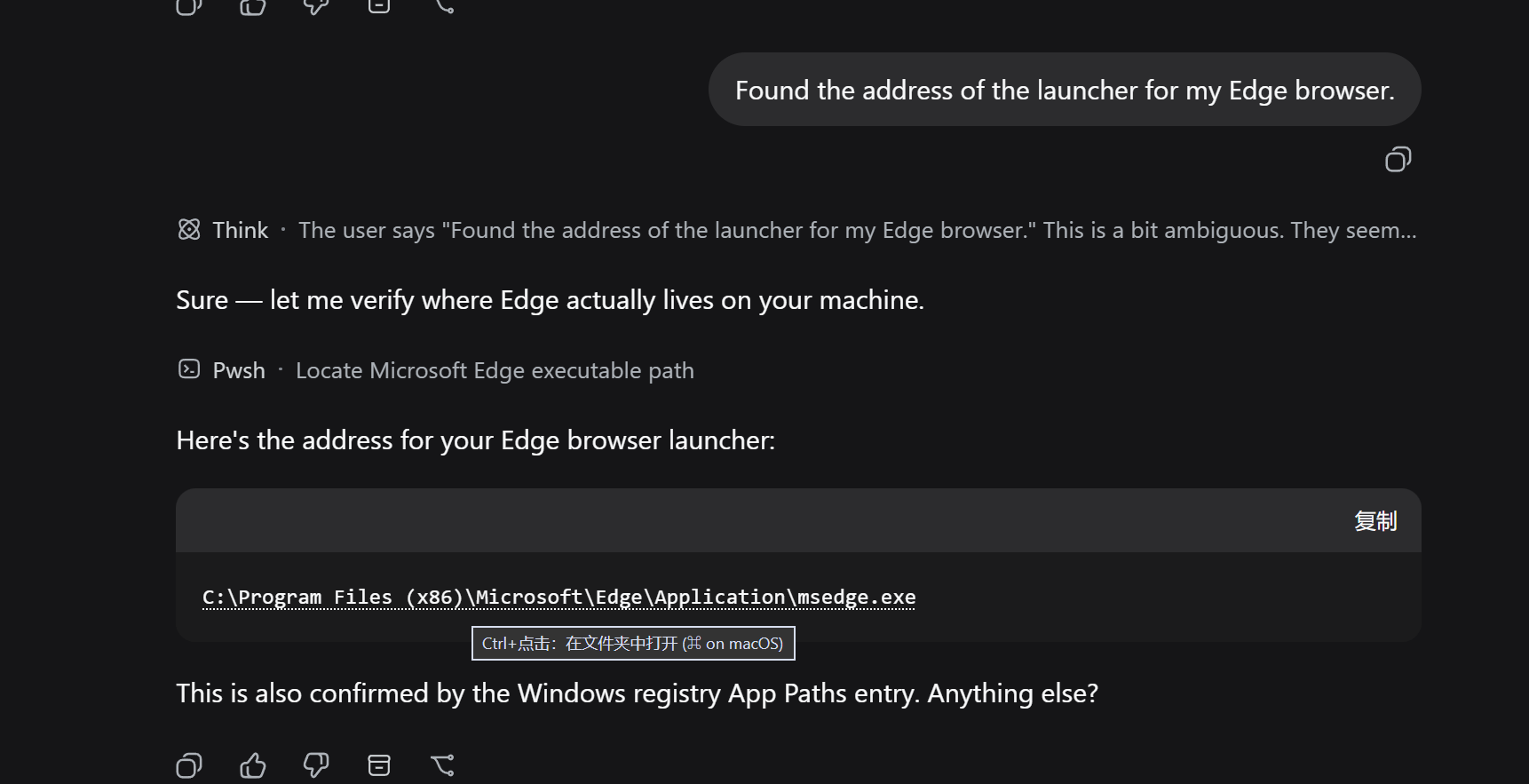
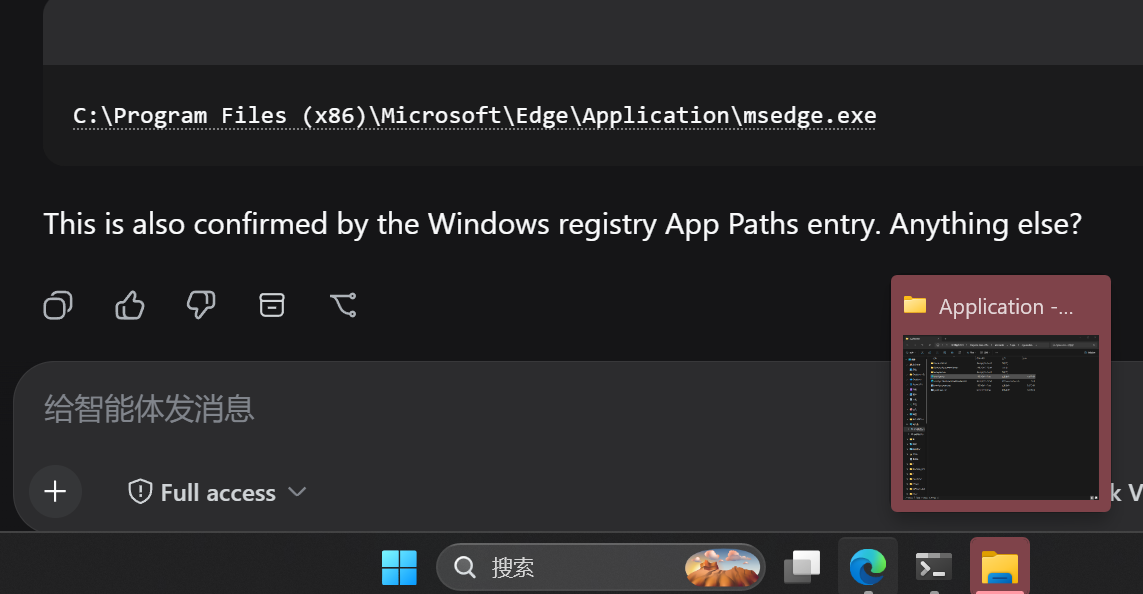
① Hovering a path shows the Ctrl+click hint — Ctrl+click opens the containing
folder with the file selected · ② The recognized path in a real conversation
(dotted underline).
Install
dsh plugin --profile web add dsh-pathlink
or via GitHub:
dsh plugin --profile web add github:penguin-oo/dsh-pathlink
Restart the web GUI afterwards. Requires the web profile (a browser is the
only surface that can receive the click).
Usage
- Wait for a settled message that mentions a path or a link — recognized
tokens get a dotted underline. - Hold Ctrl (or ⌘ on macOS) and click.
- Path → folder opens in Explorer/Finder with the file selected.
- Link → opens in a new browser tab.
- Relative paths resolve against the session's workspace directory first,
then the harness working directory; missing paths show a toast.
Config
| Key | Default | Meaning |
|---|---|---|
maxPathChars |
1024 |
Longest accepted path text, in characters |
How it works
- Client half (
dsh.client, platformweb): a MutationObserver-driven
scanner watches the rendered conversation containers (data-chat-flow/data-conversation-scroll), recognizes paths and URLs in text nodes, wraps
matches in inert inline spans, and handles one delegated capture-phase click
listener. The officialchatFileMentionsseam is deliberately not used so
the plugin never conflicts with the built-in deliverables provider and
covers every surface uniformly. - Host half (
pathlinkRemote service): one read-onlyopenmethod that
resolves relative paths against the addressed session's working directory,
verifies existence, and launches the platform file manager. No durable
state; it never creates or resumes an Agent or Session.
Development
npm install
npm run build   # bundle src/client → lib/client.js
npm run smoke   # Remote markers + Typert manifest validation
node scripts/e2e-synthetic.mjs   # browser E2E against http://127.0.0.1:3738
docs/demo.html is built with node scripts/build-demo.mjs (reuses the
production recognizer) and screenshotted by node scripts/e2e-screenshot.mjs.
Limitations
- Web GUI only (the click surface is a browser); the host opener covers
Windows / macOS / Linux. - Path recognition is heuristic: CJK directory names survive, but a path whose
final segment is a bare English word (no extension) followed directly by
prose may occasionally be over-matched — the existence check then shows the
not-found toast instead of opening anything wrong.
License
MIT
Acknowledgements
Built for the DeepSeek Harness plugin ecosystem — thanks to the community on
LINUX DO for feedback and testing.
安装
装一次目录插件,之后本站所有插件都能让 DeepSeek Harness 自动找、自动装:
dsh plugin add dshbase-catalog然后对 agent 说「帮我装 dsh-pathlink」,它会在目录里找到并自动安装。文档:dshbase-catalog · 已验证场景包。
该插件是 GitHub 源码(未发 npm)——直接从仓库装:
Web profile:
dsh plugin --profile web add github:penguin-oo/dsh-pathlinkHeadless(CLI)profile:
dsh plugin --profile headless add github:penguin-oo/dsh-pathlink实测报告
尚未 L3 验证——若已跑过,见下方失败备注。
分享徽章
把这枚徽章粘进 README——它会链回本页,实测状态变化时自动更新:

[](https://dshbase.com/zh/plugins/dsh-pathlink/)<a href="https://dshbase.com/zh/plugins/dsh-pathlink/"><img src="https://dshbase.com/badges/dsh-pathlink.svg" alt="dshbase 已收录"></a>