
插件目录 / Content / dsh-md-preview
dsh-md-preview
已验证 · 实测可装 LeslieWylie
功能简介
将Markdown渲染为独立HTML,支持无头模式和预览导出
可用 — 实测通过,早期项目
将Markdown渲染为独立HTML,支持无头模式和预览导出 实测能干净安装、正常启动。早期项目,但功能可用。
「已验证」表示我们的自动化 CI 在干净 profile 里实际执行了 dsh plugin add 并启动成功——仅此而已。功能描述与版本兼容性均为作者声明。这不是安全审计,也不代表对第三方代码的背书。
README
📄 dsh-md-html-render
English | 简体中文
Turn Markdown into a page you can send to someone.
A Markdown renderer for the DeepSeek Harness with two front doors and one engine behind them:
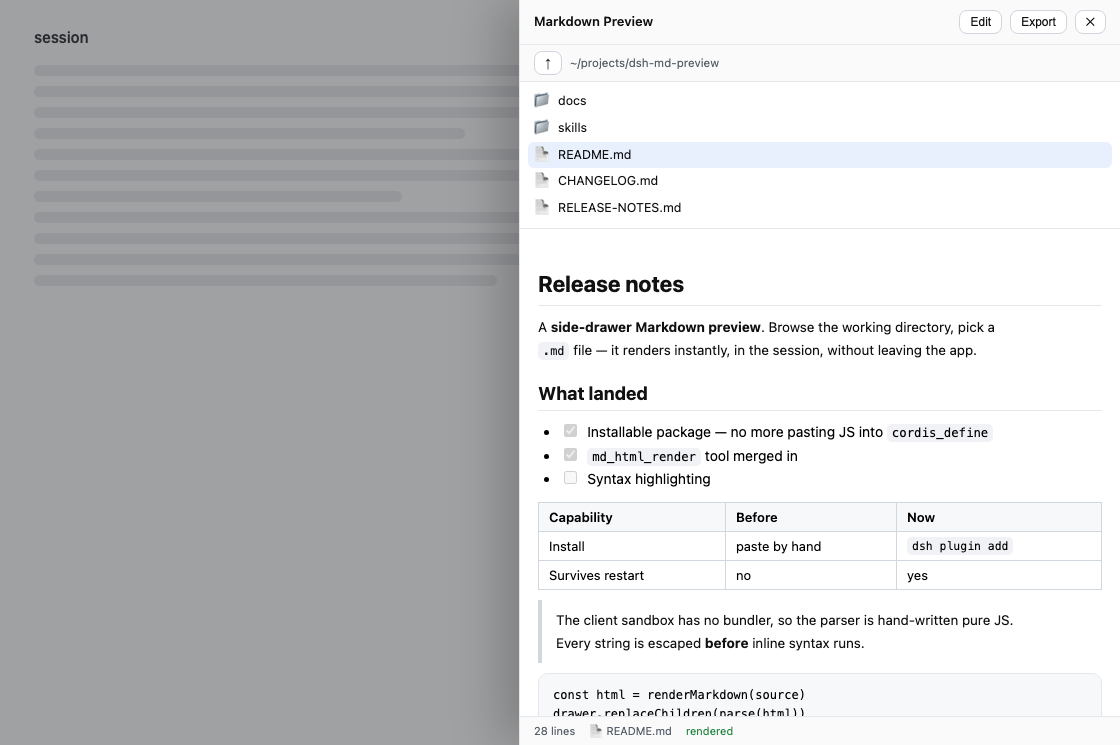
md_html_render— a tool the model can call. Give it Markdown, get back a complete, self-contained HTML document, optionally written to disk. Works in a headless profile with no GUI at all.- The MD drawer — press MD in the web session header, browse your working directory, click a
.mdfile. It renders in place. No new tab, no second editor, no context switch.
Both go through the same renderer, so a page the model generates and a page you export from the drawer are byte-for-byte identical. A test asserts that on every case in the corpus.
Install
Renamed in v0.3.0. This package was
dsh-md-previewthrough v0.2.2. The
npm namedsh-md-previewwas registered by an unrelated project from another
author on 2026-08-17, so this one publishes asdsh-md-html-render— the
name of the tool it has always shipped. Installingdsh-md-previewfrom npm
gets you that other project, not this one. The GitHub repository path is
unchanged, so existing git pins keep resolving; bump the pin to#v0.3.0,
because the dependency key has to match this package's new name.
Not on npm yet — install straight from GitHub. Add it to your profile's package.json:
// ~/.dsh/profiles/<profile>/package.json
{
  "dependencies": {
    "dsh-md-html-render": "github:LeslieWylie/dsh-md-preview#v0.3.0"
  },
  "dsh": {
    "profile": {
      "bundles": ["dsh-md-html-render"]
    }
  }
}
Then reinstall and restart the profile:
cd ~/.dsh/profiles/<profile> && pnpm install
dsh --profile <profile>
Drop the #v0.3.0 to track the default branch instead of pinning.
Try it without editing your profile
dsh --profile web --patch <(printf -- "- insert:\n - id: md-preview\n name: dsh-md-html-render\n")
The package still has to resolve from the profile's node_modules, so run the pnpm install above first.
The tool
md_html_render(markdown, title?, save_path?) -> { html, savedPath?, error? }
| Parameter | ||
|---|---|---|
markdown |
required | The Markdown source. |
title |
optional | Page <title>. Defaults to Markdown. |
save_path |
optional | Where to write the file. Resolved through the session filesystem service, so it obeys the same sandbox policy as every other write. |
Ask for a report, a plan, a comparison table — anything the model would otherwise dump into the transcript — and get a file you can open in a browser or mail to a colleague.
Render this migration plan to
~/Desktop/plan.html
The output is standalone: styles are embedded, there is no stylesheet, font, script, or image loaded from anywhere. It opens from disk, from a USB stick, or on an airgapped machine and looks the same. It follows the reader's dark mode. Nothing phones home, because there is nothing to phone home to.
If save_path is refused by the sandbox, the tool still returns the HTML along with the error, so the work is never lost to a permissions problem.
The drawer
| Browse in place | Opens on your working directory. Click a folder to descend, ↑ to go back. No system file dialog. |
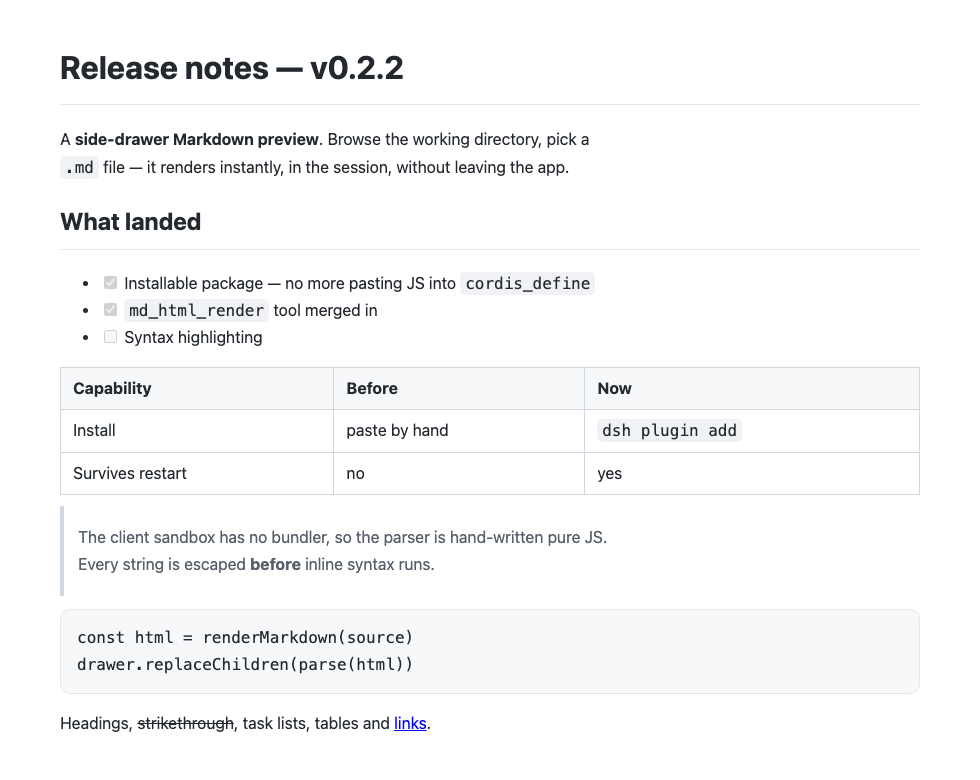
| Render on click | Headings, bold/italic/strikethrough, inline code, fenced code, blockquotes, ordered/unordered/task lists, tables, links, images, rules. |
| Edit | Toggle to a plain textarea to scratch a note or fix a line, then toggle back. |
| Export | Writes a standalone HTML page next to the source — the same document md_html_render produces. |
| Theme-aware | Reads the harness theme variables, so it matches light and dark without configuration. |
Why another Markdown plugin
Three things this one does not do:
- No runtime dependencies. The client half loads as a plain script with no bundler, so
markedandmarkdown-itare not available to it. The renderer is ~150 lines of hand-written JavaScript. The dependency tree you audit is one file. - No second path to your disk. Every read and write goes through the harness
fsservice, so the plugin inherits whatever sandbox policy the session already runs under. It never opens its own filesystem access. The drawer'sreadFilerefuses anything that is not.md,.markdown,.mdx, or.txt. - No raw HTML execution. Every scrap of document text is HTML-escaped before any inline syntax runs, and link targets that are not
http(s):,#,/, ormailto:collapse to#. A document containing<script>or ajavascript:link renders as literal characters.
How it works
                        lib/render.js          ← the only renderer
                       ╱             ╲
   md_html_render  ◀──╯               ╰──▶  Export button
   (host, headless)                          (client, in-browser)
          │                                        │
          ╰──────────▶  ctx.fs  ◀──────────────────╯
                   every read and write
Only fs is a hard requirement. The tool registry and the client connection are picked up opportunistically through ctx.inject, so the plugin runs headless, in the GUI, or in both, and degrades to whichever surface the profile actually has instead of failing to load.
Compatibility
| Profile | What you get |
|---|---|
| Headless / CLI | md_html_render |
| Web GUI | md_html_render and the MD drawer |
No fs service |
Logs a warning and stays inert rather than half-loading |
Requires Node ^22.19.0 || >=24.0.0.
Tests
npm test
Four executing suites, no mocks of the thing under test:
tests/render.test.cjsextracts the client renderer from the browser bundle and runs it.tests/host.test.mjsruns the host renderer on the same corpus, asserts the two agree exactly (a drift between them is what produced two competing Markdown plugins before they were merged), then drivesapply()against a stub context to check the tool shape, the RPC endpoints, and the sandbox-refusal path.tests/client.test.mjscovers the drawer's path rendering, including the bidi guard described below.tests/boot.test.mjsboots a real harnessContextwith the harness's own filesystem service, loads this package the way a profile does, then asks the real tool registry formd_html_renderand executes it against the real disk.
That last one exists because a DSH plugin can import cleanly, pass every unit test, and still register nothing when a Context actually boots it — silently, with no error. Unit tests cannot see that.
It needs the harness packages, so it is written to skip rather than fail when they are missing. That makes the skip path dangerous: a green tick proves nothing if the integration half never ran. The harness packages are therefore ordinary devDependencies, not optional peers — npm does not auto-install optional peers, so declaring them that way is exactly what leaves this suite permanently skipped in CI. A plain npm install && npm test from a fresh clone runs it for real. If the log says SKIPPED, treat the run as unverified.
The XSS checks assert a structural invariant — no emitted tag ever carries an unterminated attribute or an on*= handler — and the suite includes checks that the checker itself goes red on genuinely unsafe markup, so a security assertion cannot silently rot into one that always passes.
Notes
The ~/ in the path bar. The breadcrumb is direction: rtl so that when a path outgrows the bar, text-overflow: ellipsis trims it from the front and keeps the deepest directory — the part you are actually looking at — visible. The side effect is that a leading run of bidi-neutral characters, which is precisely what ~/ is, gets reordered to the far end: ~/projects/app displayed as projects/app/~. The fix is a single leading U+200E (LEFT-TO-RIGHT MARK), which anchors the run without disturbing the front-truncation. unicode-bidi: plaintext also fixes the order but flips the ellipsis back to the tail, losing the property the rtl was there for; a trailing mark does nothing at all. tests/client.test.mjs pins this.
The screenshots are generated, not staged. node docs/screenshot.mjs --shoot rebuilds both images from the real renderer, with the drawer CSS sliced out of lib/client.js rather than retyped, so they cannot drift from what the plugin actually draws.
License
MIT
安装
装一次目录插件,之后本站所有插件都能让 DeepSeek Harness 自动找、自动装:
dsh plugin add dshbase-catalog然后对 agent 说「帮我装 dsh-md-preview」,它会在目录里找到并自动安装。文档:dshbase-catalog · 已验证场景包。
该插件是 GitHub 源码(未发 npm)——直接从仓库装:
Web profile:
dsh plugin --profile web add github:LeslieWylie/dsh-md-previewHeadless(CLI)profile:
dsh plugin --profile headless add github:LeslieWylie/dsh-md-preview实测报告
验证通过:从 GitHub 源码完成 L1 安装 + L2 加载 + L3 运行(dsh 0.1.0-rc.6)。
使用场景
把 agent 变成写手——生成、编辑或本地化文本与媒体——用于内容密集任务。
适合谁
产出文档、帖子或营销文案、想让 agent 在同一循环里起草和修改的人。
二次开发建议
内容流水线和格式输出是缝——加模板、风格规则或导出目标。
分享徽章
把这枚徽章粘进 README——它会链回本页,实测状态变化时自动更新:

[](https://dshbase.com/zh/plugins/dsh-md-preview/)<a href="https://dshbase.com/zh/plugins/dsh-md-preview/"><img src="https://dshbase.com/badges/dsh-md-preview.svg" alt="dshbase 实测可装"></a>