
插件目录 / Developer / dsh-llm-oauth
dsh-llm-oauth
未验证 ziyou979
功能简介
在 DSH 里接入 Grok、Codex、GitHub Copilot 等 LLM 的 OAuth/订阅。
未验证 — 尚未实测
在 DSH 里接入 Grok、Codex、GitHub Copilot 等 LLM 的 OAuth/订阅。 尚未验证——请自行安装测试。
「未验证」表示我们的自动化 CI 尚未安装过该插件。功能描述与版本兼容性均为作者声明。这不是安全审计,也不代表对第三方代码的背书。
README
dsh-llm-oauth
English | 中文
Standalone OAuth / subscription-plan LLM plugin for DeepSeek Harness. Install it into your own profile with dsh plugin add — it does not patch the Harness repo.
Official dsh-llm-pi-ai authenticates with API keys only and never runs an OAuth login or refresh. This plugin reuses the same catalog package, @earendil-works/pi-ai, but constructs Models with a durable CredentialStore so subscription tokens refresh on the request path.
Packaging follows the official plugin guides — your first plugin and publish / install:
package.json→dsh.bundle.patchplus optionaldsh.client(Web Settings face)cordis.patch.ymlinserts one plugin rowpreparebundlessrc/→lib/(includinglib/client.js) on git install- function plugin: export
name,inject,Config,apply— noexport default
Providers
| Subscription | Provider id | Notes |
|---|---|---|
| Grok (SuperGrok / X Premium) | xai |
Model ids come from the installed pi-ai catalog. |
| GitHub Copilot | github-copilot |
Optional Enterprise URL defaults to public github.com. |
| ChatGPT / Codex plan | openai-codex |
Not the openai API-key route. Needs device-code authorization enabled in ChatGPT — see below. Account-ban risk. |
| Anthropic subscription | anthropic |
|
| OpenRouter | openrouter |
Large catalog — enable only if you need it. |
| Kimi For Coding | kimi-coding |
Model ids come from the installed @earendil-works/pi-ai catalog, not from this plugin. Bump that dependency and rebuild when you want a newer catalog.
Enable vs sign-in
After install the plugin is dormant: the catalog lists the providers above, but providers: {}, so the model picker is not flooded with hundreds of models.
| Concept | Meaning | How |
|---|---|---|
| Enable | Register the LLM route; provider appears in the picker | Settings → OAuth / Subscriptions, /oauth enable xai, or auto on login |
| Sign in | Store tokens in pi-ai-oauth.json |
Settings panel, /oauth login xai, or bin/login.mjs |
| Disable | Remove from picker; keep stored tokens | Settings panel or /oauth disable xai |
Only enabled providers list models. They sit alongside API-key providers under Settings → Models once enabled.
Install
dsh plugin --profile web add github:ziyou979/dsh-llm-oauth
From a local checkout:
dsh plugin --profile web add ./dsh-llm-oauth
Confirm the layer:
dsh --profile web --dump-config
A git install may ask you to allow prepare in the profile's pnpm-workspace.yaml (pnpm ≥10 refuses lifecycle scripts otherwise):
allowBuilds:
  dsh-llm-oauth: true
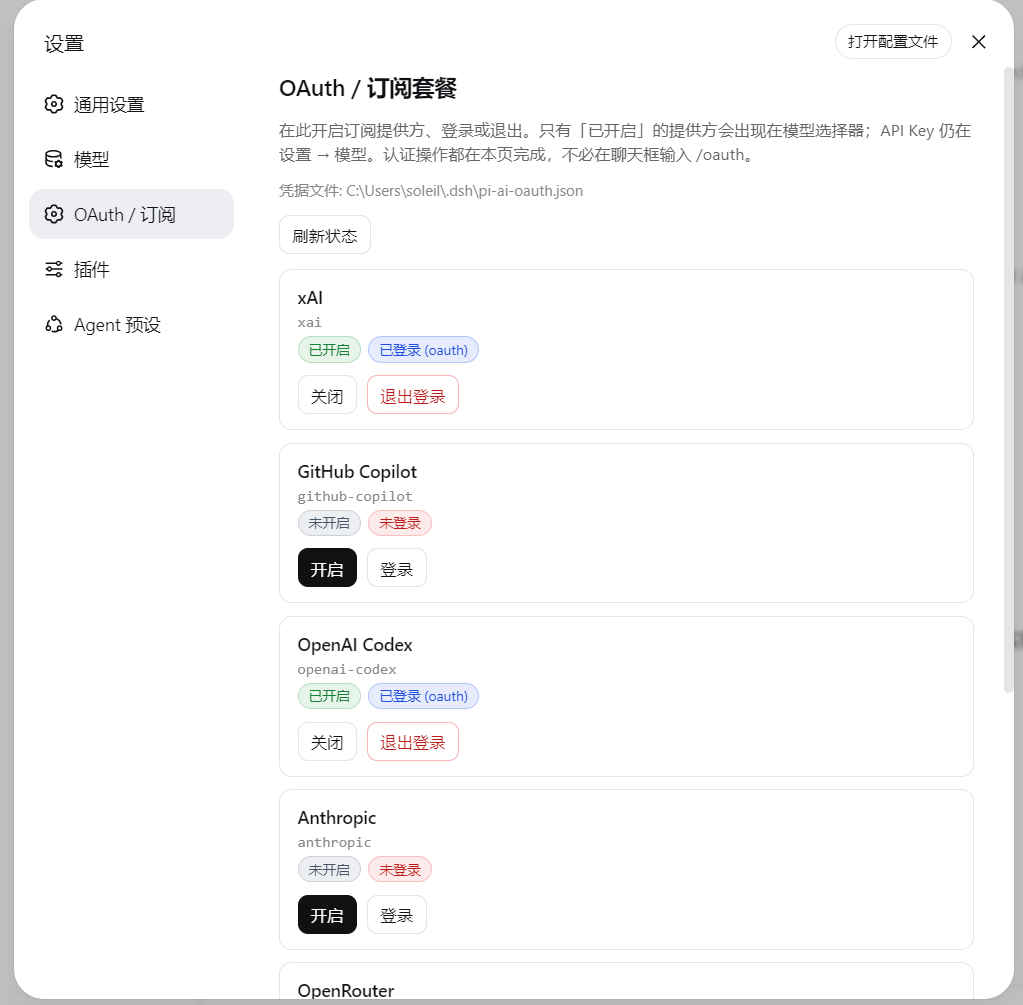
Settings → OAuth / Subscriptions
The Web UI adds a settings section (between Models and Plugins) with:
- Every catalog subscription provider
- Badges: enabled / disabled, signed-in / out, login-in-progress
- Actions: enable, disable, sign in, sign out (buttons on this page — no need to type
/oauthin chat) - Successful sign-in stores tokens and auto-enables the provider
- Device codes show on the page (with copy); authorization URLs open in a new tab, or via Open authorization page if the popup is blocked
Providers that ask “pick a login method” (e.g. openai-codex) auto-select device code on Web (browser login needs a local :1455 callback). If you still see an interactive-prompt error, use bin/login.mjs in a terminal.
After a provider is enabled (and signed in), it also appears under Settings → Models next to API-key routes:
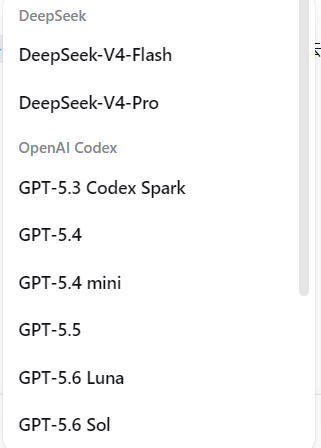
API-key providers stay curated under Settings → Models. OAuth enable + login live on this plugin’s page.
Host HTTP API (same-origin Web):
| Method | Path | Body |
|---|---|---|
GET |
/dsh-llm-oauth/status |
— |
POST |
/dsh-llm-oauth/enable |
{ "provider": "xai" } |
POST |
/dsh-llm-oauth/disable |
{ "provider": "xai" } |
POST |
/dsh-llm-oauth/login |
{ "provider": "xai" } |
POST |
/dsh-llm-oauth/logout |
{ "provider": "xai" } |
ChatGPT / Codex: enable device-code auth first
openai-codex on Web uses device code, not the localhost :1455 browser callback. ChatGPT hides that flow until you turn it on:
- Open ChatGPT → Settings → Apps & connectors (or Settings → Connectors / Codex, depending on the current UI).
- Find Codex and enable Enable device code authorization for Codex.
- Come back here, click Sign in on
openai-codex, then open the authorization URL and enter the code shown on the Settings page.
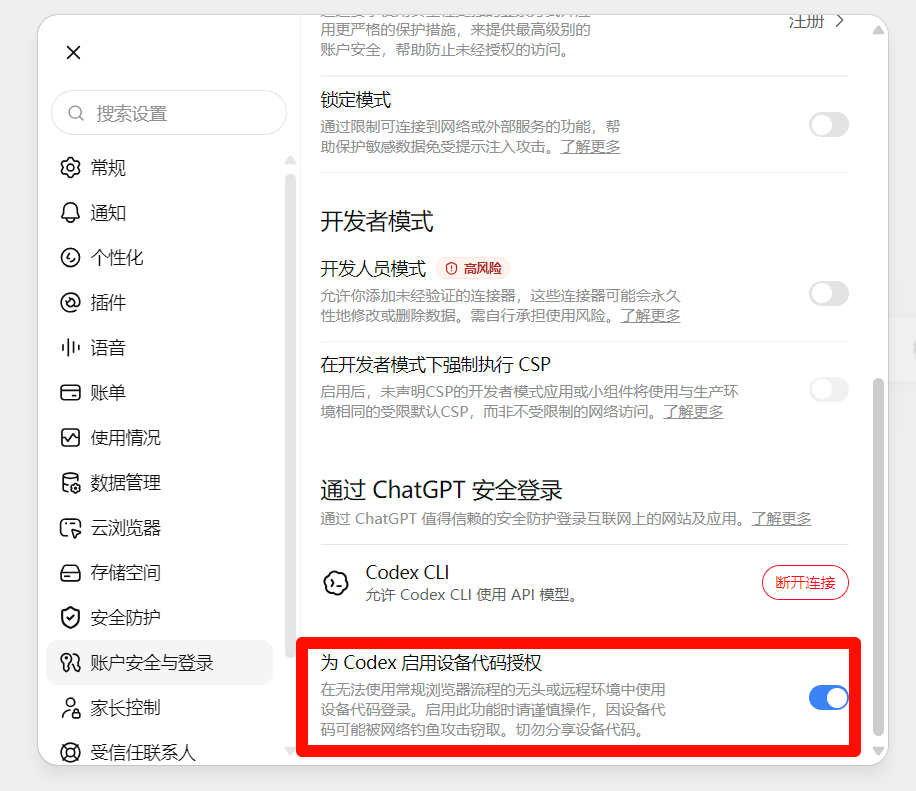
Without that toggle, the device page rejects the code even though this plugin already picked the device-code method.
Risk: signing in to Codex / ChatGPT this way (device code or any unofficial client OAuth) can get the ChatGPT account restricted or banned. OpenAI treats this as using the subscription outside official Codex / ChatGPT apps. Use a disposable account if you try it; do not put a main or paid account you cannot afford to lose on this route. This plugin cannot prevent or reverse a ban.
Login / commands
In the Web UI:
/oauth status
/oauth list
/oauth enable xai
/oauth login xai
/oauth disable xai
/oauth logout xai
/oauth login returns the authorization URL and user code immediately so the chat UI does not hang. Finish in the browser, then run /oauth status or refresh the Settings page. The poll continues in the background.
Credentials are stored at $DSH_HOME/pi-ai-oauth.json (default ~/.dsh/pi-ai-oauth.json).
If you need a terminal (or a provider still requires an interactive prompt):
node bin/login.mjs --list
node bin/login.mjs xai
After a profile install:
node %USERPROFILE%\.dsh\profiles\web\node_modules\dsh-llm-oauth\bin\login.mjs xai
Or enable in settings.yaml without the UI:
llm-oauth:
  providers:
    xai: {}
Do not collide with llm-pi-ai
dsh-base mounts dormant dsh-llm-pi-ai. Declaring the same provider id under an llm-pi-ai: settings section throws DUPLICATE_ADAPTER.
- Subscription / OAuth → this plugin only
- API keys (DeepSeek, official OpenAI API) →
llm-deepseek/llm-pi-ai
Develop
pnpm install
pnpm test
pnpm run build
node bin/login.mjs --list
@deepseek-ai/* packages are peers supplied by the DSH profile. Unit tests (catalog / store / service) only need @earendil-works/pi-ai.
Limits
- Model list follows
@earendil-works/pi-ai; this plugin does not maintain a private model table - No image / vision path
- No full native replay signatures
- No in-browser OAuth callback server (device code / open URL)
- Plain OpenAI API and DeepSeek official stay on API keys
- Settings → Models curated editors still target API keys; OAuth enable + login live under Settings → OAuth / Subscriptions
License
MIT
安装
装一次目录插件,之后本站所有插件都能让 DeepSeek Harness 自动找、自动装:
dsh plugin add dshbase-catalog然后对 agent 说「帮我装 dsh-llm-oauth」,它会在目录里找到并自动安装。文档:dshbase-catalog · 已验证场景包。
该插件是 GitHub 源码(未发 npm)——直接从仓库装:
Web profile:
dsh plugin --profile web add github:ziyou979/dsh-llm-oauthHeadless(CLI)profile:
dsh plugin --profile headless add github:ziyou979/dsh-llm-oauth实测报告
尚未 L3 验证——若已跑过,见下方失败备注。
备注:验证: install-fail (0.1.0-rc.6) 浏览全部待验证失败 →
使用场景
扩展 agent 的编码能力面——给它一个新工具、工作流或集成,让它接手以前做不了的开发任务。
适合谁
想让 dsh 在真实代码库上像队友一样干活的开发者——能改、能跑、能验证,而不只是回答问题。
二次开发建议
工具/命令面就是缝:暴露更多 SDK 能力、加更聪明的上下文接线,或收紧改代码与验证之间的循环。
分享徽章
把这枚徽章粘进 README——它会链回本页,实测状态变化时自动更新:

[](https://dshbase.com/zh/plugins/dsh-llm-oauth/)<a href="https://dshbase.com/zh/plugins/dsh-llm-oauth/"><img src="https://dshbase.com/badges/dsh-llm-oauth.svg" alt="dshbase 已收录"></a>