
插件目录 / UI & Skins / dsh-drop-to-path
dsh-drop-to-path
已验证 · 实测可装 loudMore
功能简介
DSH 插件:图片和文件直达纯文本模型——拖拽保留原生附件体验,发送时自动转为路径。
可用 — 实测通过,早期项目
DSH 插件:图片和文件直达纯文本模型——拖拽保留原生附件体验,发送时自动转为路径。 实测能干净安装、正常启动。早期项目,但功能可用。
「已验证」表示我们的自动化 CI 在干净 profile 里实际执行了 dsh plugin add 并启动成功——仅此而已。功能描述与版本兼容性均为作者声明。这不是安全审计,也不代表对第三方代码的背书。
README
dsh-drop-to-path
Drop or paste images, PDFs, office docs, zips, videos and audio into DeepSeek Harness — they reach your text-only model as workspace file paths. Images keep the native attachment UI (preview / remove), everything else shows as square chips in the attachment rail, and paths are appended automatically when you hit send.

Demo
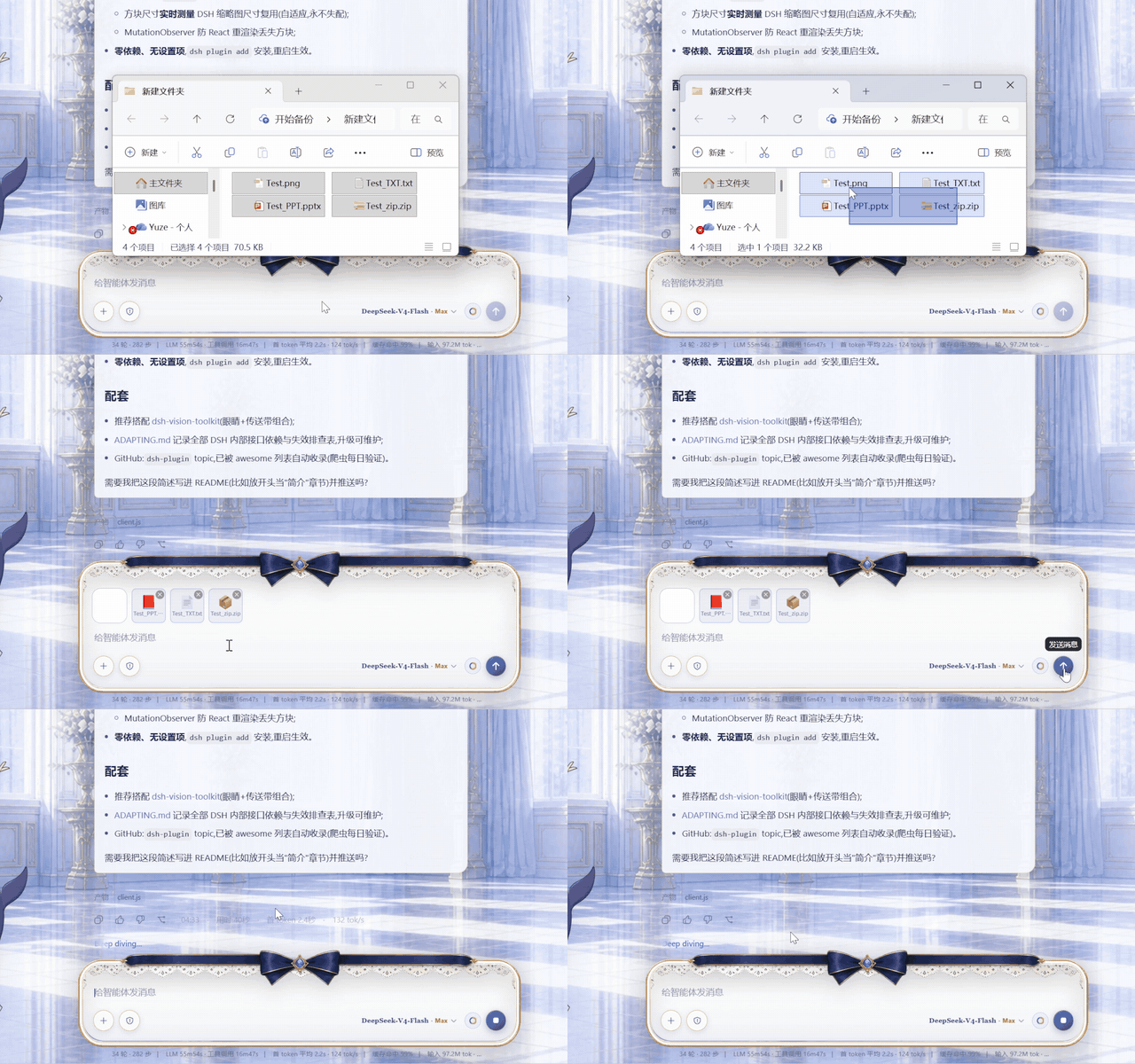
Drag images / PPT / TXT / ZIP into the composer → square file chips appear next to image thumbnails → hit send → the model receives workspace file paths.

The effect: images and files arrive at the text-only model as workspace paths, ready for vision / document tools.
Why this plugin
I use a text-only model (deepseek) in DeepSeek Harness and frequently need to send screenshots to the agent. But DSH image attachments go through the model's native attachment channel, and text-only models are rejected by a preflight check before the message is even sent — the composer shows a system toast:
The current model does not support images; switch to a model that does.

Backed by the host image-admission preflight (attachment-error):
Model "deepseek-v4-flash" does not support image input.
dsh-vision-toolkit solves the "see the image" half — but its tools only accept workspace file paths, so the image must enter the message as a path. Every screenshot became: save to workspace → manually type the path into the message. Painful. And beyond images, DSH refuses to attach PDFs, office documents, videos or any non-image file at all.
After experiencing "paste and go" in another tool, I decided to bring that experience back to DSH: keep the attachment UI completely native, and convert images and files to paths only at the moment of sending. Hence this plugin.
How it works
flowchart LR
    A["Paste / drag in"] --> B{"File type?"}
    B -->|"Images<br/>png / jpg / webp / gif"| C["Native attachment card<br/>preview / remove"]
    C --> D["Hit send"]
    D --> E["Upload → workspace/.drops/"]
    E --> F["Message becomes plain text paths"]
    F --> G["Text-only model reads them<br/>with vision / document tools"]
    B -->|"Other files<br/>pdf / docx / xlsx / video…"| H["Square chip in the<br/>attachment rail<br/>format icon · ✕ remove"]
    H --> D
- The image admission preflight (
attachment-errorindsh-host-apiproxy) is bypassed: no image block is ever sent, the model only sees text. - Nothing is typed into the composer while you add files — paths are appended on send, exactly like the image conversion.
- Upload failure is never silent: a visible notice explains what happened before falling back to the native send path; messages are never swallowed.
- Supports paste and drag-and-drop; images, files and mixed batches are uploaded in order and sent as one text block of paths.
Supported file types
| Type | Extensions | Limit | Experience |
|---|---|---|---|
| Images | png jpg jpeg webp gif |
30MB | Native attachment card (preview / remove), auto-converted to paths on send |
| Documents | pdf doc docx xls xlsx ppt pptx txt md csv json |
100MB | Square chip in the attachment rail (format icon, full name on hover, ✕ to remove), path appended on send |
| Archives | zip |
100MB | Same |
| Video | mp4 mov webm mkv avi |
100MB | Same |
| Audio | mp3 wav flac m4a |
100MB | Same |
Images keep the native attachment experience. DSH itself only accepts these image formats as attachments (see the toast below) and refuses everything else — this plugin turns the rest into plain workspace paths instead, so the agent can process them with PDF / document tools.

Pairing with dsh-vision-toolkit (recommended)
🎯 Strongly recommended to pair with dsh-vision-toolkit — it is the eyes of a text-only model, this plugin is the conveyor belt:
- This plugin solves "how an image or file becomes a path" (automatic conversion on send);
- dsh-vision-toolkit solves "how a path becomes vision capability" (intent-aware image Q&A, long-screenshot OCR, UI restoration, grounding, pixel diff — 10 structured vision tools, with DSH Credentials / managed runtime / Web Settings).
Install:
dsh plugin --profile web add <path-to-dsh-vision-toolkit>(see its repo README). Together they give a text-only model an experience close to a native multimodal model.
| Scenario | Before | Now |
|---|---|---|
| Image Q&A | screenshot → save to workspace → type path | screenshot → Ctrl+V → Enter |
| Multi-image diff (pixel diff) | same, type every path | just send two images |
| Long-screenshot OCR / UI restoration | same | just send the image |
| Analyze a PDF / xlsx / video | copy it into the workspace, type the path | just drag it in and send |
Comparison with similar plugins
- dsh-drag-and-drop: dropping a file inserts its raw path into the composer, no file copying. Great for referencing files already in the workspace; images are still sent as attachments (still rejected by text-only models), and paste is not supported.
- This plugin: keeps the native attachment UI (preview / remove), automatically copies images and files to the workspace and converts them to paths on send, supports paste and drag-and-drop, and shows non-image files as removable square chips in the attachment rail. Built for "sending images and files to a text-only model".
They are complementary: use dsh-drag-and-drop to reference existing files, use this plugin to send screenshots and new files.
Installation
Requirements: DeepSeek Harness (Web profile), Node.js, dsh CLI.
# Option 1: install via dsh plugin (recommended)
dsh plugin --profile web add /path/to/dsh-drop-to-path

# Option 2: manual (matches this repo layout)
# 1. add to dependencies in package.json:
#    "@dsh-external/dsh-drop-to-path": "link:/path/to/dsh-drop-to-path"
# 2. add to dsh.profile.bundles: "@dsh-external/dsh-drop-to-path"
# 3. copy the directory (including lib/) into profiles/<name>/node_modules/@dsh-external/dsh-drop-to-path
Restart the Web profile after installing (relaunch the launcher / restart dsh web). No settings to configure.
Usage
- Paste or drop images as usual — the attachment cards behave natively (preview / remove);
- Drag or paste any other file (pdf / office / zip / video / audio) — a square chip with a format icon appears in the attachment rail next to the image thumbnails (full name on hover, ✕ to remove);
- Type your message (optional) and hit send — no attachments are sent; images and files are uploaded and their workspace paths are appended to the message automatically;
- The agent (paired with dsh-vision-toolkit) reads images with
vision_glance/vision_pixel_diffand friends, and handles documents with PDF / spreadsheet tools.
Files are stored under <workspace>/.drops/; clean them up whenever you like.
File structure
dsh-drop-to-path/
├─ package.json        bundle manifest (dsh.bundle.patch / dsh.client)
├─ cordis.patch.yml    mount row (insert drop-to-path)
├─ lib/
│  ├─ index.js         host:POST /_dsh/drop-to-path/import route
│  └─ client.js        browser: interception + sendSession wrapper + chips
├─ assets/             demo GIF, combined effect image, social preview, toasts
├─ README.md
├─ README.zh.md
└─ ADAPTING.md         upgrade adaptation guide (read before upgrading DSH)
Implementation notes
- host side (
lib/index.js): registers thewebServerroutePOST /_dsh/drop-to-path/import, accepts{ name, dataBase64 }, validates (whitelisted extensions; images ≤30MB, other files ≤100MB; Unicode-safe sanitized file names against path traversal), writes into the session workspace.drops/, returns{ ok, value: { path, kind } }. - Workspace resolution: reads
$DSH_HOME/storages/workspace.json(the durable workspace registry) and picks the workspace with the newestupdatedAt. - browser side (
lib/client.js):- pure-image drops pass through untouched (native rail + overlay handling);
- drops/pastes that contain non-image files are intercepted: files upload in order, chips are rendered, and a synthetic
dragendcloses DSH's full-screen drop overlay so the page never gets stuck; conversation.sendSessionis wrapped on the ConversationController prototype (survives instance recreation): on send, image attachments and queued files are uploaded and their paths are joined with your text into one message;- chips are square tiles sized live from the measured image-thumbnail size (falls back to 62px), with per-format icons/colors and a MutationObserver that re-renders them after React updates;
- after a successful send the chips clear; upload failures show a visible notice and fall back to the native send path — messages are never lost.
Compatibility
| DSH version | Status |
|---|---|
| 0.1.0-rc.6 (verified in this repo's environment) | ✅ Works |
This plugin depends on several undocumented internal interfaces of DSH (service names, method signatures, storage formats) and may break after a DSH upgrade. Read ADAPTING.md before upgrading — it contains the failure symptoms and the fix steps.
Contributing & adapting
- Issues / ideas: GitHub Issues.
- Plugin broken after a DSH upgrade: follow the symptom table in
ADAPTING.md, fix, and append a row to the adaptation log.
License
MIT
安装
装一次目录插件,之后本站所有插件都能让 DeepSeek Harness 自动找、自动装:
dsh plugin add dshbase-catalog然后对 agent 说「帮我装 dsh-drop-to-path」,它会在目录里找到并自动安装。文档:dshbase-catalog · 已验证场景包。
该插件是 GitHub 源码(未发 npm)——直接从仓库装:
Web profile:
dsh plugin --profile web add github:loudMore/dsh-drop-to-pathHeadless(CLI)profile:
dsh plugin --profile headless add github:loudMore/dsh-drop-to-path实测报告
验证通过:从 GitHub 源码完成 L1 安装 + L2 加载 + L3 运行(dsh 0.1.0-rc.6)。
使用场景
改变 dsh 的外观或交互方式——一套主题、皮肤或新面板,重塑工作区。
适合谁
在 web UI 里一待几小时、想让它按自己的习惯好看又好用的人。
二次开发建议
皮肤、面板和主题 token 是扩展点——写新皮肤、加面板,或与上游配色同步 token。
分享徽章
把这枚徽章粘进 README——它会链回本页,实测状态变化时自动更新:

[](https://dshbase.com/zh/plugins/dsh-drop-to-path/)<a href="https://dshbase.com/zh/plugins/dsh-drop-to-path/"><img src="https://dshbase.com/badges/dsh-drop-to-path.svg" alt="dshbase 实测可装"></a>