
插件目录 / UI & Skins / dsh-cyber-pet
dsh-cyber-pet
已验证 · 实测可装 BorisShaw6
功能简介
赛博鲸鱼宠物:悬浮在 Web UI 里游动,实时播报 token 消耗,可投喂/换色/陪聊
可用 — 实测通过,早期项目
赛博鲸鱼宠物:悬浮在 Web UI 里游动,实时播报 token 消耗,可投喂/换色/陪聊 实测能干净安装、正常启动。早期项目,但功能可用。
「已验证」表示我们的自动化 CI 在干净 profile 里实际执行了 dsh plugin add 并启动成功——仅此而已。功能描述与版本兼容性均为作者声明。这不是安全审计,也不代表对第三方代码的背书。
README
dsh-cyber-pet 🐳
English | 中文 · 🎮 Live Demo
A cyber whale pet for DeepSeek Harness: a floating, feedable, color-customizable whale that lives inside the Web UI and reports your token usage, quota, context occupancy, interactions, and conversation counts — with three chat backends, growth levels, moods, milestone celebrations, and a one-click PNG report card.
🎮 Try it without installing anything: Live Demo — swap skins, recolor the whale, simulate turns, and feed it, right in your browser.
Gallery
Two skins — pixel-art and skeuomorphic (the animated tiles are live SVG recreations of the in-app skins; the photos are real screenshots):
| Pixel-art | Skeuomorphic |
|---|---|
 |
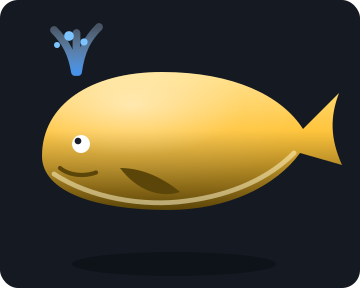 |
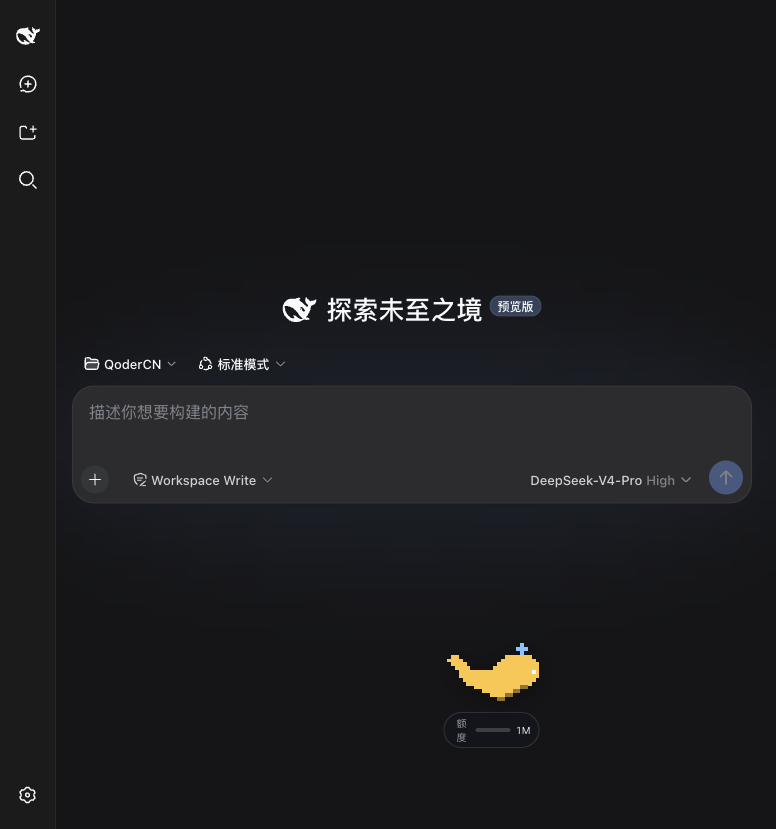 |
 |
The dashboard in both UI languages (Chinese / English):
| Chinese UI | English UI |
|---|---|
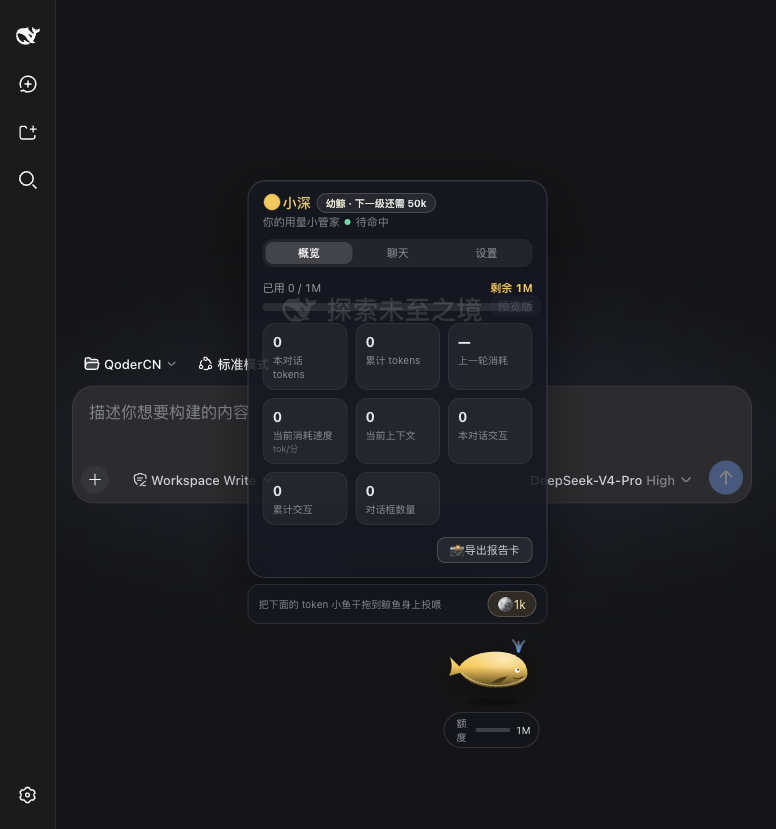 |
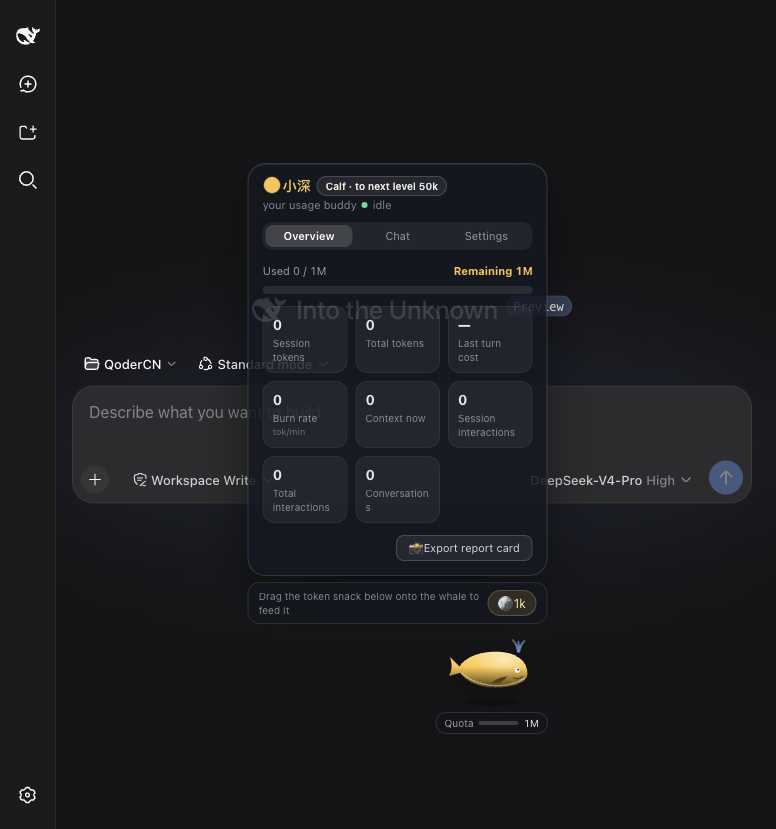 |
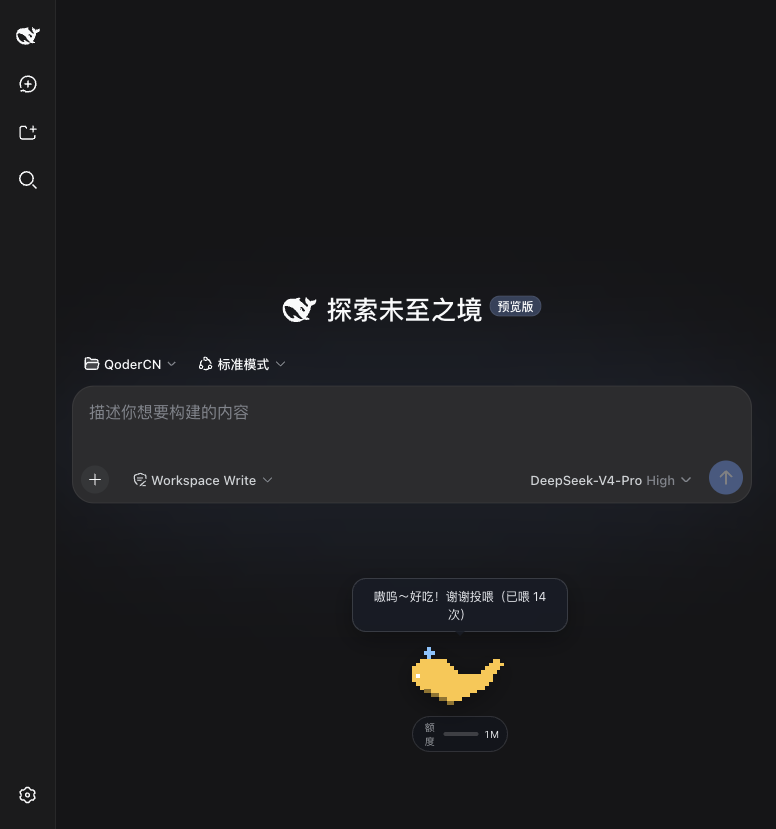
It talks — the whale reports every completed turn (cost + remaining quota) in a speech bubble:
Install
Option A — one-line install (recommended, zero source code)
All you need is Node.js (≥ 22.19, LTS recommended) and pnpm — the plugin command delegates to it, one-time setup: npm install -g pnpm. No Git, no source checkout, no build.
1. Add the whale to your harness web profile — one line:
npx @deepseek-ai/dsh plugin --profile web add @borisshaw6/dsh-cyber-pet
The first run asks y to confirm downloading the harness; when you see + @borisshaw6/dsh-cyber-pet, it is installed.
2. Start (or restart) the web UI:
npx @deepseek-ai/dsh web
The whale loads at profile startup. If a web session is already running, stop it and run the command again — a bare browser refresh is not enough.
3. Open http://127.0.0.1:3080 — a yellow whale appears and starts swimming; click it to open the dashboard panel.
Optional — confirm the plugin layer is mounted:
npx @deepseek-ai/dsh --profile web --dump-config | grep pet-chat
Update / uninstall:
npx @deepseek-ai/dsh plugin --profile web update @borisshaw6/dsh-cyber-pet
npx @deepseek-ai/dsh plugin --profile web remove @borisshaw6/dsh-cyber-pet
Under the hood, the bundle package carries both halves (host-side petChat Remote + browser surface) and mounts through the profile's cordis.patch.yml layer plus the dsh.client declaration. Building it from source is described in dsh-cyber-pet-bundle/README.md.
Troubleshooting
| Symptom | Fix |
|---|---|
| No whale after install | Restart the web profile (step 2) — the browser half loads at startup — then hard-refresh the page. |
pnpm not found on PATH |
npm install -g pnpm (or corepack enable), then re-run step 1. |
| Port 3080 already in use | npx @deepseek-ai/dsh web --port 3099, or stop whatever is holding 3080. |
Harness older than 0.1.0-rc.6 |
Upgrade the harness, or use Option B below. |
Option B — source checkout install (developers)
Requirements: Node.js ≥ 22.19, Git, and pnpm (corepack enable). Tested against harness 0.1.0-rc.5.
git clone https://github.com/deepseek-ai/deepseek-harness.git
git clone https://github.com/BorisShaw6/dsh-cyber-pet.git
cd dsh-cyber-pet && ./install.sh ../deepseek-harness
cd ../deepseek-harness && pnpm dsh web     # open http://127.0.0.1:3080
Or let the installer fetch the harness for you:
git clone https://github.com/BorisShaw6/dsh-cyber-pet.git && cd dsh-cyber-pet && ./install.sh --quick
The installer clones harness 0.1.0-rc.5 (pinned tag) when no checkout is given, copies both packages, wires the 4 registration files, installs, and builds. It is idempotent and safe to re-run; options: --force (replace existing plugin files), --skip-deps, --skip-build.
For the fully manual procedure (copy the two packages, edit the four files, build), the usage guide, and troubleshooting, see ui-pet/README.md.
Uninstall:
./uninstall.sh /path/to/deepseek-harness --purge
What you get
- 🐋 Two skins — pixel-art and skeuomorphic; seven preset colors + free picker (default Sunny Yellow)
- 🧭 Behavior modes — Active / Standby / Sleep, via right-click quick menu or Settings
- 🏊 Autonomous roaming — swim speed follows the live token burn rate × your speed ratio, inside your chosen roam area
- 📊 Glass dashboard — Overview / Chat / Settings tabs; user-composed stat cards (visibility / size / order), quota bar, context occupancy, last-turn cost, burn rate
- 🎛️ Under-whale badge — click to cycle Quota → Context → Turns
- 💬 Chat with the whale — Local Pet (rule-based, zero requests), Online Pet (any OpenAI-compatible endpoint you configure), Harness Pet (host-side
petChatRemote, credentials stay on the host — needsDEEPSEEK_API_KEY) - 🌱 Growth system — Calf → Junior → Adult → Golden (crown at max level)
- 😊 Mood engine — happy / focused / anxious (<10% quota) / sleepy
- 🎉 Milestones & digest — celebration every 10k tokens; "yesterday you burned X tokens" on first load
- 🍱 Feeding — drag the 🪙 snack onto the whale
- ⏸️ Rest reminder — naps for 3 minutes after N consecutive turns
- 📸 Report card — one-click PNG export with the whale and your numbers
- 🔊 Soft sound effects (toggleable), 🌍 Chinese / English UI switch
All counters and preferences persist in browser localStorage (dsh.cyber-pet.v3).
Repository layout
dsh-cyber-pet/
├── install.sh            # one-click source installer (Option B)
├── uninstall.sh          # one-click uninstaller
├── scripts/
│   └── patch-files.mjs   # idempotent registration engine (apply/revert)
├── dsh-cyber-pet-bundle/ # dsh-plugin bundle package (Option A, npm-publishable)
├── docs/                 # gallery assets (screenshots + animated SVG demos)
├── ui-pet/               # → packages/client/ui-pet   (browser whale surface)
└── pet-chat/             # → packages/feedback/pet-chat (host chat Remote)
The installer copies ui-pet/ and pet-chat/ into the harness workspace and adds four registration lines (tsconfig.host.json, tsconfig.client.json, packages/bundle/web-app/package.json, packages/bundle/web-app/cordis.patch.yml). See ui-pet/README.md for the full manual procedure, usage guide, and troubleshooting.
Notes
- DeepSeek Harness is in developer preview and breaks APIs between releases — Option A pins peers at
0.1.0-rc.6; Option B pins the harness checkout at0.1.0-rc.5(--quickclones that exact tag). - Option A and Option B must not be mixed on the same harness install — pick one.
dsh plugin addtargets harness ≥0.1.0-rc.6; the source installer targets0.1.0-rc.5. - The Online Pet backend keeps your API key in browser
localStorage; prefer Harness Pet when the host credentials are configured.
Why this little whale exists
Amid great anticipation and excitement, DeepSeek Harness has finally been officially launched. Riding the surging wave of AI, each of us developers is a firsthand witness to this era. As backend engineers, our daily work involves either implementing requirements based on spec documents or refining business logic within the framework of various driving specifications and development standards; while the rapid iteration of AI tools boosts efficiency, it also subtly adds pressure to keep up — as if the slightest delay would leave us trailing behind the times.
Technology is constantly evolving, yet the passion for coding deep within my heart remains unchanged — a thought that is both poignant and wondrous. I usually handle business requirements on GitLab. Although I log into GitHub frequently, I rarely have the chance to let my guard down and play around there, tinkering with personal projects purely out of passion.
Early Saturday morning, I was casually browsing and came across a data structures practice assignment I'd uploaded years ago — which included a simple maze game implemented using a binary tree. Looking back with today's perspective, the code is a bit rough around the edges, but it's brimming with the pure joy of coding I felt back then. Inspired by the launch of DeepSeek Harness, an idea took root in my mind: I wanted to contribute my own small part to the Harness ecosystem.
As a pure backend developer with no prior experience in frontend technologies, I relied entirely on Qoder to complete the development of this little project. It's very small in scope, and the code is far from perfect — it might even hide some undiscovered bugs — so it's hardly a technically substantial project. Still, I hope this little thing can play its own small role within the Harness ecosystem and offer a bit of relaxation beyond technology to my peers who are constantly juggling business demands and standards.
In an era where everyone is being pushed to run faster and faster, regulations and pressure are ever-present. But I've always believed that amidst the grind of coding, we should carve out a few fragmented moments of leisure. May this little cyber pet add a moment of pure joy — free from KPIs and regulations — to your hectic development routine.
Hello, friends.
License
MIT — same as DeepSeek Harness.
安装
装一次目录插件,之后本站所有插件都能让 DeepSeek Harness 自动找、自动装:
dsh plugin add dshbase-catalog然后对 agent 说「帮我装 dsh-cyber-pet」,它会在目录里找到并自动安装。文档:dshbase-catalog · 已验证场景包。
Web profile:
dsh plugin --profile web add @borisshaw6/dsh-cyber-petHeadless(CLI)profile:
dsh plugin --profile headless add @borisshaw6/dsh-cyber-pet包信息
npm:@borisshaw6/dsh-cyber-pet · 版本 — · 实测环境 dsh 0.1.0-rc.6
实测报告
端到端验证通过:dsh 0.1.0-rc.6 上 L1 安装 + L2 加载 + L3 运行问答。
使用场景
改变 dsh 的外观或交互方式——一套主题、皮肤或新面板,重塑工作区。
适合谁
在 web UI 里一待几小时、想让它按自己的习惯好看又好用的人。
二次开发建议
皮肤、面板和主题 token 是扩展点——写新皮肤、加面板,或与上游配色同步 token。
分享徽章
把这枚徽章粘进 README——它会链回本页,实测状态变化时自动更新:

[](https://dshbase.com/zh/plugins/dsh-cyber-pet/)<a href="https://dshbase.com/zh/plugins/dsh-cyber-pet/"><img src="https://dshbase.com/badges/dsh-cyber-pet.svg" alt="dshbase 实测可装"></a>