
插件目录 / UI & Skins / dsh-at-file
dsh-at-file
已验证 · 实测可装 omdsh-dev
功能简介
为 DeepSeek Harness 提供 Codex 风格 @file 引用:在输入框搜索工作区文件并将其内容附加到提示词。
推荐 — 实测可用且热门
为 DeepSeek Harness 提供 Codex 风格 @file 引用:在输入框搜索工作区文件并将其内容附加到提示词。 实测能干净安装、正常启动。441+ stars,社区认可度高,是低风险选择。
「已验证」表示我们的自动化 CI 在干净 profile 里实际执行了 dsh plugin add 并启动成功——仅此而已。功能描述与版本兼容性均为作者声明。这不是安全审计,也不代表对第三方代码的背书。
README
dsh-at-file
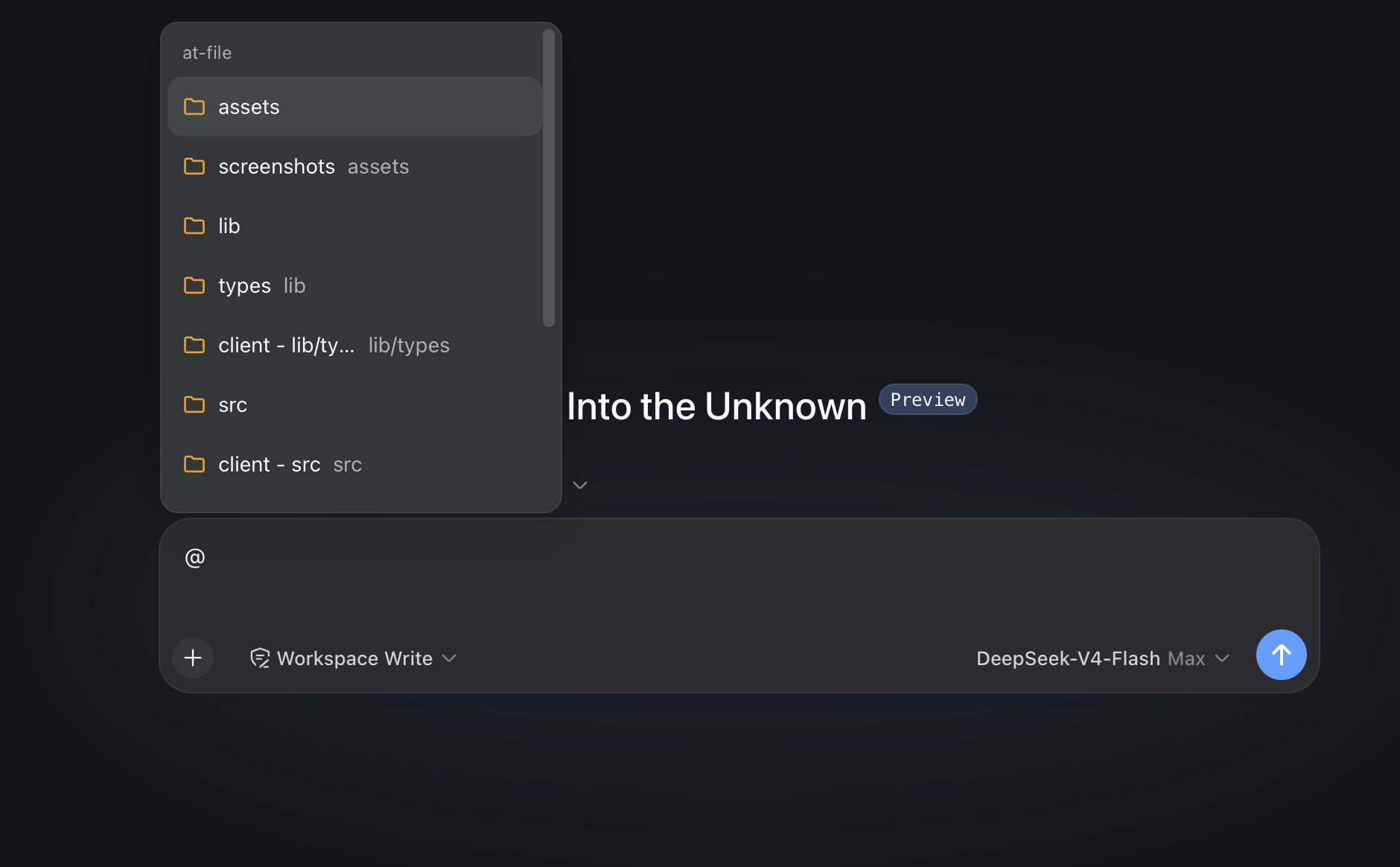
Workspace path references for the DeepSeek Harness web interface. Type @ in the composer to search the current workspace and insert a file or directory path.

Usage
Choose a result from the @ menu. The selected path remains visible in the draft and can be opened or removed from the reference bar.
Review @docs/spec.pdf
Before the agent starts a step, the plugin confirms that the path exists inside the active workspace. It then adds a short reference message:
<workspace-reference path="docs/spec.pdf" kind="file" />
The reference contains the workspace-relative path and its kind. The plugin does not open the referenced file or list the contents of a referenced directory. The agent can inspect the path with the tools available in the current session when the task requires it.
Pasted text is treated as ordinary text by default. An @path copied from another application does not open the picker, appear in the reference bar, or create a workspace-reference marker. Turn off Ignore @ mentions in pasted text in Settings -> File mentions if you need the older behavior.
File format and file size do not change this behavior. A PDF follows the same path-reference flow as any other workspace file.
This mechanism applies to version 0.3.0 and later. Earlier releases read file content during submission and enforced file-size limits.
Path Picker
Plain queries match filenames. Exact names, prefixes, and compact matches rank ahead of looser results, without matching letters scattered across a long directory path.
A query containing / matches path segments in order. For example, src/view can find src/client/view.ts. A trailing slash such as src/ searches within that path.
When a directory is highlighted, press ArrowRight to enter it. The draft advances to @path/ without a trailing space, and the candidate menu stays open for the next selection. Enter and pointer selection keep the existing behavior and finish the directory reference.
Each result shows the complete filename first and its parent directory underneath. The menu expands to its 537px design width when space permits, and long filenames wrap instead of being ellipsized. Duplicate filenames also include the parent directory in the main label. Built-in SVG icons distinguish folders, source files, text, PDFs, images, data and configuration files, archives, and other files.
The default index skips common version-control directories, IDE metadata, dependency trees, caches, and build output. The list covers VS Code, Visual Studio, JetBrains IDEs, Fleet, Eclipse, Android and Gradle, Xcode, CMake, Flutter, .NET, Unity, Unreal, and common JavaScript and Python output directories. OS metadata files named desktop.ini, Thumbs.db, and .DS_Store are excluded by default.
Install or Update
dsh plugin --profile web add https://github.com/omdsh-dev/dsh-at-file/archive/refs/tags/v0.6.7.tar.gz
Use the same command to update an existing installation. Restart dsh web after installation so the Host and browser client load version 0.6.7.
File Filters
Open Settings -> File mentions to manage file-name filters.

- Global contains rules shared by every workspace.
- Workspace contains additional rules for the selected workspace path. Each workspace keeps its own list, and the panel shows the global rules it inherits.
Each rule has its own matching mode and case setting:
- Exact matches one complete basename. Path separators are not accepted.
- Regex runs a JavaScript regular expression against the complete basename. It does not receive the parent directory or workspace path.
- Case-sensitive can be enabled independently for any Exact or Regex rule. It is off by default.
Rules are added and removed individually. An invalid regular expression is shown before saving and is also rejected by the Host. Restore defaults resets the global list to the built-in file names. Clear workspace rules removes only the selected workspace's additions.
Settings are saved in the DSH web profile through the plugin's own Host connection. Existing string values in ignoreFiles and workspace lists continue to work as case-insensitive Exact rules. A change clears the affected index cache, so the next @ search uses the saved rules.
Configuration
The available options apply to the path picker index:
maxIndexedFilessets the maximum number of indexed workspace entries.ignoreDirsreplaces the built-in list of directory names excluded from the picker. Set it to[]to index every directory.
Add the complete configuration to the selected profile's cordis.patch.yml. The usual path is ~/.dsh/profiles/web/cordis.patch.yml.
- id: dsh-at-file
  config:
    maxIndexedFiles: 10000
Omitting ignoreDirs keeps the built-in list. When you provide it, include every directory name you want excluded.
Path Handling
- The picker indexes regular files, directories, and symbolic links in the active workspace. Directory links are traversed through their workspace-relative alias, while links back to an ancestor are kept visible without being re-entered.
- Global and workspace file-name filters are combined during the Host index walk, before entries count toward
maxIndexedFilesor reach the browser. - The Host accepts workspace-relative paths. Absolute paths and paths that escape the workspace are ignored.
- Reference markers are created from typed text and picker selections. Pasted
@tokens are ignored when the default setting is enabled. - Clicking a referenced path uses the Harness
host.openPathendpoint. - The picker index is cached per session for 30 seconds.
- An
@pathtoken cannot contain whitespace or another@character. maxIndexedFileslimits picker results. A manually entered path can still be referenced when it exists inside the workspace.
The active agent may lack a tool for a particular file format. DSH provides read for UTF-8 text and read_image for supported images. PDF support depends on the tools available in the session.
Development
pnpm install
pnpm run check
pnpm run test
pnpm run build
The development setup expects the official deepseek-ai/deepseek-harness repository at ../deepseek-harness, its default clone directory. Built files under lib/ are committed so profile installation does not require package build scripts.
License
MIT
安装
装一次目录插件,之后本站所有插件都能让 DeepSeek Harness 自动找、自动装:
dsh plugin add dshbase-catalog然后对 agent 说「帮我装 dsh-at-file」,它会在目录里找到并自动安装。文档:dshbase-catalog · 已验证场景包。
该插件是 GitHub 源码(未发 npm)——直接从仓库装:
Web profile:
dsh plugin --profile web add github:omdsh-dev/dsh-at-fileHeadless(CLI)profile:
dsh plugin --profile headless add github:omdsh-dev/dsh-at-filedsh plugin --profile web add https://dshbase.com/builds/dsh-at-file-0.4.0.tgz实测报告
验证通过:从 GitHub 源码完成 L1 安装 + L2 加载 + L3 运行(dsh 0.1.0-rc.6)。
使用场景
在输入框里用 @file 引用工作区文件并附上内容,就像 Codex 那样。
适合谁
想给模型精确文件上下文、又不想复制粘贴代码进提示词的开发者。
二次开发建议
mention 的源头就是扩展缝——延伸到符号、文档、issue,让 @ 能拉进的不只是原始文件文本。
分享徽章
把这枚徽章粘进 README——它会链回本页,实测状态变化时自动更新:

[](https://dshbase.com/zh/plugins/dsh-at-file/)<a href="https://dshbase.com/zh/plugins/dsh-at-file/"><img src="https://dshbase.com/badges/dsh-at-file.svg" alt="dshbase 实测可装"></a>