
插件目录 / Developer / deepseek-app
deepseek-app
未验证 RongleCat
功能简介
DSH桌面工作台,Grok App视觉外壳,非官方
未验证 — 尚未实测
DSH桌面工作台,Grok App视觉外壳,非官方 尚未验证——请自行安装测试。
「未验证」表示我们的自动化 CI 尚未安装过该插件。功能描述与版本兼容性均为作者声明。这不是安全审计,也不代表对第三方代码的背书。
README

DeepSeek App
Desktop workbench for local DeepSeek Harness
Sessions, projects, tools, terminal — for the real dsh engine









[!NOTE]
Note
DeepSeek App is not an official DeepSeek product. It is a desktop workbench around local DeepSeek Harness: sessions, workspaces, permissions, files, terminal, and plugins.
Visual language is shared with sibling Grok App (tokens, three-column workbench, composer, skins). The engine is Harness — not a Grok CLI swap, and not an iframe around
dsh web.
Contents
- Overview
- Features
- Screenshots
- Install & first run
- macOS “damaged” / Gatekeeper
- Config paths
- Develop & build
- Docs & contributing
- Author
- Follow the author
Overview
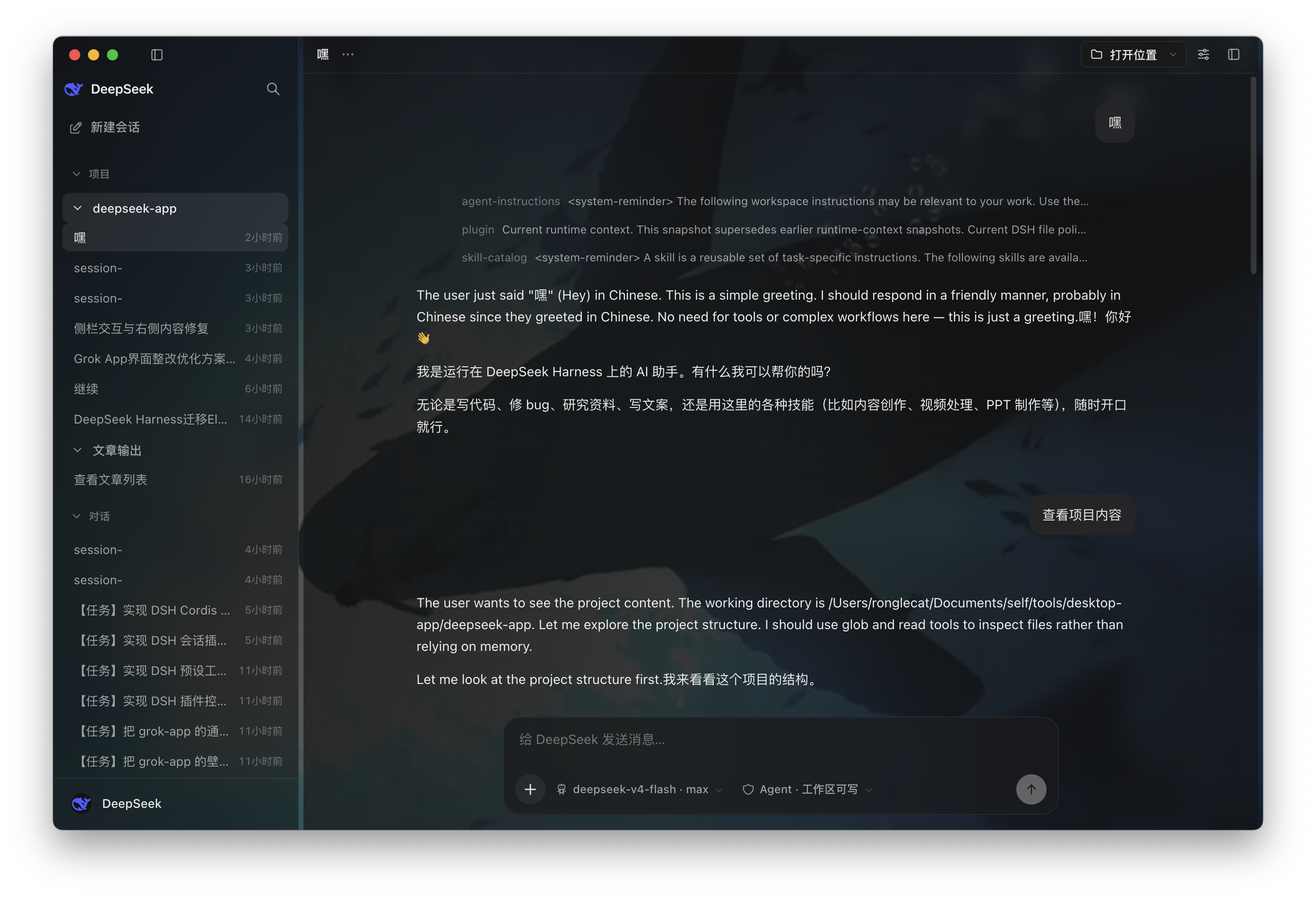
dsh is strong in a terminal. Day-to-day work still needs multi-workspace sessions, a permission chip, streaming tools and thinking, a file / terminal side pane, and bilingual UI.
DeepSeek App is that workbench:
- Install the app (the Harness engine boots inside an Electron utility process — no system
dshrequired) - Add a workspace / new session
- Put a DeepSeek (or compatible) API key in Settings, or at first-run onboarding
- Chat, preview files, open a terminal, manage plugins and presets
Stack: Electron 37 + electron-vite · React 19 + TypeScript · Tailwind CSS · DeepSeek Harness (utilityProcess + MessagePort)
The renderer never talks to /api directly. It only uses window.desktop.*. Main process owns the trust fence, filesystem gate, and engine lifecycle.
Features
| Area | What you get |
|---|---|
| Real Harness sessions | In-process dsh web profile via utilityProcess; crash-isolated; auto-respawn |
| Projects & sessions | Workspaces, search, pin, archive, fork, rename, export; draft page until first send |
| Streaming chat | Tools + thinking chrome; plan / goal bar; edit last user turn and resend; stick-to-bottom; message-node rail; in-chat find |
| Composer | + / / / @ palettes; skill & file chips; attachments (drop / paste / pick); model + effort; permission chip; busy queue |
| Side workbench | Files (tree / preview / edit), browser, terminal (xterm + node-pty), skills, trajectory |
| Providers | DeepSeek + catalog + custom OpenAI-compatible; optional Grok login for that provider |
| Plugins & presets | Host plugin cards, Cordis console, preset studio, session plugin view |
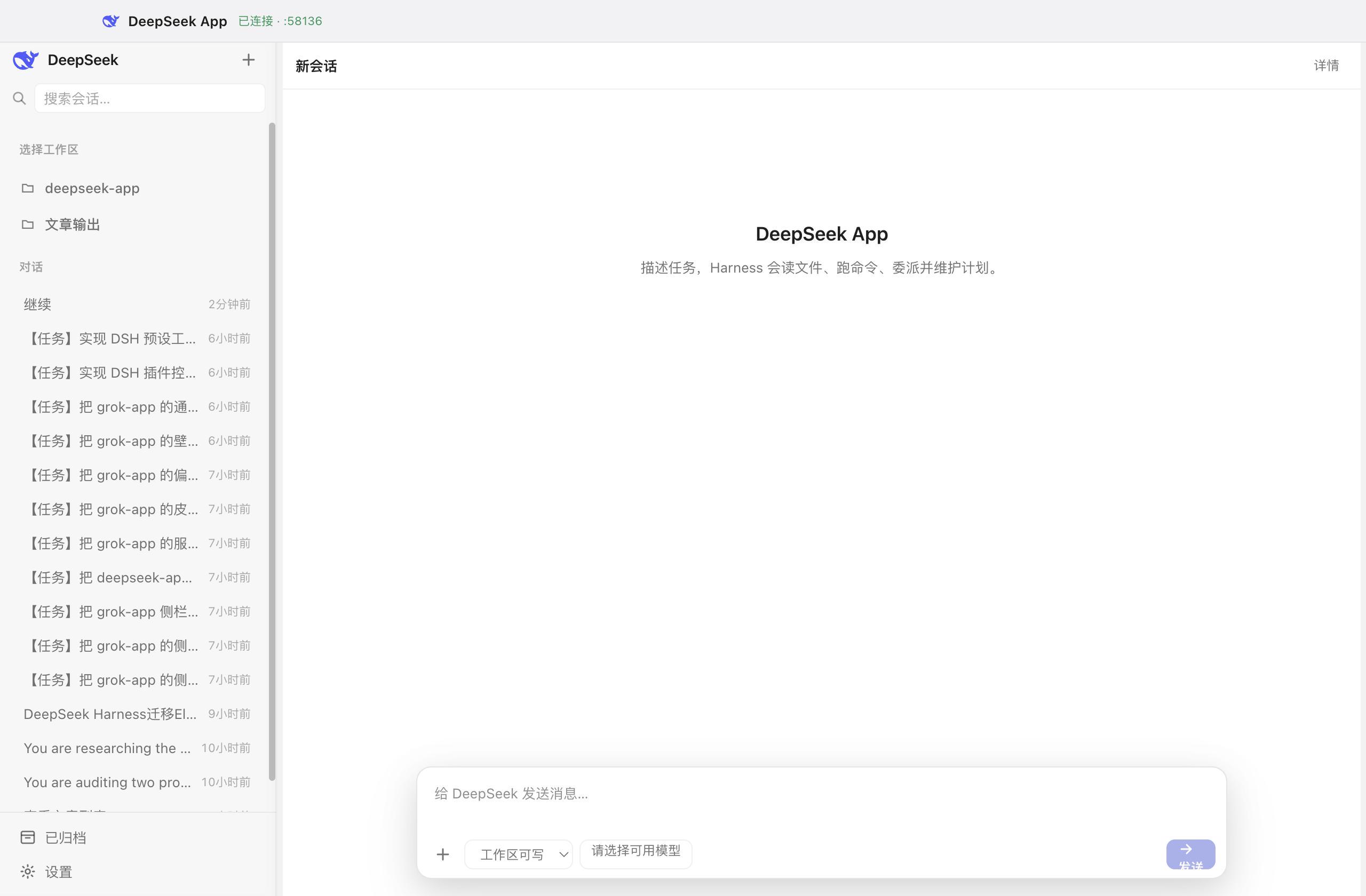
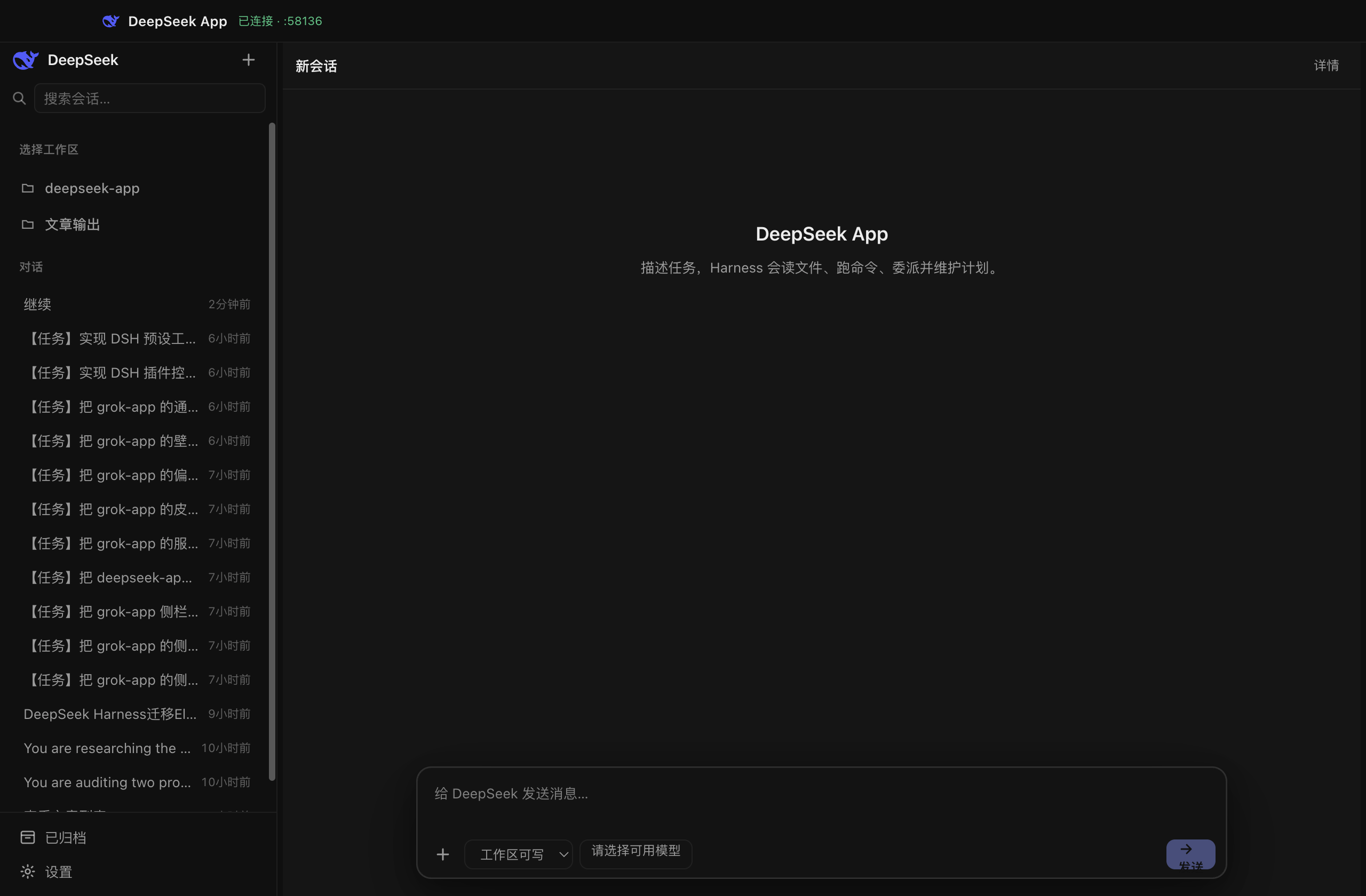
| Appearance | 6 skins × dark / light; wallpaper (image / gif / video + crop + scrim) |
| Native | Tray, app menu, single-instance lock, dsh://session/<id> deep link, in-app update |
| Security | Strict CSP, IPC sender checks, RPC whitelist, payload caps, filesystem fence, 3-tier permission gating |
| Diagnostics | Unified diagnostic zip (not session.export); token-usage heatmap from local logs |
| i18n | Simplified Chinese / Traditional Chinese / English |
| Packaging | macOS ARM / Intel · Windows x64 (setup + portable) · Linux x64 (AppImage / deb / rpm) |
Screenshots
From the current macOS development build.
| Workbench | Account & providers |
|---|---|
 |
 |
| Light theme | New session |
|---|---|
 |
 |
Install & first run
1. Download
Get installers from Releases:
| Platform | Artifact |
|---|---|
| macOS Apple Silicon | DeepSeek-App-*-mac-arm64.dmg |
| macOS Intel | DeepSeek-App-*-mac-x64.dmg |
| Windows x64 | NSIS *-win-x64.exe installer + *-win-x64.zip portable |
| Linux x64 | AppImage (in-app update) · .deb · .rpm |
The bundle product name is DeepSeek App (matches the window title).
Prebuilt packages need no build tools. Node / pnpm are only required if you build from source.
Verify your download
Each release ships a SHA256SUMS file. After downloading:
# macOS / Linux
shasum -a 256 -c SHA256SUMS --ignore-missing
# Windows (PowerShell)
Get-FileHash .\DeepSeek-App-*-win-x64.exe -Algorithm SHA256
Compare the PowerShell hash against the matching line in SHA256SUMS.
Windows SmartScreen
Community / unsigned Windows builds show SmartScreen “Windows protected your PC / Unknown publisher” on first run — click More info → Run anyway and verify the checksum above if in doubt. Release CI can Authenticode-sign installers when WINDOWS_CERTIFICATE + WINDOWS_CERTIFICATE_PASSWORD secrets are configured (see docs/BUILD.md); signed builds use the publisher name on the certificate.
In-app auto-update
Silent updates from Settings → About work on packaged mac / Windows / Linux AppImage builds. Local pnpm dev and Linux .deb / .rpm stay on the GitHub open-release / download installer path. Full matrix: docs/desktop-auto-update.md.
2. First run
- Launch → welcome dialog can store a DeepSeek API key (skippable; configure later in Settings)
- Add a workspace (or start in the general workspace)
- Pick a model / effort, set the permission chip (default is workspace-writable)
- Send a message — the first send materializes the draft session
Credentials land in $DSH_HOME/.credentials.yaml (default ~/.dsh). The repo never stores plaintext keys.
pnpm dev and the installed app share that same $DSH_HOME. The engine does not inherit a shell DEEPSEEK_API_KEY, so a terminal export cannot lock credentials.set. If the installed app already stored a key, the first-run prompt is skipped.
3. Requirements
- A DeepSeek API key, or another provider from Settings → Account
- Packaged app embeds Electron’s Node 22.21 (no system
dshneeded) - From source: Node.js 22.19+ and pnpm 9+
macOS “damaged” / Gatekeeper
Maintainer Releases are Apple-signed and notarized when Developer ID + App Store Connect API secrets are set (see docs/BUILD.md). Forks and unsigned local builds are not — Gatekeeper may block those downloads. That is expected.
Recommended:
xattr -cr "/Applications/DeepSeek App.app"
open "/Applications/DeepSeek App.app"
Also works:
- Finder: right-click → Open → confirm
- System Settings → Privacy & Security → Open Anyway
Only download from this repo’s official Releases.
Config paths
App data root is Electron userData (package name deepseek-app):
| Platform | Typical path |
|---|---|
| macOS | ~/Library/Application Support/deepseek-app/ |
| Windows | %APPDATA%\deepseek-app\ |
| Linux | ~/.config/deepseek-app/ |
<userData>/
  workspaces/general/     # unbound chat cwd (not listed as a sidebar project)
  network.json            # Settings → Runtime → Network (proxy); not ~/.dsh
  logs/
  crashDumps/
Harness data lives under ~/.dsh (override with DSH_HOME):
~/.dsh/
  .credentials.yaml       # API keys (do not commit)
  sessions/
  profiles/
  cordis.patch.yml        # host-plugin enable / disable
| Variable | Role |
|---|---|
DSH_HOME |
Harness home (settings, credentials, profiles) |
DSH_CWD |
Spawn cwd (default: current workspace) |
DSH_BIN |
Dev-only override to a local dsh binary; packaged / default v3 boots in-tree |
Develop & build
# Needs: Node 22.19+, pnpm 9+
pnpm install
pnpm dev

# Gates
pnpm typecheck
pnpm test
pnpm style:audit
pnpm build
pnpm run pack       # --dir (unpacked app)
pnpm dist           # current-host installers
pnpm dist:mac       # macOS arm64 + x64 (.dmg + .zip)
pnpm dist:win       # Windows x64 (NSIS + zip)
pnpm dist:linux     # AppImage + deb + rpm
Release (write the matching CHANGELOG.md section first):
./scripts/release-tag.sh 0.1.1
./scripts/release-tag.sh 0.1.1 --push
Cross-compile, signing, and CI notes: docs/BUILD.md.
asar is off because the engine’s profile heal creates real symlinks. scripts/fix-pnpm-collector.mjs runs before electron-builder.
Docs & contributing
| Audience | Link |
|---|---|
| Handoff (start here if you are taking over) | docs/HANDOFF.md |
| Feature map | docs/FEATURES.md |
| Protocol | docs/PROTOCOL.md |
| Architecture | docs/llm-wiki/architecture.md |
| Build & release | docs/BUILD.md |
| Auto-update | docs/desktop-auto-update.md |
| Changelog | CHANGELOG.md |
| Agent coding rules | AGENTS.md |
Issues and PRs are welcome. This is a sibling of Grok App; do not land Grok-only surfaces (official xAI account as a product, Imagine, Remote IM).
Author

License
MIT © RongleCat
Follow the author
| Channel | Link |
|---|---|
| X / Twitter | 铁柱AGI @cgnot996 |
| WeChat Official Account | Search 「铁柱AGI」 (QR at top left) |
| WeChat community group | Scan the QR at top right |
| Sibling app | Grok App |
linux.do 学AI,上L站
If DeepSeek App helps you, please star the repo ⭐
安装
装一次目录插件,之后本站所有插件都能让 DeepSeek Harness 自动找、自动装:
dsh plugin add dshbase-catalog然后对 agent 说「帮我装 deepseek-app」,它会在目录里找到并自动安装。文档:dshbase-catalog · 已验证场景包。
该插件是 GitHub 源码(未发 npm)——直接从仓库装:
Web profile:
dsh plugin --profile web add github:RongleCat/deepseek-appHeadless(CLI)profile:
dsh plugin --profile headless add github:RongleCat/deepseek-app实测报告
尚未 L3 验证——若已跑过,见下方失败备注。
备注:验证: install-fail (0.1.0-rc.6) 浏览全部待验证失败 →
使用场景
扩展 agent 的编码能力面——给它一个新工具、工作流或集成,让它接手以前做不了的开发任务。
适合谁
想让 dsh 在真实代码库上像队友一样干活的开发者——能改、能跑、能验证,而不只是回答问题。
二次开发建议
工具/命令面就是缝:暴露更多 SDK 能力、加更聪明的上下文接线,或收紧改代码与验证之间的循环。
分享徽章
把这枚徽章粘进 README——它会链回本页,实测状态变化时自动更新:

[](https://dshbase.com/zh/plugins/deepseek-app/)<a href="https://dshbase.com/zh/plugins/deepseek-app/"><img src="https://dshbase.com/badges/deepseek-app.svg" alt="dshbase 已收录"></a>