
Minke
已验证 · 实测可装 lencx
功能简介
🐳 DeepSeek Harness桌面版
推荐 — 实测可用且热门
🐳 DeepSeek Harness桌面版 实测能干净安装、正常启动。537+ stars,社区认可度高,是低风险选择。
「已验证」表示我们的自动化 CI 在干净 profile 里实际执行了 dsh plugin add 并启动成功——仅此而已。功能描述与版本兼容性均为作者声明。这不是安全审计,也不代表对第三方代码的背书。
README

Minke
A native desktop workspace for DeepSeek Harness
English · 简体中文




Minke brings DeepSeek Harness to the desktop as a focused, local-first workspace for agentic work. Conversations, project files, terminals, web tools, and native desktop actions stay within reach—without fragmenting your workflow across multiple apps.
[!IMPORTANT]
Minke is under active development. Features, packaging, and the local data schema may change as the project evolves. Minke is an independent community project, not an official DeepSeek product.
Highlights
- More than a chat window — Independent right and bottom Tabs keep Files, Terminal, Browser, Plugins, and Session details beside the active conversation. The Plugins workspace supports GitHub discovery, installation, status checks, repair, and removal. Files supports navigation, syntax-highlighted previews, editing, and diffs, while Terminal connects to a real PTY on the Minke host.
- A real remote workspace, not screen sharing — Minke Host projects supported desktop capabilities into a responsive Web UI. From a phone or tablet you can continue conversations, start agent tasks, work with project files, and use the host terminal without streaming pixels from the Electron window.
- Installable as a PWA — Open Minke through a secure HTTPS address and install it to the home screen for a standalone, app-like experience. The PWA provides branded launch surfaces and early connection feedback, while deliberately avoiding caches of authenticated workspace traffic.
- Private remote access — Minke can expose its responsive workspace through an application-managed remote route. The currently validated path is Tailscale Serve over HTTPS; Tailscale Direct IP and Cloudflare Access integrations remain experimental until they complete release testing.
- Local model integrations — Minke can discover and connect to LM Studio, Ollama, and other loopback OpenAI-compatible services. Optional lifecycle management can start supported local runtimes when needed without taking ownership of services that were already running.
- Fast keyboard-driven control — The global Command Palette (
Mod+K), configurable shortcuts, native menus, Session history navigation, log export, synchronized themes, and English and Chinese UI keep common actions close at hand. - Safe, recoverable data migration — Choose where Minke stores its data, then preview and merge existing Sessions, plugins, and settings. Minke deduplicates identical files, preserves conflicts and source directories, and switches only after the restart-time migration succeeds; starting with a clean data home remains an option.
- Local-first and cross-platform — Application state and browser session data stay on your machine under the Minke data boundary. Automated releases target macOS, Windows, and Linux, including a portable AppImage.
 |
 |
 |
 |
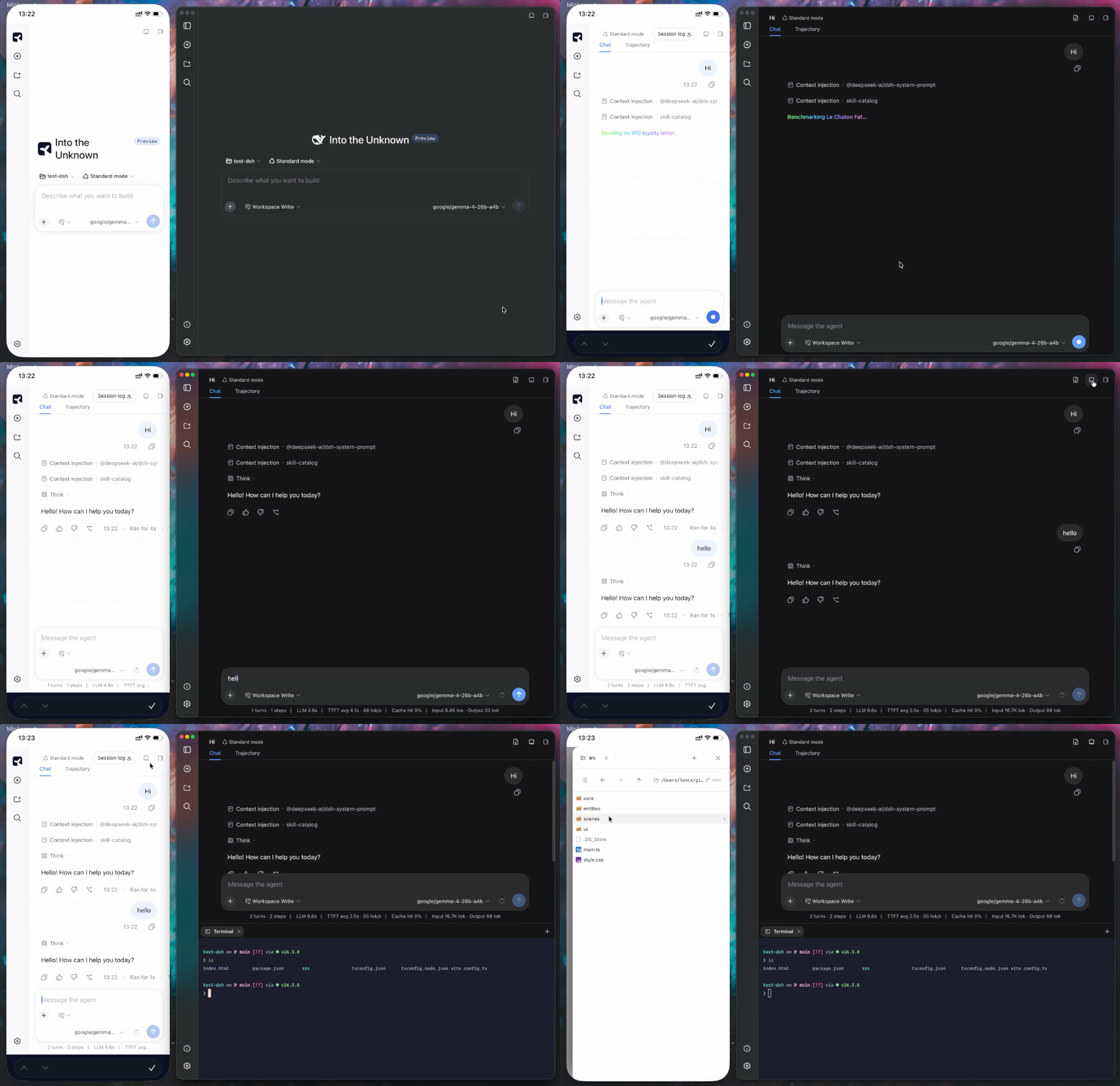
Mobile access with Tailscale
Minke remote access is a responsive Web client backed by Minke Host—not a
video stream or touch-controlled projection of the Electron window. From a
phone you can continue conversations, start agent tasks, manage project files,
and use a terminal that runs on the Minke computer.
[!NOTE]
The only remote route currently tested end to end is Tailscale Serve over
HTTPS. Tailscale Direct IP and Cloudflare Access are available as advanced
integrations, but have not yet completed release validation and should be
treated as experimental.
Minke can expose its Web UI privately through
Tailscale Serve.
It keeps Harness on the local loopback address, does not bind it to the LAN,
and does not enable the public Tailscale Funnel.
- Install Tailscale on the Minke computer and the phone, sign both into the
same tailnet, and confirm the computer is connected. - In Minke, open Settings → Remote access, enable
Access through Tailscale, then choose Restart Minke when prompted. - Return to Remote access, then copy or open the displayed
https://…ts.netaddress on the phone.
Install as a PWA
Open the Tailscale HTTPS address, choose Install Minke in the sidebar,
and accept the browser install prompt. On iPhone or iPad, use
Share → Add to Home Screen. The installed app launches in standalone mode;
when connectivity is poor it shows connection or offline feedback instead of
silently presenting cached workspace content.
Minke owns a foreground Serve session and stops it when the app exits. The
remote page can start agent tasks and use local tools already authorized in
Minke, so grant tailnet access only to people you trust.
Installation
Download Minke only from the official GitHub Releases page. The links below always point to the latest stable release.
| Platform | Architecture | Package |
|---|---|---|
| macOS | Apple Silicon (arm64) |
Download .dmg |
| macOS | Intel (x64) |
Download .dmg |
| Windows | x64 |
Download .exe |
| Linux | Debian / Ubuntu (x64) |
Download .deb |
| Linux | Fedora / RHEL (x64) |
Download .rpm |
| Linux | Any distro (portable) | Download .AppImage |
Release checksums are available in SHA256SUMS.
macOS
Download the
.dmgfile and open it.Drag
Minke.appinto the Applications folder.Current pre-release builds are not notarized. Open Terminal and remove the quarantine attribute from the installed app:
xattr -dr com.apple.quarantine "/Applications/Minke.app"Open Minke from the Applications folder.
[!CAUTION]
Removing the quarantine attribute bypasses a macOS security check. Run this command only forMinke.appdownloaded from the official Releases page, and never replace the path with a broad directory. You can also try Apple's Open Anyway flow under System Settings → Privacy & Security.
Windows
- Download the Windows x64
.exeinstaller. - Run the installer and follow the on-screen instructions.
- Windows may show a reputation-based warning for a new pre-release build. Continue only after confirming that the installer came from the official Minke Releases page.
Linux
Download the package for your distribution, then open it with your graphical package manager or install it from a terminal.
Debian / Ubuntu:
sudo apt install "/path/to/minke-package.deb"
Fedora / RHEL:
sudo dnf install "/path/to/minke-package.rpm"
Replace the example path with the downloaded package path.
Build from source
Build Minke on the same operating system and CPU architecture as the package you need. The build produces distributables for the current host under out/make; this project does not support cross-platform packaging from a single host.
Prerequisites:
- Git with submodule support. The
vendor/deepseek-harnesssubmodule must be checked out. - Node.js 24 or newer.
- pnpm 11.7.0, with the repository dependencies installed before running the scripts.
- macOS: an Apple Silicon or Intel Mac with Xcode Command Line Tools. The
.dmgtarget can only be built on macOS. - Windows: a Windows x64 host. Visual Studio 2022 Build Tools with the Desktop development with C++ workload may be needed if a native dependency must be compiled locally.
- Linux: a Linux x64 host with a native build toolchain,
fakeroot,dpkg, and eitherrpmorrpm-build.
On a fresh checkout, first install the repository dependencies, then prepare the Harness runtime:
pnpm run harness:stage
This command installs and builds the pinned DeepSeek Harness source, then stages the reusable desktop runtime under runtime/host. Run it after a fresh checkout, or whenever the pinned Harness source or runtime contract changes.
Start Minke in development mode with:
pnpm start
pnpm start refreshes the Minke integration in the prepared runtime and launches the development app.
Create the distributable package for the current platform with:
pnpm make
pnpm make performs a full runtime stage again before writing the platform package to out/make.
中国用户
如在使用中遇到问题,或希望进一步交流 Minke,可关注公众号「浮之静」,发送 dsh 获取进群码。也欢迎大家贡献 PR 或分享给更多朋友,您的每一次 Star 都是对开源项目的巨大支持,感恩。


安装
装一次目录插件,之后本站所有插件都能让 DeepSeek Harness 自动找、自动装:
dsh plugin add dshbase-catalog然后对 agent 说「帮我装 Minke」,它会在目录里找到并自动安装。文档:dshbase-catalog · 已验证场景包。
该插件是 GitHub 源码(未发 npm)——直接从仓库装:
Web profile:
dsh plugin --profile web add github:lencx/MinkeHeadless(CLI)profile:
dsh plugin --profile headless add github:lencx/Minke实测报告
验证通过:从 GitHub 源码完成 L1 安装 + L2 加载 + L3 运行(dsh 0.1.0-rc.6)。
使用场景
把 dsh 跑成原生桌面应用——独立窗口、托盘图标、快捷键——而不是浏览器标签。
适合谁
想要已安装应用的感觉和系统集成(托盘、全局热键、开机自启)的人。
二次开发建议
原生壳是缝——加全局快捷键、通知、单实例锁或按 OS 定制的行为。
分享徽章
把这枚徽章粘进 README——它会链回本页,实测状态变化时自动更新:

[](https://dshbase.com/zh/plugins/Minke/)<a href="https://dshbase.com/zh/plugins/Minke/"><img src="https://dshbase.com/badges/Minke.svg" alt="dshbase 实测可装"></a>