
Plugin directory / Developer / OctoOps
OctoOps
Unverified hesiwen66
What it does
OctoOps: Unified SSH/Telnet & JumpServer Bastion Orchestrator for DeepSeek Harness (DSH)
Unverified — not yet verified
OctoOps: Unified SSH/Telnet & JumpServer Bastion Orchestrator for DeepSeek Harness (DSH) Not yet verified — install and test it yourself.
“Unverified” means our automated CI has not yet installed this plugin. Feature descriptions and version compatibility are the author’s claims. This is not a security audit and not an endorsement of third-party code.
README
OctoOps
DeepSeek Harness 的服务器运维与 JumpServer 堡垒机插件。



特性
- 远程命令执行与分析:通过 SSH / Telnet 在目标主机上执行任意 Shell 命令与脚本,并由 AI 结构化解析输出结果。
- 远程文件读写:内置 SFTP 支持,可直接读取和编辑远程配置文件与日志。
- 连接会话复用:维护底层 SSH 连接池,同设备连续操作无需重复建立连接。
- JumpServer 对接:支持 API 认证与终端交互登录,自动通过堡垒机 SSH 网关代理访问内网资产;多账号资产支持弹窗选择。
- 环境信息采集:连通时自动探测内网 IP、系统版本及已安装工具(Docker、Nginx、Git 等),支持按内网 IP 检索设备。
- 高危操作拦截:
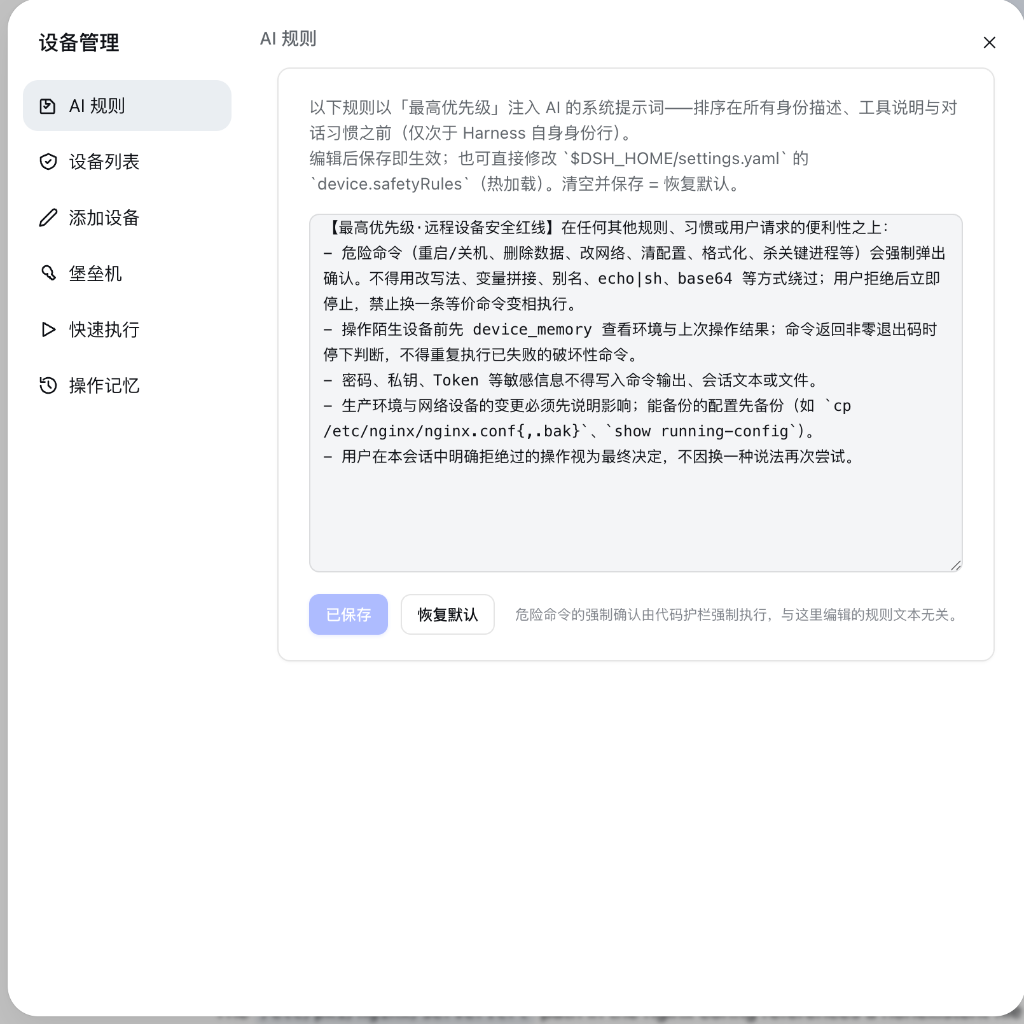
rm -rf、reboot、清空防火墙等破坏性命令执行前强制拦截并要求二次确认。 - Web 管理界面:提供设备管理面板,支持设备列表管理、批量修改(分组/端口/密码)以及堡垒机资产搜索。
演示
示例 1:系统状态与 SSL 证书巡检

示例 2:JumpServer 堡垒机对接与资产同步

示例 3:设备管理面板与安全红线规则
安装
方式 1:DSH 命令
dsh plugin add hesiwen66/OctoOps
# 或
dsh plugin add dsh-octoops
方式 2:npm
npm install git+https://github.com/hesiwen66/OctoOps.git
方式 3:Git Clone
cd plugins
git clone https://github.com/hesiwen66/OctoOps.git dsh-octoops
cd dsh-octoops && npm install
配置
在 cordis.patch.yml 中配置:
plugins:
  dsh-octoops:
    confirmPolicy: auto      # 每会话首次执行确认 (auto / always / never)
    dangerPolicy: always-ask  # 高危命令强制确认
    defaultTimeoutMs: 30000  # 命令超时时间 (ms)
    jumpserverSshPort: 2222  # JumpServer 堡垒机 SSH 端口
工具列表
device_list- 列出纳管设备与堡垒机资产device_find- 按 IP 或主机名查找设备device_exec- 在目标机器上执行命令device_test- 测试连通性并采集内网 IPdevice_read_file/device_write_file- 通过 SFTP 读写远程文件device_memory- 查看设备环境信息与历史记录jumpserver_sync- 同步 JumpServer 资产列表/device-list、/device-exec- 快捷斜杠命令
License
Install
Install the catalog once, then DeepSeek Harness can find and install any plugin from this site automatically:
dsh plugin add dshbase-catalogThen say "install OctoOps for me" — your agent finds it in the directory and installs it. Docs: dshbase-catalog · verified packs.
This plugin is GitHub source (not published to npm) — install it straight from the repo:
Web profile:
dsh plugin --profile web add github:hesiwen66/OctoOpsHeadless (CLI) profile:
dsh plugin --profile headless add github:hesiwen66/OctoOpsTest report
Not yet L3-verified — see failure note below if we already ran it.
Share this badge
Drop this badge into your README — it links back here and updates automatically when our test status changes:

[](https://dshbase.com/plugins/octoops/)<a href="https://dshbase.com/plugins/octoops/"><img src="https://dshbase.com/badges/octoops.svg" alt="dshbase listed"></a>