
Plugin directory / Developer / dsh-viewboost
dsh-viewboost
Unverified AlexCHONG8
What it does
DeepSeek Harness 插件:右侧预览面板工具栏增强(访达显示/全屏/复制路径/复制文件)+ Token 用量卡
Unverified — not yet verified
DeepSeek Harness 插件:右侧预览面板工具栏增强(访达显示/全屏/复制路径/复制文件)+ Token 用量卡 Not yet verified — install and test it yourself.
“Unverified” means our automated CI has not yet installed this plugin. Feature descriptions and version compatibility are the author’s claims. This is not a security audit and not an endorsement of third-party code.
README
viewboost
DeepSeek Harness 右侧预览面板的工具栏增强:在访达显示、全屏、复制路径、复制文件,外加一个 Token 用量卡。




给 DSH 右侧的 aionui 预览面板工具栏加几个按钮,顺手在左下角放一个 Token 用量卡。不碰任何第三方插件源码。
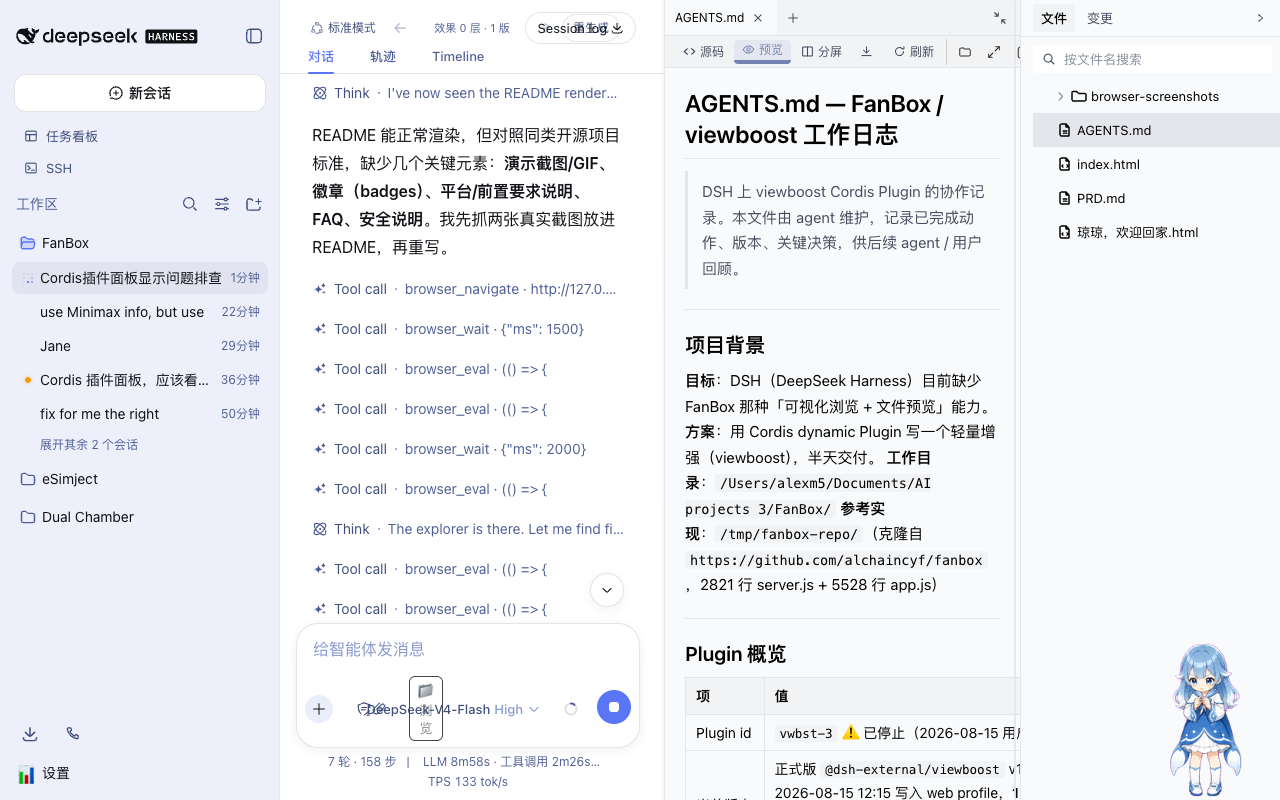
功能
| 按钮 | 干什么 |
|---|---|
| 📁 在访达显示 | 在 macOS Finder 里选中当前预览的文件(open -R) |
| ⤢ 全屏 | 预览面板全屏,按 Esc 退出 |
| 📋 复制路径 | 复制文件绝对路径 |
| ⧉ 复制文件 | 把文件引用放进剪贴板,Finder 里 Cmd+V 就能粘贴复制 |
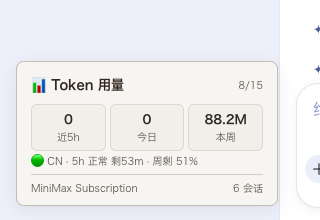
| 📊 Token 用量 | 左下角卡片:近 5h / 今日 / 本周用量,可选 MiniMax 配额状态 |
工具栏图标用的是 feather SVG,和 FanBox 同一套。
安装
前提:已经跑着一个 DeepSeek Harness 的 web profile。
直接装(推荐):
dsh plugin --profile web add github:AlexCHONG8/dsh-viewboost
或者本地 clone 后装:
git clone https://github.com/AlexCHONG8/dsh-viewboost.git
dsh plugin --profile web add link:/path/to/dsh-viewboost
装完重启 DSH(dsh web)就生效。插件随 profile 自动挂载,不用像动态插件那样每次去 Cordis 面板点「运行」。
用法
- 右侧文件树点开任意文件,预览工具栏会出现 4 个图标按钮
- 📁 Finder 弹出并选中该文件
- 📋 复制完整路径
- ⧉ 文件进剪贴板,切到 Finder 按
Cmd+V粘贴(相当于复制文件) - ⤢ 全屏预览,
Esc退出 - 📊 左下角 Token 用量卡
MiniMax 配额(可选)
往 ~/.dsh/viewboost.env(权限 0600)写:
MINIMAX_CN_API_KEY=sk-cp-...    # 国内版 api.minimaxi.com
# 或
MINIMAX_API_KEY=sk-...          # 国际版 api.minimax.io
卡片底部会显示真实的 Token Plan 状态(5h 滚动窗口 / 周配额剩余、倒计时)。
环境要求
- 需要 DSH 的
webprofile,目标是 aionui 右侧面板布局 - macOS 功能最全(Finder 显示、文件引用剪贴板)
- Linux / Windows:复制路径、全屏、用量卡能用,Finder 相关按钮自动降级
项目结构
viewboost/
├── dsh.plugin.json      # DSH 插件清单 (client.main)
├── cordis.patch.yml     # bundle patch(dsh plugin add 时自动挂载)
├── package.json         # npm 包 + dsh.bundle/client 声明
└── lib/
    ├── index.js         # Host: /viewboost/* HTTP 路由 (fs/subprocess/curl)
    └── client.js        # Client: 工具栏注入 + Token 卡 (module-loader 包装)
实现原理
- Host 声明
inject: ['fs', 'webServer'],注册/viewboost/{list,read,fileUrl,stat,thumb,binary,finder,copyfile,usage,minimax}路由 - Client 用
window.__ModuleLoader__.load()包装,通过fetch('/viewboost/...')调 host - aionui 集成:MutationObserver 把按钮插进
.aionui-preview-col工具栏(刷新按钮旁边),当前文件路径靠拦截/aionui-panel/read|list的 fetch 拿到 - 复制:同步
execCommand('copy')(离屏 textarea,和官方 writeClipboard 一个思路)+ Clipboard API 双保险
迭代过程踩的坑都记在 docs/ITERATION-NOTES.md,想给 DSH 写插件的人可以看看。
特别致谢
灵感来自**花叔(Huashu)**的 FanBox:给 Agent 界面配「可视化浏览 + 文件预览」这个想法,还有工具栏那套 feather SVG 图标,都是从他那儿来的。这个插件算是我照着那份灵感手搓出来的。感谢花叔,没有 FanBox 就没有它。🙏
License
MIT,见 LICENSE。
Install
Install the catalog once, then DeepSeek Harness can find and install any plugin from this site automatically:
dsh plugin add dshbase-catalogThen say "install dsh-viewboost for me" — your agent finds it in the directory and installs it. Docs: dshbase-catalog · verified packs.
This plugin is GitHub source (not published to npm) — install it straight from the repo:
Web profile:
dsh plugin --profile web add github:AlexCHONG8/dsh-viewboostHeadless (CLI) profile:
dsh plugin --profile headless add github:AlexCHONG8/dsh-viewboostTest report
Not yet L3-verified — see failure note below if we already ran it.
2026-08-27 · flagged webonly Note: 验证: web-only;待 L4 web CDP;L4 web CDP runtime-fail on dsh 0.1.0-rc.8. Browse all pending failures →
Share this badge
Drop this badge into your README — it links back here and updates automatically when our test status changes:

[](https://dshbase.com/plugins/dsh-viewboost/)<a href="https://dshbase.com/plugins/dsh-viewboost/"><img src="https://dshbase.com/badges/dsh-viewboost.svg" alt="dshbase listed"></a>