
Plugin directory / Developer / dsh-usage-meter
dsh-usage-meter
Unverified cute-baobao
What it does
DeepSeek Harness plugin: per-model daily token usage recorder (input/output/cache hits) with a Web GUI dashboard.
Unverified — not yet verified
DeepSeek Harness plugin: per-model daily token usage recorder (input/output/cache hits) with a Web GUI dashboard. Not yet verified — install and test it yourself.
“Unverified” means our automated CI has not yet installed this plugin. Feature descriptions and version compatibility are the author’s claims. This is not a security audit and not an endorsement of third-party code.
README
dsh-usage-meter
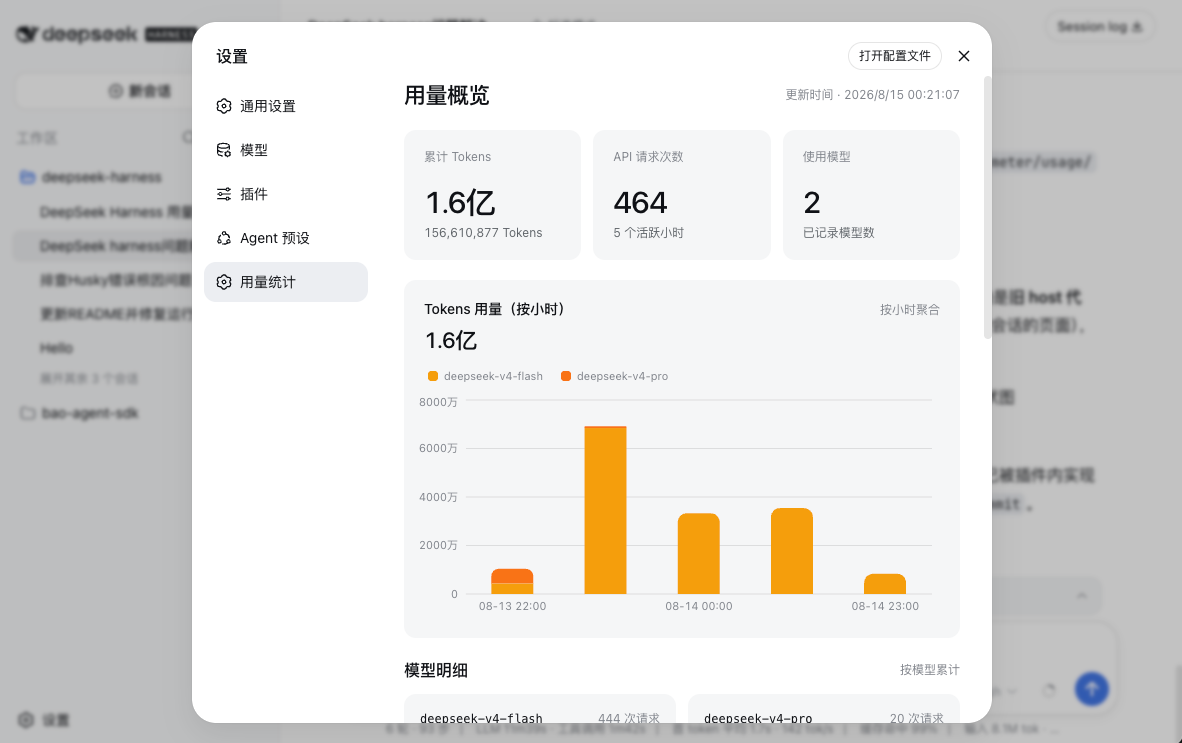
DeepSeek Harness 用量统计插件:自动记录模型调用的 token 用量,按「模型 × 小时」聚合,在 Web GUI 设置页以堆叠柱状图展示(每小时一根柱子,按模型分色)。
🌐 English · 中文
安装
pnpm dsh plugin --profile web add @dsh-usage-meter/usage
刚发布当天若解析失败,显式钉版本(如
@dsh-usage-meter/[email protected])即可。
重启 dsh web,设置 → 用量统计 即可查看。
卸载
pnpm dsh plugin --profile web remove @dsh-usage-meter/usage
数据
记录在 $DSH_HOME/usage-meter/usage.jsonl,启动时按小时重新聚合;界面中英双语,跟随 GUI 语言。
许可
MIT
Install
Install the catalog once, then DeepSeek Harness can find and install any plugin from this site automatically:
dsh plugin add dshbase-catalogThen say "install dsh-usage-meter for me" — your agent finds it in the directory and installs it. Docs: dshbase-catalog · verified packs.
This plugin is GitHub source (not published to npm) — install it straight from the repo:
Web profile:
dsh plugin --profile web add github:cute-baobao/dsh-usage-meterHeadless (CLI) profile:
dsh plugin --profile headless add github:cute-baobao/dsh-usage-meterTest report
Not yet L3-verified — see failure note below if we already ran it.
Note: 验证: install-fail (0.1.0-rc.6) Browse all pending failures →
When to use it
Extend the agent's coding surface — give it a new tool, workflow, or integration so it handles a dev task it couldn't before.
Who it's for
Developers who want dsh to behave like a teammate on real codebases — editing, running, and verifying changes rather than just answering.
For developers — extending it
The tool/command surface is the seam: expose more of the SDK, add smarter context wiring, or tighten the loop between code changes and verification.
Share this badge
Drop this badge into your README — it links back here and updates automatically when our test status changes:

[](https://dshbase.com/plugins/dsh-usage-meter/)<a href="https://dshbase.com/plugins/dsh-usage-meter/"><img src="https://dshbase.com/badges/dsh-usage-meter.svg" alt="dshbase listed"></a>