
Plugin directory / Developer / dsh-tool-vision-read
dsh-tool-vision-read
Unverified Mappedinfo
What it does
DSH plugin: vision_read — route image reading to a dedicated vision model (e.g. Kimi K3) so text-only agents can see images
Unverified — not yet verified
DSH plugin: vision_read — route image reading to a dedicated vision model (e.g. Kimi K3) so text-only agents can see images Not yet verified — install and test it yourself.
“Unverified” means our automated CI has not yet installed this plugin. Feature descriptions and version compatibility are the author’s claims. This is not a security audit and not an endorsement of third-party code.
README
dsh-tool-vision-read
Unofficial community plugin. Independently developed and maintained; not part of the official DeepSeek Harness distribution.
A lightweight DeepSeek Harness plugin that registers a vision_read tool: it reads an image file through a dedicated vision model route and returns a text description — so a text-only agent (a model whose route does not declare image input, e.g. a chat model without vision) can still "see" images.
It is the same idea as routing different roles to different models (e.g. oh-my-pi's modelRoles), applied to one narrow capability: image description. No third-party CLI (modlens etc.), no manual delegation — the plugin does it in one call.
How it works
| Mode | Behavior | Cost |
|---|---|---|
direct (default) |
The plugin reads the file, commits it through the attachment service, and makes one llm.stream call to the configured vision provider/model with a text+image message. |
One round trip, no agent loop. |
subagent |
The plugin starts an in-process subagent pinned to the vision route (agentOptions), which calls read_image itself and can iterate (zoom, OCR, follow-ups). |
Full agent loop, more flexible. |
The tool always routes to the configured vision route, regardless of the calling model. Configuration parsing fails when either route id is omitted; a call resolves the route before image I/O and fails with guidance when the resolved route does not declare image input (declare it in the provider settings, e.g. defaultInput: [text, image] for pi-ai routes).
Requirements
- A DeepSeek Harness deployment (source checkout or out-of-tree profile install).
- A vision-capable model route. The plugin was verified against Kimi Coding API (
k3-256k, which accepts image input) — any provider that supports image content blocks works.
Install
Option A: inside the deepseek-harness monorepo (recommended for development)
Copy this package under packages/vision/tool-vision-read (or install from git), then:
pnpm install
Register the package in tsconfig.base.json (add ./packages/vision/*/src to the @deepseek-ai/dsh-* wildcard and the @deepseek-ai/dsh-*/invariant wildcard) and in tsconfig.host.json references, then mount it — see the official adding-a-package cookbook.
Option B: install the Profile Bundle (recommended)
Install the Git repository into a profile through the DSH plugin manager:
dsh plugin --profile web add github:Mappedinfo/dsh-tool-vision-read
For local development, link the checkout instead:
dsh plugin --profile web add link:/absolute/path/to/dsh-tool-vision-read
The package declares a DSH Profile Bundle, so a successful install adds it to dsh.profile.bundles. Restart dsh web; its bundled cordis.patch.yml mounts vision_read automatically. The default route is kimi-coding / k3-256k. Override it for one launch without editing the package:
DSH_VISION_PROVIDER=my-provider DSH_VISION_MODEL=my-vision-model dsh web
The profile's own cordis.patch.yml is applied after the Bundle. Use an id-targeted override when the route or other options must be durable:
- id: tool-vision-read
  config:
    provider: my-provider
    model: my-vision-model
    mode: direct
Do not insert a second tool-vision-read row in the profile. Remove the Bundle with dsh plugin --profile web remove @deepseek-ai/dsh-tool-vision-read. The @deepseek-ai/* peer packages are satisfied by the DSH installation's module closure ($DSH_HOME/profiles/node_modules flat fallback) — autoInstallPeers: false keeps pnpm from pulling older registry copies.
Configuration
| Key | Type | Default | Meaning |
|---|---|---|---|
provider |
string | — (required) | Registered provider route owning the vision model. |
model |
string | — (required) | Vision model id on that route. |
toolName |
string | vision_read |
Model-facing tool name. |
mode |
'direct' | 'subagent' |
'direct' |
Execution mode. |
maxImageBytes |
number | attachment limits | Cap on image bytes sent to the vision route. |
maxOutputTokens |
number | 1024 |
Cap on the vision route's output tokens. |
prompt |
string | see source | Instruction sent beside the image; {{path}} and {{focus}} placeholders. |
Tool contract
vision_read(file_path: string, focus?: string)
Returns { path, provider, model, description } — the vision model's text description of the image. Accepts PNG/JPEG/WebP/GIF paths only; paths resolve against the calling session's workspace cwd.
Example
A text-only agent (deepseek-v4-flash) calling vision_read on a campus-gate photo, with the description produced by Kimi K3-256K through the kimi-coding route:
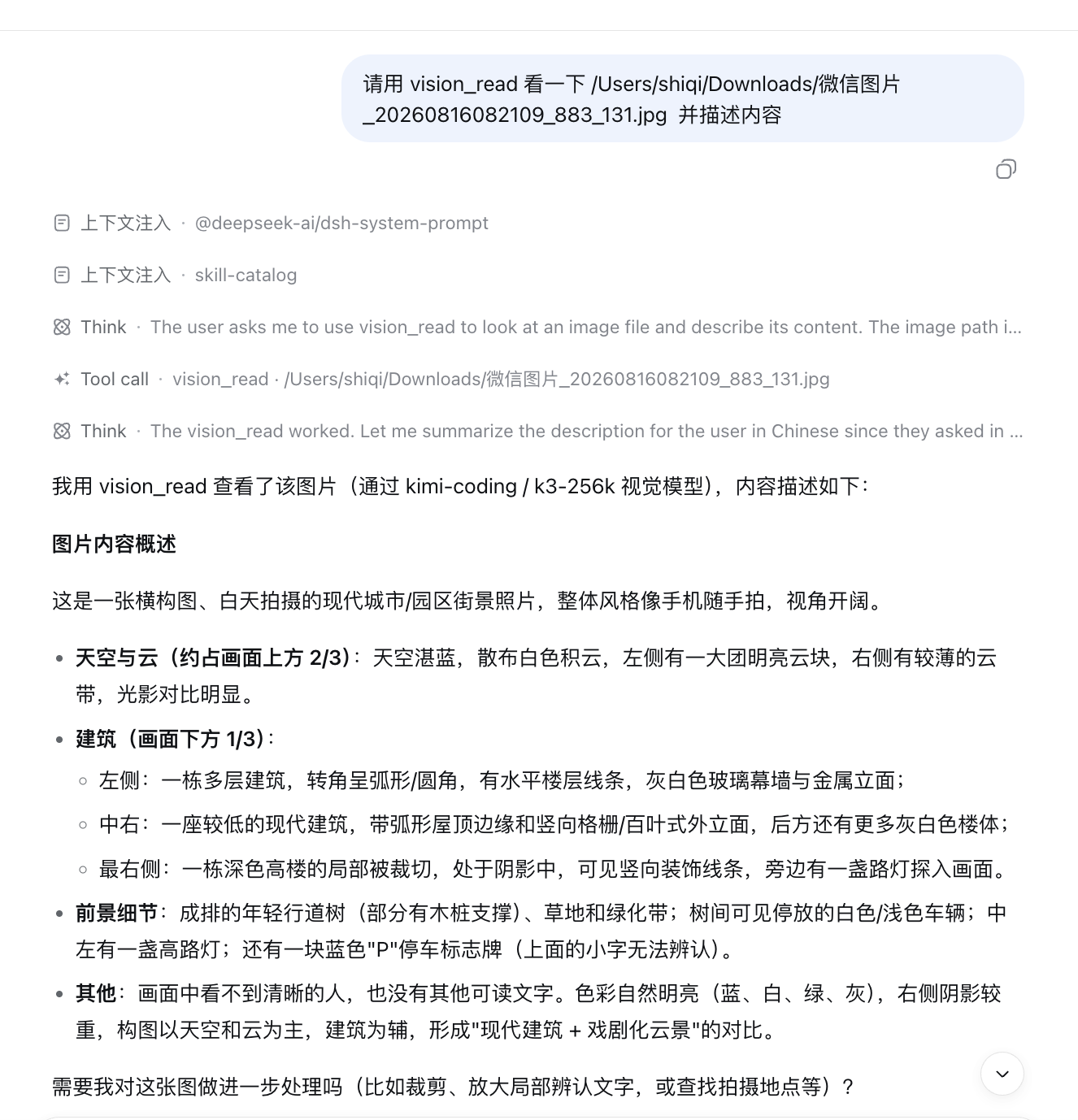
user: 请用 vision_read 看一下 /Users/shiqi/Downloads/微信图片_20260816082109_883_131.jpg 并描述内容
agent: (vision_read) → "这是一张横构图、白天拍摄的现代城市/园区街景照片……天空与云约占画面上方 2/3……
        左侧一栋多层建筑转角呈弧形……中右一座较低的建筑带弧形屋顶边缘和竖向格栅外立面……"
Layout
src/index.ts          # plugin (name/inject/apply/Config) + vision_read tool
src/invariant.ts      # package invariant companion (no runtime invariant)
cordis.patch.yml      # auto-mounted DSH Profile Bundle layer
lib/                  # reference build emitted from the deepseek-harness monorepo
tests/                # vitest spec (runs in the monorepo context)
docs/dsh-discussion-draft.md   # DeepSeek Harness "Show Your Plugins!" draft
Notes
lib/is the reference build generated from the package inside the deepseek-harness monorepo (packages/vision/tool-vision-read); the tests run against the monorepo toolchain. The git dependency installs the committedlib/directly.- Developed and verified end-to-end: a text-only agent (deepseek-v4-flash) calling
vision_readon a JPEG received a correct description from Kimi K3-256K.
License
MIT
Install
Install the catalog once, then DeepSeek Harness can find and install any plugin from this site automatically:
dsh plugin add dshbase-catalogThen say "install dsh-tool-vision-read for me" — your agent finds it in the directory and installs it. Docs: dshbase-catalog · verified packs.
This plugin is GitHub source (not published to npm) — install it straight from the repo:
Web profile:
dsh plugin --profile web add github:Mappedinfo/dsh-tool-vision-readHeadless (CLI) profile:
dsh plugin --profile headless add github:Mappedinfo/dsh-tool-vision-readTest report
Not yet L3-verified — see failure note below if we already ran it.
Share this badge
Drop this badge into your README — it links back here and updates automatically when our test status changes:

[](https://dshbase.com/plugins/dsh-tool-vision-read/)<a href="https://dshbase.com/plugins/dsh-tool-vision-read/"><img src="https://dshbase.com/badges/dsh-tool-vision-read.svg" alt="dshbase listed"></a>