
Plugin directory / Developer / dsh-plugin-rollback-whale
dsh-plugin-rollback-whale
Unverified ccbili30-collab
What it does
回档大肥鱼:DeepSeek Harness 的可安装外置回档与恢复插件
Unverified — not yet verified
回档大肥鱼:DeepSeek Harness 的可安装外置回档与恢复插件 Not yet verified — install and test it yourself.
“Unverified” means our automated CI has not yet installed this plugin. Feature descriptions and version compatibility are the author’s claims. This is not a security audit and not an endorsement of third-party code.
README
Rollback Whale
中文 | English
A well-fed guardian that helps DeepSeek Harness swim back to a healthy checkpoint.
Rollback Whale is an independently installable DSH plugin. It adds a compact power-style menu to the sidebar and a complete checkpoint manager to Settings. The recovery guardian and its payload store live outside the DSH checkout, so a broken UI or plugin composition does not remove the command-line escape hatch.
Install
dsh plugin --profile web add github:ccbili30-collab/dsh-plugin-rollback-whale
Restart the Web profile after installation. When DSH is launched from a Git checkout, Rollback Whale finds the source root automatically. Otherwise set DSH_SOURCE_HOME=/path/to/deepseek-harness before launch.
To remove it:
dsh plugin --profile web remove dsh-plugin-rollback-whale
Screenshots
| Quick power menu | Management in Settings |
|---|---|
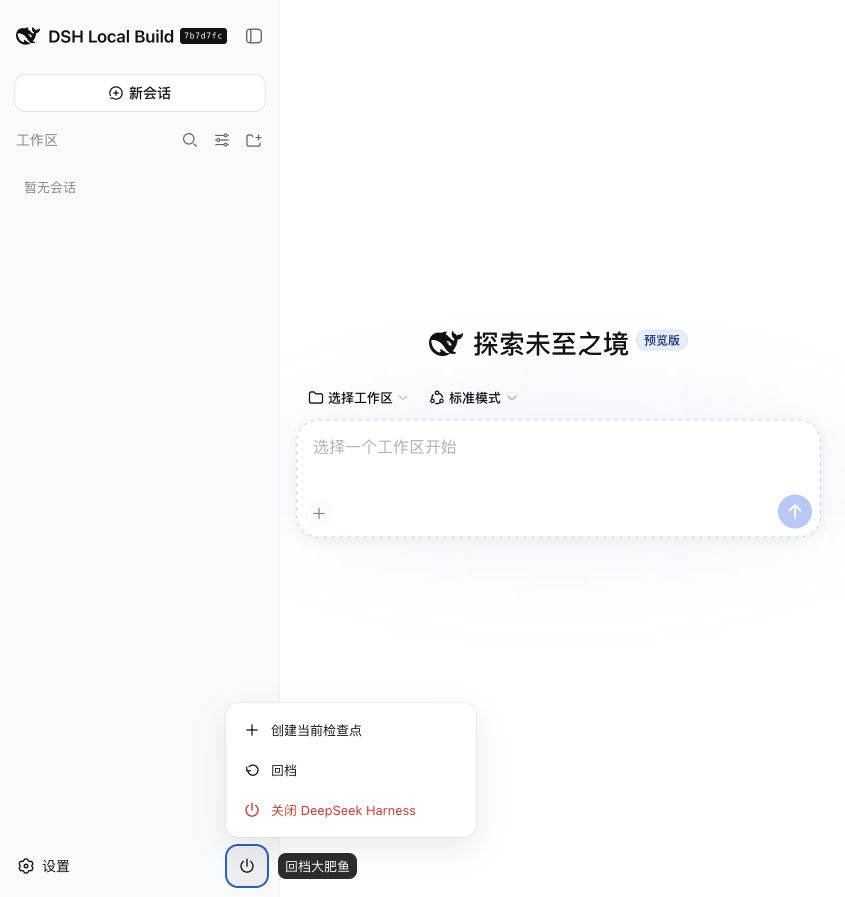 |
 |
What it protects
- Creates immutable checkpoints from the current Git checkout and DSH control files.
- Stores checkpoints under
~/.dsh-recoveryby default, outside both the checkout andDSH_HOME. - Verifies every payload with SHA-256 before restore.
- Creates an automatic rescue checkpoint, shuts DSH down, restores offline, and restarts the original launcher.
- Provides
rollback-whaleas a boot-independent CLI when the Web profile cannot start.
Credentials, conversations, attachments, storage data, workspaces, and installed dependencies are deliberately excluded. This is safe rollback—not a data-erasing factory reset.
Emergency CLI
rollback-whale list
rollback-whale create --source /path/to/deepseek-harness --label "before plugin install"
rollback-whale verify CHECKPOINT_ID
rollback-whale restore CHECKPOINT_ID --confirm CHECKPOINT_ID --offline --source /path/to/deepseek-harness
Stop DSH before using the manual restore command. UI-initiated restore handles shutdown and restart through the detached guardian.
License
MIT
Install
Install the catalog once, then DeepSeek Harness can find and install any plugin from this site automatically:
dsh plugin add dshbase-catalogThen say "install dsh-plugin-rollback-whale for me" — your agent finds it in the directory and installs it. Docs: dshbase-catalog · verified packs.
This plugin is GitHub source (not published to npm) — install it straight from the repo:
Web profile:
dsh plugin --profile web add github:ccbili30-collab/dsh-plugin-rollback-whaleHeadless (CLI) profile:
dsh plugin --profile headless add github:ccbili30-collab/dsh-plugin-rollback-whaleTest report
Not yet L3-verified — see failure note below if we already ran it.
2026-08-26 · flagged webonly Note: 验证: web-only;待 L4 web CDP;L4 web CDP runtime-fail on dsh 0.1.0-rc.8. Browse all pending failures →
Share this badge
Drop this badge into your README — it links back here and updates automatically when our test status changes:

[](https://dshbase.com/plugins/dsh-plugin-rollback-whale/)<a href="https://dshbase.com/plugins/dsh-plugin-rollback-whale/"><img src="https://dshbase.com/badges/dsh-plugin-rollback-whale.svg" alt="dshbase listed"></a>