
Plugin directory / Developer / dsh-plugin-mgr
dsh-plugin-mgr
Unverified oxlyn
What it does
deepseek harness plugin manager
Unverified — not yet verified
deepseek harness plugin manager Not yet verified — install and test it yourself.
“Unverified” means our automated CI has not yet installed this plugin. Feature descriptions and version compatibility are the author’s claims. This is not a security audit and not an endorsement of third-party code.
README
dsh-plugin-mgr


DeepSeek Harness (DSH) 插件:在 设置 → 插件 页面新增「插件管理」子页面——卡片式管理已安装插件,支持启停切换、详情查看与卸载。
中文 | EN
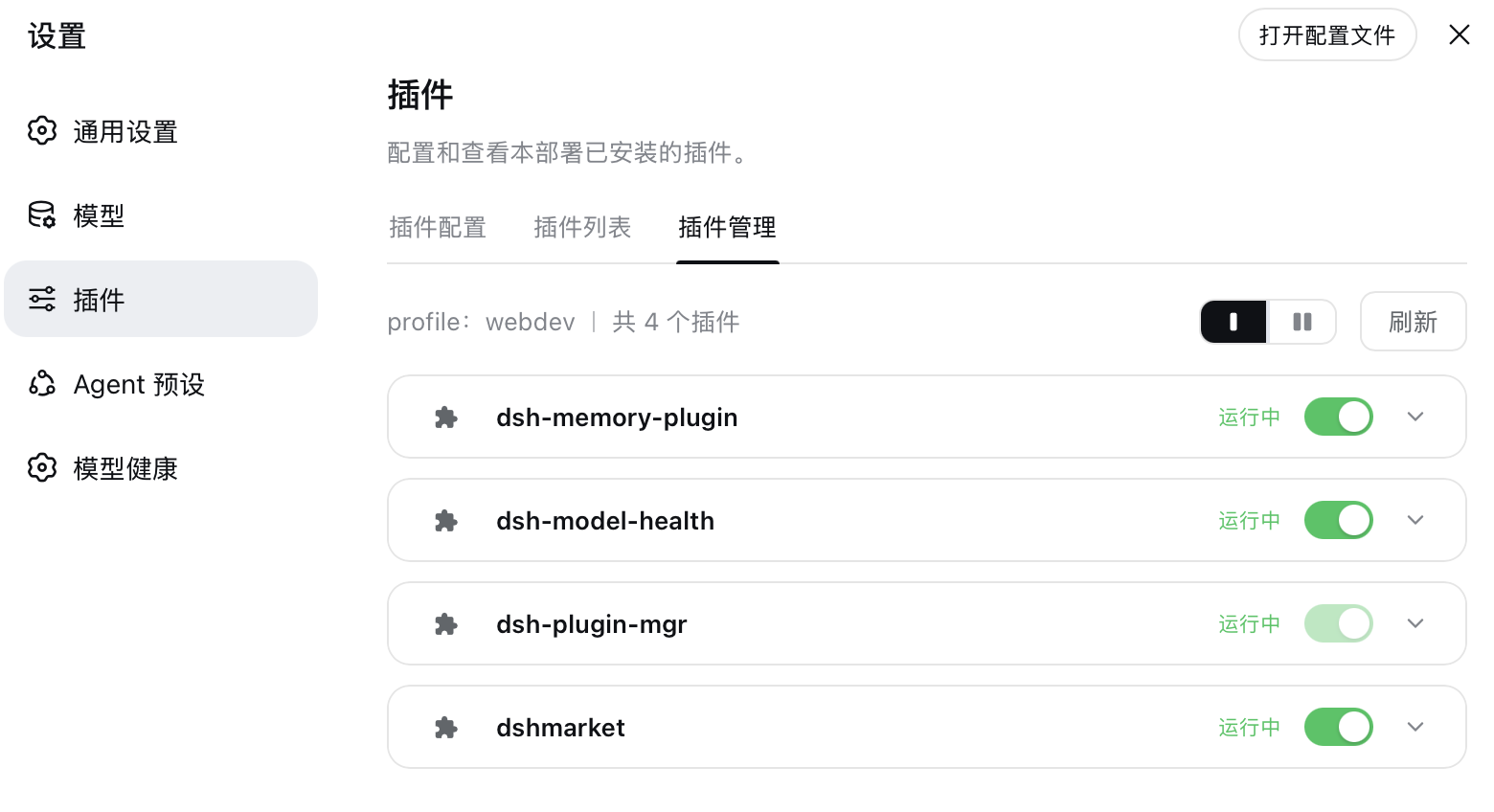
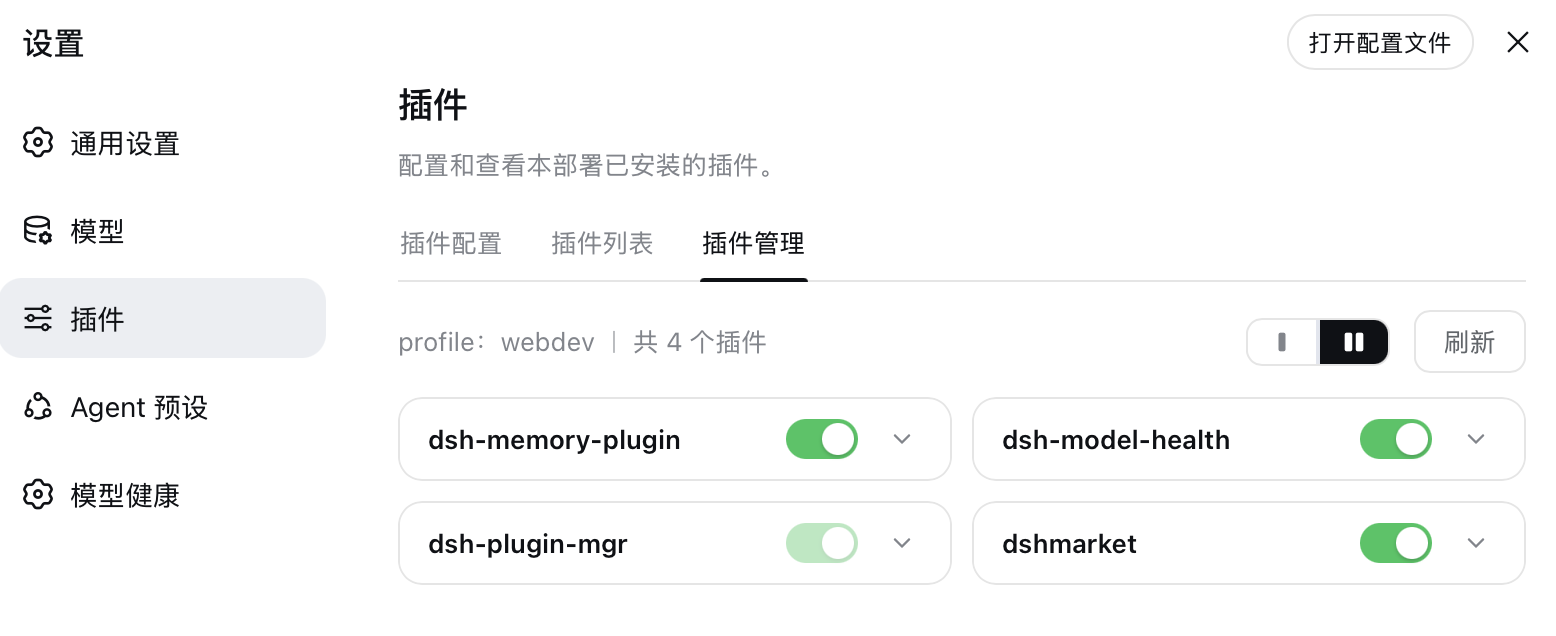
功能 / Features
| # | 形式 | 说明 |
|---|---|---|
| 1 | 已安装插件列表 | 卡片式布局,支持 单列 / 双列 切换(记忆偏好);显示名称、版本、运行状态、启停开关 |
| 2 | 启动 / 停止 | 通过 profile 用户补丁层(cordis.patch.yml)写入 disabled: true/false,HMR 约 1s 热生效,跨重启保留 |
| 3 | 详情展开 | 点卡片展开:版本 / 安装来源(npm·GitHub·本地分类 + 版本范围 + 可点击的仓库地址)/ 插件介绍 |
| 4 | 卸载 | 展开详情中的卸载按钮(二次确认),先清理启停行再执行 dsh plugin --profile <name> remove <pkg> |
| 5 | 更新检查 + 一键更新 | npm 来源插件自动比对 registry 最新版(结果缓存 5min),有新版时卡片显示「可更新」徽标,详情里一键更新到 latest;更新不冲掉已有启停状态;有更新的包会惰性补查并显示新版本的 npm 发布时间 |
| 6 | 搜索 | 工具栏搜索框(匹配 名称/描述/spec,大小写不敏感);过滤时计数显示「x / y」,滤空可一键清除 |
| 7 | 运行错误展示 | 监听宿主 fiber 状态事件:插件加载失败时卡片显示红色「加载失败」、详情里看错误信息;恢复运行(HMR 修复/回滚重启)自动清除 |
特性一览:
- 现代化卡片 UI,设计语言对齐 DSH 官方设置卡片(bg-layer-3 卡面、12px 圆角、hover 提亮)
- 明暗主题适配(全部取主题 CSS 变量),中英双语(语言跟随 harness 设置即时切换)
- 刷新带明确反馈:按钮态变化 + 「列表已刷新 · 时间」横幅
- 安全防护:宿主基础设施模块拒绝启停/卸载;插件管理器自身开关与卸载置灰(悬停提示"本插件"),host 侧 API 双重校验
- 补丁层写入做了串行化(防并发交错)、空
[]占位恢复(防 profile 无法启动)、非法 YAML 拒绝写入 - 更新检查走 npm registry,registry 取用顺序:
DSH_PLUGIN_MGR_REGISTRY环境变量 >npm_config_registry> profile/.npmrc > ~/.npmrc > npmjs.org(识别 npmmirror 等镜像);仅查 npm 源插件,宿主模块与自身保护同卸载口径 - 运行错误捕获走 cordis
internal/status事件(global: true绕过上下文过滤):FAILED 按fiber.entry.options.name归因到包、fiber.await()重抛的错误取消息,回 ACTIVE 清除——不依赖轮询,失败与恢复都是即时感知 - POST 接口校验
Content-Type: application/json(CSRF 门卫)+ 64KB 请求体上限
实现方式 / How it works
插件分为 host 侧与 client 侧两部分(package.json 的 dsh.client 字段声明 client 入口):
┌─ host 侧  src/index.ts → dist/index.js ─────────────────────────┐
│  ctx.webServer.register:                                          │
│    GET  /api/plugin-manager/list     读取 profile 依赖+补丁层状态    │
│    GET  /api/plugin-manager/updates  比对 npm registry 最新版本      │
│    POST /api/plugin-manager/toggle   启停(写 cordis.patch.yml)    │
│    POST /api/plugin-manager/uninstall spawn dsh plugin remove      │
│    POST /api/plugin-manager/update   spawn dsh plugin add pkg@latest│
│  profile 定位:loader 的 cordis:include entry 实际路径              │
└──────────────────────────────────────────────────────────────────┘
                          │ fetch (JSON)
┌─ client 侧 src/client.js(浏览器端模块)───────────────────────────┐
│  settings.plugins.tab slot 注入「插件管理」tab                      │
│  React 卡片列表 + switch + 手风琴详情;locale 服务注册 zh/en 词典    │
└──────────────────────────────────────────────────────────────────┘
启停机制(与 dshmarket / dsh-plugin-hub 的 plugin console 同源):profile 用户补丁层逐行覆盖语义,- id: X + disabled: true 停用、disabled: false 强制启用,DSH 配置热重载(HMR)约 1s 内重新组合插件树。
安装 / Install
npm 安装(推荐)
dsh plugin --profile web add dsh-plugin-mgr
源码 / GitHub 安装
git clone https://github.com/oxlyn/dsh-plugin-mgr.git
cd dsh-plugin-mgr && pnpm install && pnpm run build

# 在插件父目录执行(dsh plugin add 相对路径锚定调用目录):
cd ..
dsh plugin --profile web add ./dsh-plugin-mgr
dsh web
# 启动日志应出现:[dsh-plugin-mgr] ready — routes GET /api/plugin-manager/list ...
GitHub 直装(自动跑 prepare 构建出 dist):
dsh plugin --profile web add github:oxlyn/dsh-plugin-mgr
验证 / Verify
打开 dsh web → 设置 → 插件 → 「插件管理」tab,应能看到已安装插件卡片。
环境要求 / Requirements
- Node
^22.19.0 || >=24.0.0(DSH 宿主要求) - pnpm(源码构建用)
开发 / Development
pnpm install
pnpm run typecheck   # 类型检查
pnpm run build       # 构建 dist/
项目结构:
dsh-plugin-mgr/
├── src/index.ts              # host 入口:插件元数据 + 路由注册 + 单测导出聚合
├── src/server/               # host 侧按职责拆分的模块
│   ├── types.ts              #   共享类型 + cordis Context 声明
│   ├── paths.ts              #   profile / 用户补丁层定位
│   ├── patch-layer.ts        #   补丁层逐行读写(启停落盘)
│   ├── rows.ts               #   每个包拥有的补丁行 id
│   ├── lifecycle.ts          #   dsh CLI 子进程(卸载/更新)
│   ├── fiber-watch.ts        #   运行失败捕获(fiber FAILED 归因)
│   ├── registry.ts           #   npm 更新检查(semver/.npmrc/packument)
│   ├── inspect.ts            #   已安装列表组装
│   └── http.ts               #   JSON 收发 + 参数校验
├── src/shared/api-paths.ts   # API 路径常量(host 与 client 同源引用)
├── src/client/               # client 侧(esbuild 打包为 dist/client.js)
│   ├── main.js               #   boot() 工厂入口 + apply()
│   ├── context.js            #   平台 require 桥(React/hooks/UI 原语)
│   ├── i18n.js               #   zh/en 词典 + fmt
│   ├── styles.js             #   CSS 注入
│   ├── api.js                #   HTTP 封装
│   ├── toast.js              #   Toast 队列 hook + 渲染
│   ├── PluginManagerTab.js   #   tab 主组件(状态编排)
│   └── components/           #   Toolbar / PluginCard / ConfirmModal
├── scripts/build-client.mjs  # esbuild 打包脚本
├── cordis.patch.yml          # bundle 层声明(id/name 走包名解析)
└── dist/                     # 构建产物(npm 发布包含在 files 字段中)
client 产物约束:dist/client.js 必须是单文件 IIFE,尾部追加__ModuleLoader__.load(...) 调用;平台依赖(react、UI 原语)在运行期经context.js 桥接解析,因此打包无需 external 配置。业务模块禁止在模块顶层
取用平台模块(bundle 求值早于工厂执行)。
友情链接 / Links
License
Install
Install the catalog once, then DeepSeek Harness can find and install any plugin from this site automatically:
dsh plugin add dshbase-catalogThen say "install dsh-plugin-mgr for me" — your agent finds it in the directory and installs it. Docs: dshbase-catalog · verified packs.
This plugin is GitHub source (not published to npm) — install it straight from the repo:
Web profile:
dsh plugin --profile web add github:oxlyn/dsh-plugin-mgrHeadless (CLI) profile:
dsh plugin --profile headless add github:oxlyn/dsh-plugin-mgrTest report
Not yet L3-verified — see failure note below if we already ran it.
2026-08-27 · flagged webonly Note: 验证: web-only;待 L4 web CDP;L4 web CDP runtime-fail on dsh 0.1.0-rc.8. Browse all pending failures →
Share this badge
Drop this badge into your README — it links back here and updates automatically when our test status changes:

[](https://dshbase.com/plugins/dsh-plugin-mgr/)<a href="https://dshbase.com/plugins/dsh-plugin-mgr/"><img src="https://dshbase.com/badges/dsh-plugin-mgr.svg" alt="dshbase listed"></a>