
Plugin directory / Developer / dsh-molecule-viewer
dsh-molecule-viewer
Unverified PandaAIDD
What it does
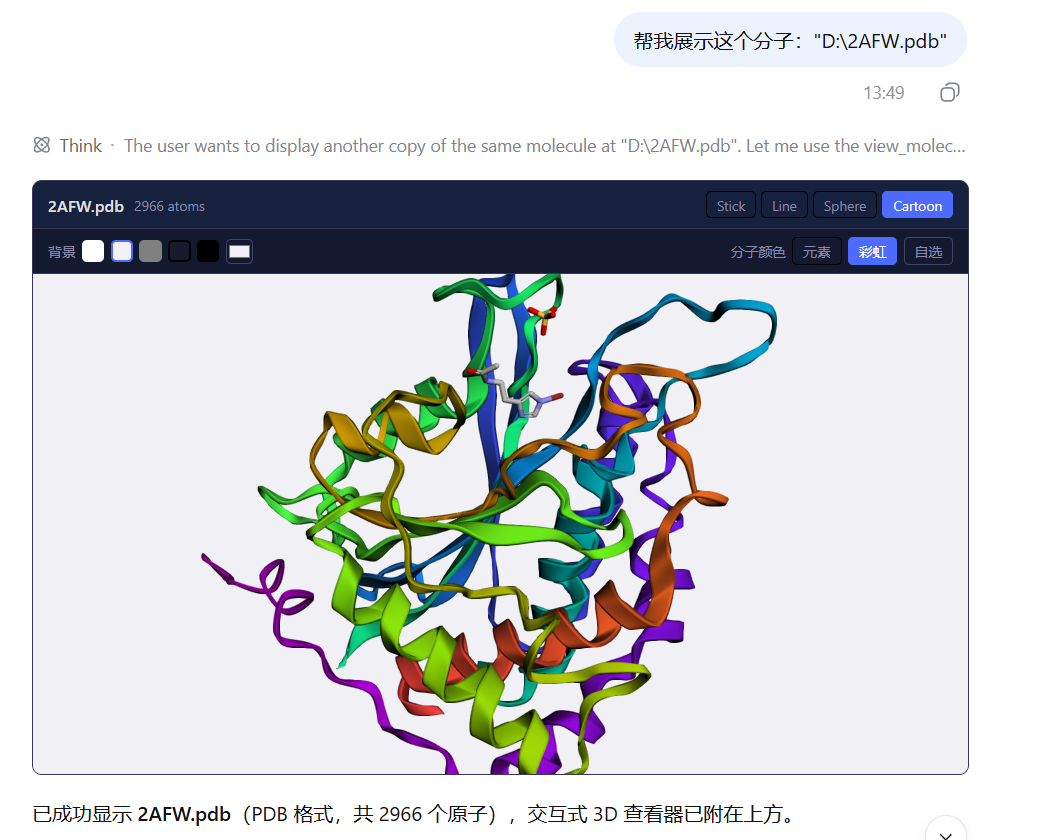
DSH(DeepSeek Harness)分子结构查看器插件:传入分子文件路径或 PDB/SDF/MOL2/MOL 格式数据,在会话界面渲染交互式 3D 分子查看器(3Dmol.js,支持旋转/缩放/样式切换/着色)。
Unverified — not yet verified
DSH(DeepSeek Harness)分子结构查看器插件:传入分子文件路径或 PDB/SDF/MOL2/MOL 格式数据,在会话界面渲染交互式 3D 分子查看器(3Dmol.js,支持旋转/缩放/样式切换/着色)。 Not yet verified — install and test it yourself.
“Unverified” means our automated CI has not yet installed this plugin. Feature descriptions and version compatibility are the author’s claims. This is not a security audit and not an endorsement of third-party code.
README
dsh-molecule-viewer
English | 简体中文
DSH(DeepSeek Harness)分子结构查看器插件:传入分子文件路径或 PDB/SDF/MOL2/MOL 格式数据,在会话界面渲染交互式 3D 分子查看器(3Dmol.js,支持旋转/缩放/样式切换/着色)。
特性
- 🧬 四种格式:PDB(蛋白质/大分子)、SDF、MOL2、MOL
- 📁 路径优先:直接传文件路径,工具在服务端读取——Windows(
D:\dir\x.pdb)、WSL(/mnt/d/dir/x.pdb)和~/写法都能自动识别互转 - 🖱️ 交互式查看器:旋转、缩放,实时切换 cartoon / stick / line / sphere 样式、背景色与分子着色
- 🔄 重启可恢复:查看器载荷随
tool/result事件持久化,重启加载历史后照常渲染(依赖官方插槽,原版 harness 即可安装) - ⚡ 轻量解析:Host 侧只做原子计数与校验,真正的解析渲染交给浏览器端 3Dmol.js
- 📦 本地打包 3Dmol.js:
vendor/3Dmol-min.cjs(2.4.2)在构建时打进 client bundle —— 无 CDN 运行时请求,加载快、可离线、不受浏览器跟踪防护影响
安装
dsh plugin --profile web add git+https://github.com/PandaAIDD/dsh-molecule-viewer.git
重启生效:
dsh --profile web
安装后 view_molecule 工具自动可用,模型按工具描述自动调用。
dsh plugin是 pnpm 转发器:克隆仓库 → 安装到 profile 的node_modules→ 检测到dsh.bundle.patch声明 → 自动加入dsh.profile.bundles。peerDependencies 从 profile 的 healednode_modules解析。
使用
对话中直接描述需求即可,模型会自动调用工具:
"帮我可视化这个分子:D:\project\Dock\data\3IPQ.pdb"
或明确要求:
"用 view_molecule 工具查看这段 SDF 数据:..."
支持的格式
| 格式 | 扩展名 | 说明 |
|---|---|---|
| PDB | .pdb .ent |
蛋白质/大分子(ATOM/HETATM 记录) |
| SDF | .sdf .sd |
多分子结构(V2000/V3000) |
| MOL2 | .mol2 |
TRIPOS 格式 |
| MOL | .mol |
MDL MOL(V2000/V3000) |
SMILES 暂不支持——需要含 3D 坐标的格式。
超过 2 MB 的分子内容不会内联进会话日志,查看器位置显示摘要卡片(原子数与格式仍然可见)。
工具参数
| 参数 | 类型 | 必填 | 说明 |
|---|---|---|---|
path |
string |
与 data 二选一(优先) |
分子文件路径,按用户原始写法传入即可(Windows/WSL 双向兼容,~/ 自动展开);服务端直接读取,速度快 |
data |
string |
与 path 二选一 |
分子文件纯文本内容——仅用于磁盘上没有文件的情况(如聊天中粘贴的内容),不要 base64 编码 |
format |
pdb | sdf | mol2 | mol |
传 data 时必填 |
输入格式;传 path 时按扩展名自动推断,可省略 |
name |
string |
否 | 显示名称(如 "1CRN"),作为查看器标题 |
style |
stick | line | sphere | cartoon |
否 | 初始渲染样式(默认 stick;蛋白质建议 cartoon) |
License
MIT
Install
Install the catalog once, then DeepSeek Harness can find and install any plugin from this site automatically:
dsh plugin add dshbase-catalogThen say "install dsh-molecule-viewer for me" — your agent finds it in the directory and installs it. Docs: dshbase-catalog · verified packs.
This plugin is GitHub source (not published to npm) — install it straight from the repo:
Web profile:
dsh plugin --profile web add github:PandaAIDD/dsh-molecule-viewerHeadless (CLI) profile:
dsh plugin --profile headless add github:PandaAIDD/dsh-molecule-viewerTest report
Not yet L3-verified — see failure note below if we already ran it.
Share this badge
Drop this badge into your README — it links back here and updates automatically when our test status changes:

[](https://dshbase.com/plugins/dsh-molecule-viewer/)<a href="https://dshbase.com/plugins/dsh-molecule-viewer/"><img src="https://dshbase.com/badges/dsh-molecule-viewer.svg" alt="dshbase listed"></a>