
Plugin directory / Developer / dsh-image-skin
dsh-image-skin
Unverified Jack-sun-learner
What it does
DSH 图片皮肤插件:导入 PNG/JPG/WebP 自动生成主题配色,可选 Q 版宠物(程序化/AI 生图)
Unverified — not yet verified
DSH 图片皮肤插件:导入 PNG/JPG/WebP 自动生成主题配色,可选 Q 版宠物(程序化/AI 生图) Not yet verified — install and test it yourself.
“Unverified” means our automated CI has not yet installed this plugin. Feature descriptions and version compatibility are the author’s claims. This is not a security audit and not an endorsement of third-party code.
README
dsh-image-skin — 图片皮肤 + 桌面宠物插件
效果图

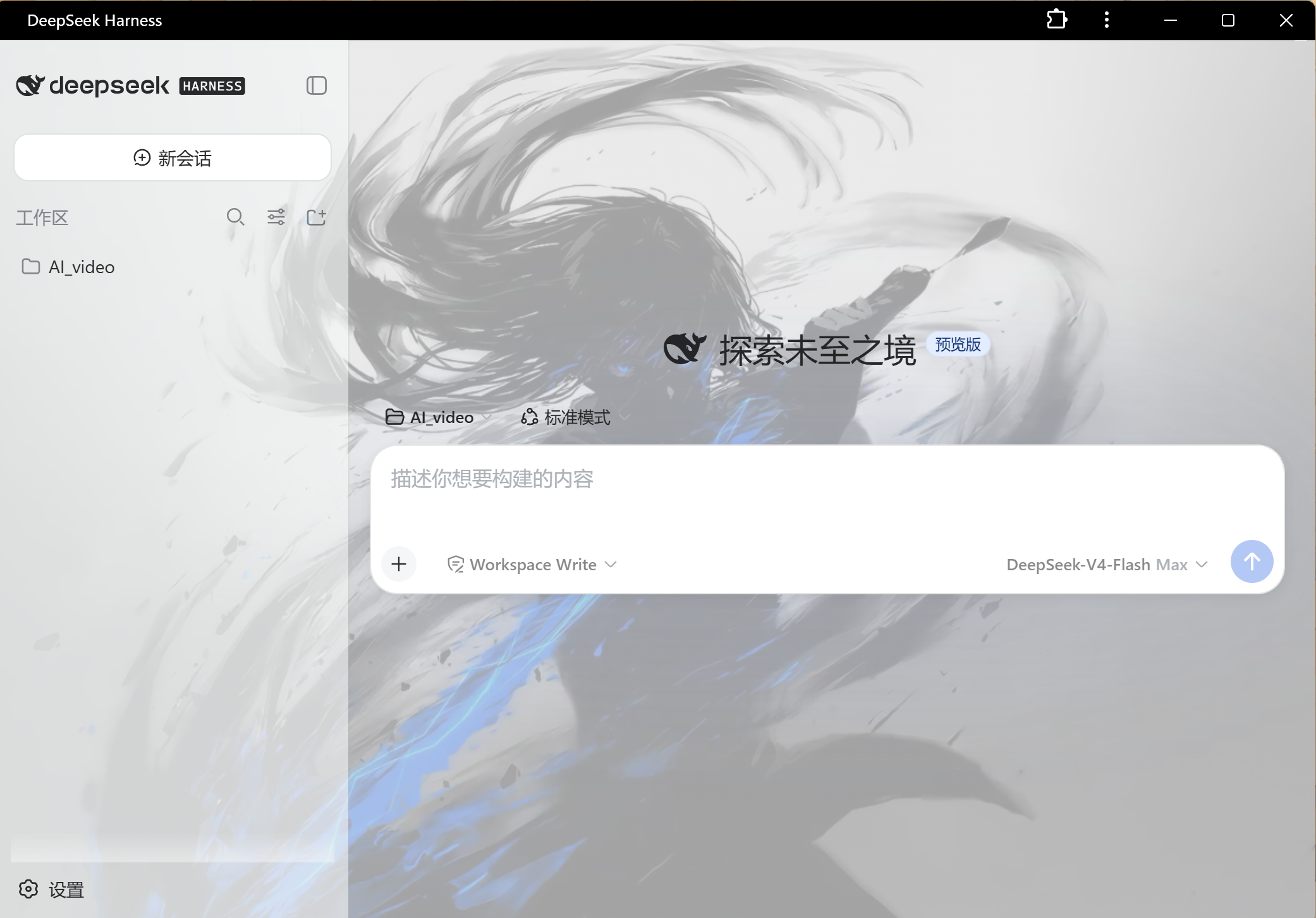
功能
- 图片皮肤:在 设置 → 图片皮肤 上传照片(可多选)到图库,点击缩略图一键应用:
- k-means 提取主色/辅色/强调色,自动生成明暗两套主题 token(背景、面板、侧栏、边框、品牌强调色、文字色全部跟随图片主色调)
- 图片作为页面背景(半透明面板透出图片),支持浓度、模糊(画布预烘焙)调节
- 图库缩略图网格:当前应用项高亮"应用中",右上角 × 可删除单项;图库存于浏览器本地
- 桌面宠物(独立置顶窗口,活在主屏幕上,与 DSH 浏览器窗口无关):
- 5 个预设形象(猫/兔/鲸/龙/柴犬,共 30 张 GDI+ 生成的表情素材),大小 60–240px 可调
- 行为:出现时打招呼 → 30 秒无互动躲到屏幕右缘露出半身 → 鼠标悬停跳跃回应 → 左键拖拽自由摆放(自动记住位置)→ 右键关闭
- 与 DSH 联动:有 agent 在运作时宠物进入思考状态(轮询宿主
/api/dsh-image-skin/busy),完成后气泡"搞定啦!" - 通过宿主 API 启动/停止(
pet-launch/pet-stop),由 PowerShell/WPF 实现,零额外依赖
- 状态保存在浏览器 localStorage,重启后自动恢复
结构
package.json          # dsh.bundle.patch + dsh.client.platform: web
cordis.patch.yml      # 组合插入行
lib/host.js           # 宿主端:/api/dsh-image-skin 路由(busy / pet-launch / pet-stop)
lib/client.js         # 客户端:皮肤/图库/桌面宠物控制/设置页(__ModuleLoader__ 加载)
pet/dsh-pet.ps1       # 桌面宠物窗口(WPF 透明置顶,物理坐标定位)
pet/gen-pet-assets.ps1# 宠物素材生成(C# GDI+,5 角色 × 6 表情)
pet/assets/           # 30 张宠物素材 PNG
安装 Install
从 GitHub 安装(推荐):
dsh plugin --profile web add github:jack-sun-learner/dsh-image-skin
本地开发安装(link: 源,修改即时生效):
dsh plugin --profile web add link:D:\AI_video\plugins\dsh-image-skin
安装后重启 web 服务生效。仓库地址:https://github.com/jack-sun-learner/dsh-image-skin
开发迭代注意
profile 对 link: 依赖创建 junction 指向源码目录,修改源码无需同步副本,重启 web 服务后生效。
语法检查:node --check lib/client.js lib/host.js;宠物脚本注意 PowerShell 5.1 需要 UTF-8 with BOM 才能正确解析中文注释。
已知说明
- 宠物窗口位置使用 Win32
SetWindowPos物理坐标定位(WPF 的 Left/Top 在幽灵显示器/虚拟桌面场景会落到屏幕外)。 - 背景图方案:token 覆盖把应用面板底色变半透明 + body 背景挂图(叠加深色渐变遮罩保证文字对比度)。若某面板不支持半透明会显得不跟随,属预期。
Install
Install the catalog once, then DeepSeek Harness can find and install any plugin from this site automatically:
dsh plugin add dshbase-catalogThen say "install dsh-image-skin for me" — your agent finds it in the directory and installs it. Docs: dshbase-catalog · verified packs.
This plugin is GitHub source (not published to npm) — install it straight from the repo:
Web profile:
dsh plugin --profile web add github:Jack-sun-learner/dsh-image-skinHeadless (CLI) profile:
dsh plugin --profile headless add github:Jack-sun-learner/dsh-image-skinTest report
Not yet L3-verified — see failure note below if we already ran it.
2026-08-26 · flagged webonly Note: 验证: web-only;待 L4 web CDP;L4 web CDP runtime-fail on dsh 0.1.0-rc.8. Browse all pending failures →
Share this badge
Drop this badge into your README — it links back here and updates automatically when our test status changes:

[](https://dshbase.com/plugins/dsh-image-skin/)<a href="https://dshbase.com/plugins/dsh-image-skin/"><img src="https://dshbase.com/badges/dsh-image-skin.svg" alt="dshbase listed"></a>