
Plugin directory / Developer / dsh-hover-approve
dsh-hover-approve
Unverified wydddddcool
What it does
DSH Web 侧边栏锚定气泡:等待授权/提问/计划确认/目标阻断的会话,在左侧会话行旁一键处理,无需点进会话
Unverified — not yet verified
DSH Web 侧边栏锚定气泡:等待授权/提问/计划确认/目标阻断的会话,在左侧会话行旁一键处理,无需点进会话 Not yet verified — install and test it yourself.
“Unverified” means our automated CI has not yet installed this plugin. Feature descriptions and version compatibility are the author’s claims. This is not a security audit and not an endorsement of third-party code.
README
dsh-hover-approve
授权?不用点进会话。
DSH Web 侧边栏锚定气泡:等待授权、提问、计划确认、目标阻断的会话,在列表行旁一键处理。



中文 · English
为什么需要它
DSH 的会话经常需要你停下来处理:授权写文件、回答一个问题、确认一个计划、看一眼目标为什么断了。内置面板要求你点进会话、翻到对话里才能操作——来回切换很打断思路。
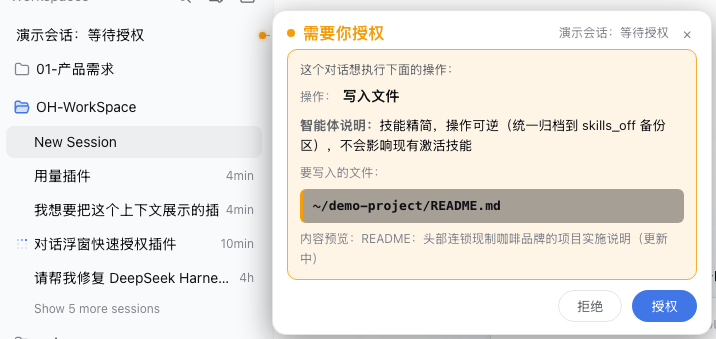
这个插件让处理停留在会话列表这一行:有交互需求的会话旁边自动弹出气泡,一条引线 + 圆点指给你是哪一个,气泡里直接拒绝 / 授权 / 作答,不用点进会话。
功能
🟠 需要你授权会话请求权限(写文件 / 跑命令等)时,展示操作类型、智能体说明、要写入的文件(高亮块)与命令,气泡里直接「拒绝 / 授权」。 |
🟠 需要你选择askUserQuestion 提问到来时,展示问题与选项:单选点选即答,多选勾选后统一确认,推荐项 ⭐ 高亮。 |
🟠 需要你确认计划plan-review 计划确认以卡片展示计划正文 + 批准 / 拒绝选项,点击即答。 |
🔴 目标已阻断目标进入 blocked 阶段时,红色大字展示阻断原因与目标内容,纯通知不打扰,可一键「去会话查看」。 |
效果
真实 DSH Web 界面演示(会话行右侧锚定气泡,引线 + 圆点连到对应会话):

- 自动弹出,不用悬停:锚定在会话行右侧,一眼看出是哪个会话在等你;
- 信息完整:操作类型用大白话(bash→运行终端命令、write→写入文件…)、文件路径高亮块、命令默认单行截断点击展开、智能体说明重点显示;
- 点外部关闭:点气泡外任意区域或 × 关闭,本轮不再弹,新一轮交互重新弹出;
- 跟随列表:滚动 / 行重渲染时气泡和引线跟随行位置;多个会话同时有交互各自锚定、横向错开;
- 归档会话不弹:已归档的旧对话不再弹任何通知,归档 / 取消归档即时生效(已弹的立即收起)。
安装
快速安装(推荐):
dsh plugin --profile web add https://github.com/wydddddcool/dsh-hover-approve
一条命令完成依赖安装与 bundle 注册(自动应用 cordis.patch.yml),重启 dsh web 后生效。
也可以手动在 profile(如 ~/.dsh/profiles/web)里安装:
# 1. package.json dependencies 加:
#    "dsh-hover-approve": "https://github.com/wydddddcool/dsh-hover-approve"
# 2. dsh.profile.bundles 加 "dsh-hover-approve"(自动应用 cordis.patch.yml)
pnpm install
# 3. 重启 dsh web
本地开发用 file: 路径依赖;注意 pnpm 的 file: 依赖是拷贝,改源码后需手动同步:cp <src>/lib/client.js ~/.dsh/profiles/web/node_modules/dsh-hover-approve/lib/client.js
与 DSH 的关系
本插件是 DeepSeek Harness Web 的社区插件(非官方产品)。它通过官方客户端注入机制(ctx.sessions / ctx.workspaces / ctx.locale)读取会话状态,并通过官方 PendingWait.respond() 通道应答——与会话内面板走同一服务端路径、有审计;应答绑定时捕获的 approvalId,审批被替换 / 处理后拒绝发送,杜绝「所见非所批」。实测兼容 dsh 0.1.0-rc.6(依赖 pendingInteraction / projectionValues / sessions.open / PendingWait 等客户端 API)。
测试
npm install   # 首次:安装 jsdom
npm test      # 16 个用例:四种模式、归档过滤、应答编码、状态切换、重试、视口钳制、卸载清理
CI(GitHub Actions)会在每次 push 自动运行测试。
局限
- 命令只在
callId匹配到 running call 时显示(bash 类工具);非 bash 工具只显示操作类型和说明——与内置面板行为一致。 - 行→会话映射靠标题评分匹配(精确匹配优先),极端重复标题仍可能错锚(概率极低)。
- 气泡依赖内置列表 DOM 结构(
[role="treeitem"])。DSH 升级若改动该结构,气泡可能静默失效(不报错),届时需适配。
License
本项目遵循 MIT License。DeepSeek 是 DeepSeek AI 的商标,本项目是独立的社区项目,与 DeepSeek 官方没有隶属关系,也未获得其背书。
Install
Install the catalog once, then DeepSeek Harness can find and install any plugin from this site automatically:
dsh plugin add dshbase-catalogThen say "install dsh-hover-approve for me" — your agent finds it in the directory and installs it. Docs: dshbase-catalog · verified packs.
This plugin is GitHub source (not published to npm) — install it straight from the repo:
Web profile:
dsh plugin --profile web add github:wydddddcool/dsh-hover-approveHeadless (CLI) profile:
dsh plugin --profile headless add github:wydddddcool/dsh-hover-approveTest report
Not yet L3-verified — see failure note below if we already ran it.
Share this badge
Drop this badge into your README — it links back here and updates automatically when our test status changes:

[](https://dshbase.com/plugins/dsh-hover-approve/)<a href="https://dshbase.com/plugins/dsh-hover-approve/"><img src="https://dshbase.com/badges/dsh-hover-approve.svg" alt="dshbase listed"></a>