
Plugin directory / Developer / dsh-find-plugin
dsh-find-plugin
Verified · install-tested on dsh awesome-dsh-plugin
What it does
Find DSH plugins inside the agent with live GitHub dsh-plugin topic search and star-ranked results.
Works — verified, growing community
Find DSH plugins inside the agent with live GitHub dsh-plugin topic search and star-ranked results. It installs cleanly and boots without issues in our testing. It has a growing community — a solid choice.
“Verified” means our automated CI actually ran dsh plugin add in a clean profile and it booted — nothing more. Feature descriptions and version compatibility are the author’s claims. This is not a security audit and not an endorsement of third-party code.
README
dsh-find-plugin 
English | 中文
A plugin that finds plugins — think /find-skills from skills.sh, for DSH.
Tell your agent what you want ("notify me on WeChat when a task finishes"),
and it searches the DSH plugin ecosystem on GitHub for you — top results by
stars, each with a one-line description and an install command.
Install
# from npm (prebuilt, recommended)
dsh plugin --profile web add dsh-find-plugin

# or from GitHub
dsh plugin --profile web add github:awesome-dsh-plugin/dsh-find-plugin
Usage
Restart dsh web after installing, then just talk to the agent — it callsfind_dsh_plugin on its own whenever plugin discovery helps:
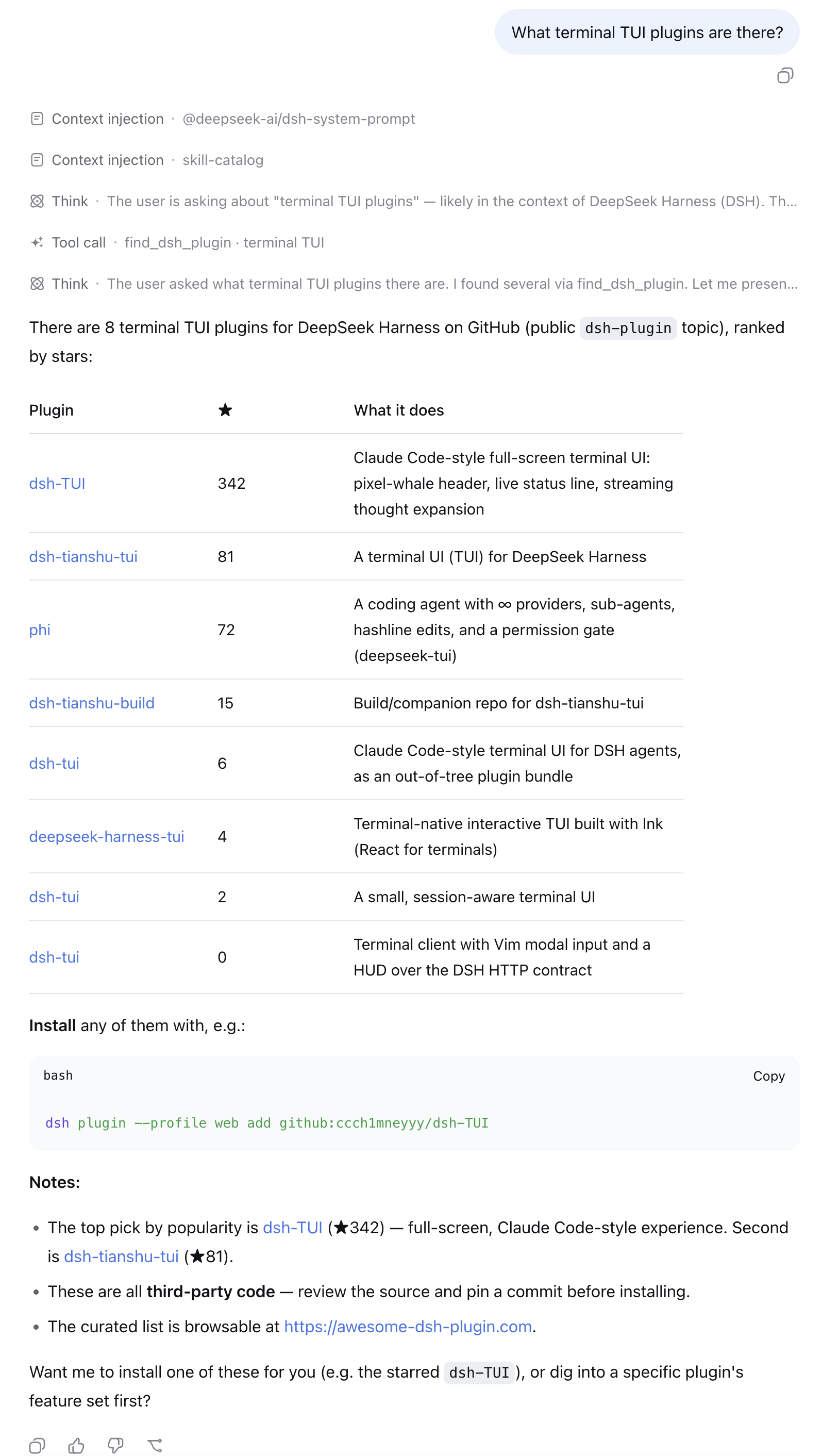
- "What terminal TUI plugins are there?"
- "I want to get a WeChat notification when a task finishes — any plugin for that?"
- "Find me something for reviewing git diffs inside DSH."
Each result comes back with stars, a description, the repo link, and a
ready-to-run dsh plugin add command — ask the agent to install one and
it can run the command for you.
How it works
- Live GitHub repository search scoped to the official
dsh-plugintopic,
re-ranked by stars (5-minute per-query cache, anonymous API). - When a result is also listed on
awesome-dsh-plugin, its hand-written
bilingual description fromplugins.jsonreplaces the GitHub one (thelangparameter picks the language) — ranking is untouched. - Every result comes with a ready-to-run
dsh plugin addcommand. Plugins
are third-party code — review the source and pin a commit.
License
MIT © awesome-dsh-plugin
Install
Install the catalog once, then DeepSeek Harness can find and install any plugin from this site automatically:
dsh plugin add dshbase-catalogThen say "install dsh-find-plugin for me" — your agent finds it in the directory and installs it. Docs: dshbase-catalog · verified packs.
Web profile:
dsh plugin --profile web add dsh-find-pluginHeadless (CLI) profile:
dsh plugin --profile headless add dsh-find-pluginPackage
npm: dsh-find-plugin · version 0.3.4 · tested on dsh 0.1.0-rc.6
Test report
Verified end-to-end: L1 install + L2 load + L3 runtime Q&A on dsh 0.1.0-rc.6.
When to use it
Extend the agent's coding surface — give it a new tool, workflow, or integration so it handles a dev task it couldn't before.
Who it's for
Developers who want dsh to behave like a teammate on real codebases — editing, running, and verifying changes rather than just answering.
For developers — extending it
The tool/command surface is the seam: expose more of the SDK, add smarter context wiring, or tighten the loop between code changes and verification.
Share this badge
Drop this badge into your README — it links back here and updates automatically when our test status changes:

[](https://dshbase.com/plugins/dsh-find-plugin/)<a href="https://dshbase.com/plugins/dsh-find-plugin/"><img src="https://dshbase.com/badges/dsh-find-plugin.svg" alt="dshbase install-tested"></a>