
Plugin directory / Developer / dsh-diff-approval
dsh-diff-approval
Unverified 9087
What it does
Pending-change review for DeepSeek Harness: whole-file diffs with per-file Keep/Revert, create/delete tracking, and restart-safe persistence.
Unverified — not yet verified
Pending-change review for DeepSeek Harness: whole-file diffs with per-file Keep/Revert, create/delete tracking, and restart-safe persistence. Not yet verified — install and test it yourself.
“Unverified” means our automated CI has not yet installed this plugin. Feature descriptions and version compatibility are the author’s claims. This is not a security audit and not an endorsement of third-party code.
README
dsh-diff-approval
English | 中文


A DeepSeek Harness (DSH) plugin for pending-change review: it automatically tracks every successful edit, write, and editor (str_replace_editor) mutation, folds them into a single pending list in the sidebar where each file's diff can be reviewed and kept/reverted — and it can also import the workspace's version-control repository's local changes (Git / SVN / Perforce) in one click.
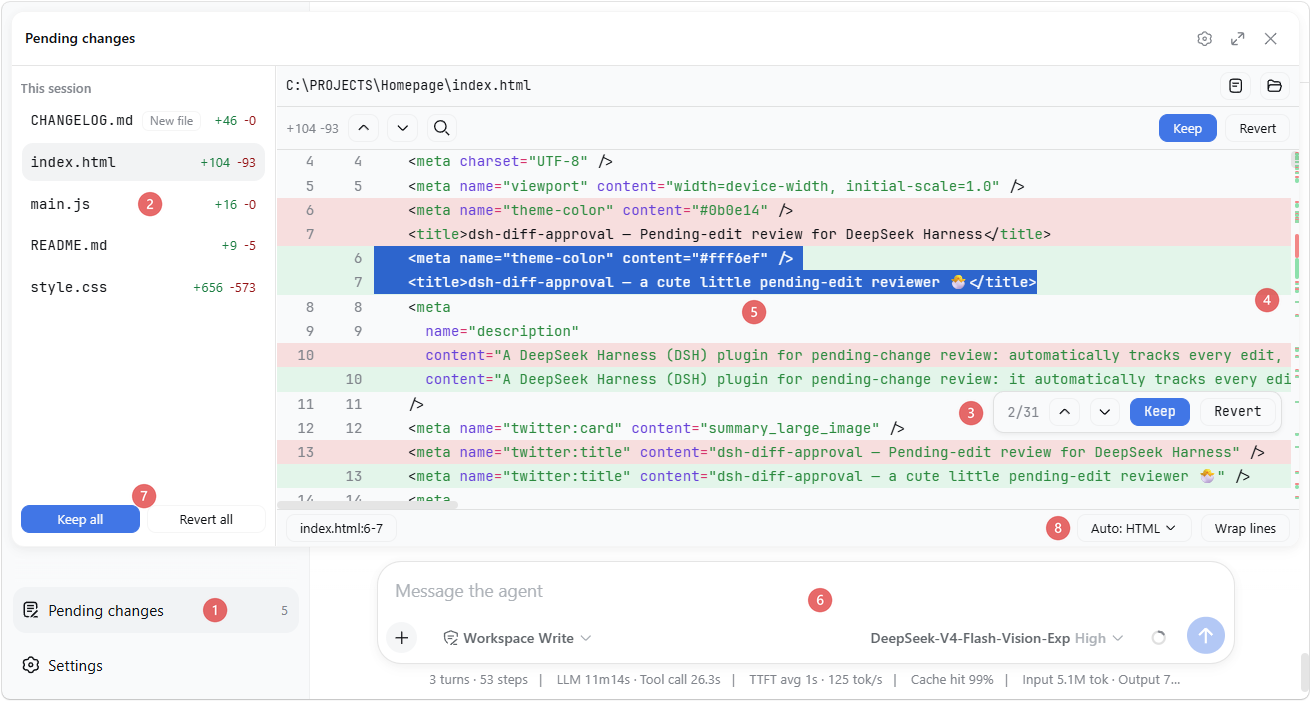
The numbered markers (① – ⑧) in the screenshot point to the matching details described below.
✨ Features
- Diff view: syntax-highlighted whole-file diff ⑤ with +/− counts, an overview ruler ④ on the scrollbar showing where changes sit, and an in-file search (
Ctrl+F). Rows are virtualized, so huge files stay smooth. - Block navigation & decisions: jump between change blocks with
Ctrl+↑/↓(or the previous/next buttons) — the focused block flashes. Hover a block to Keep or Revert just that block from a small actions frame ③ that also shows its position (e.g. "2/5"). - Per-file and bulk decisions: the files in the file list ② can be kept / reverted one at a time, or Keep all / Revert all from its footer ⑦.
- Undo / Redo: every keep, revert, and import is undoable with
Ctrl+Z/Ctrl+Y(active while the panel is open; text inputs keep their own editing). - Line references: select text in the diff — the status bar shows its
file:start-endreference; click it (or pressCtrl+L) to copy, and with the setting on it auto-pastes into the composer ⑥ and focuses it. - Highlight language: auto-detected from the file extension, or overridden from a dropdown ⑧.
- Auto-wrap: a "Wrap lines" toggle beside the language selector ⑧ wraps long lines for that language (CJK breaks between characters, Latin words stay whole), remembered per language.
- External changes: files already in the pending list are monitored — if one is later modified outside the reviewed edits (another tool, an editor), the panel adopts the new content and flags the divergence.
- Open / Reveal: while reviewing a file's diff, open it in its default app or reveal it in the system file manager with one click.
- Import workspace changes: when the list is empty, click the button to import the workspace's local changes from Git / SVN / Perforce — modified, deleted, and (opt-in) untracked files. The VCS root is found by walking up from the workspace, so a workspace inside a subdirectory works too.
- Settings: a "Diff Approval" section in DeepSeek Harness settings with the preferences for auto-paste on copy, whether untracked files are included when importing, and the diff's tab width (2 / 4 / 8 spaces).
- Persistence: pending state is stored per workspace at
<dshHome>/diff-approval/workspaces/<workspaceId>.jsonand survives restarts — unhandled changes are still there when you come back, even in a fresh session.
📦 Install
If dsh is on your PATH:
dsh plugin --profile web add dsh-diff-approval
Or, if you run the harness through npx (e.g. npx @deepseek-ai/dsh web):
npx @deepseek-ai/dsh plugin --profile web add dsh-diff-approval
or manually: add the package to your profile's package.json dependencies and insert this row into the profile's cordis.patch.yml:
- insert:
    - id: diff-approval
      name: dsh-diff-approval
      # Optional: relocate durable pending state (defaults to
      # <dshHome>/diff-approval/workspaces).
      # config:
      #   storageDir: ~/dsh-pending
Then restart dsh web.
🚀 Usage
- Work with the agent as usual — successful
edit/write/ editor (str_replace_editor) calls are recorded automatically. - Click the Pending changes action ① at the sidebar footer, review each file's diff, and Keep / Revert.
- When the list is empty, Import workspace changes pulls in the workspace's local Git/SVN/Perforce changes.
📝 Notes
- Only tracked mutations (
edit,write, andstr_replace_editoreditor calls) are recorded automatically. Deletions made outside these tools (e.g. shellrm) are sensed only for tracked files: the entry turns "File is gone" and its Revert restores the file. - The VCS import runs read-only Git/SVN/Perforce commands through the deployment's shell executor, so the respective CLI must be on
PATH. Importing untracked files (default off) scans the whole workspace, which can be slow on large trees. - Reverting a created file deletes it (the fs seam has no delete API).
- Sessions with no workspace keep their entries memory-only; corrupt persistence files are rejected and can be deleted to reset.
🛠 Development
corepack pnpm install
pnpm run typecheck   # tsc over both faces
pnpm run build       # emits lib/index.js and lib/client.js
pnpm test
Install
Install the catalog once, then DeepSeek Harness can find and install any plugin from this site automatically:
dsh plugin add dshbase-catalogThen say "install dsh-diff-approval for me" — your agent finds it in the directory and installs it. Docs: dshbase-catalog · verified packs.
This plugin is GitHub source (not published to npm) — install it straight from the repo:
Web profile:
dsh plugin --profile web add github:9087/dsh-diff-approvalHeadless (CLI) profile:
dsh plugin --profile headless add github:9087/dsh-diff-approvalTest report
Not yet L3-verified — see failure note below if we already ran it.
2026-08-26 · flagged webonly Note: 验证: web-only;待 L4 web CDP;L4 web CDP runtime-fail on dsh 0.1.0-rc.8. Browse all pending failures →
Share this badge
Drop this badge into your README — it links back here and updates automatically when our test status changes:

[](https://dshbase.com/plugins/dsh-diff-approval/)<a href="https://dshbase.com/plugins/dsh-diff-approval/"><img src="https://dshbase.com/badges/dsh-diff-approval.svg" alt="dshbase listed"></a>